

SNMP Router Traffic Grapher
Septudio LLC Tools In-app purchases Contains ads
Live SNMP traffic monitoring, insight dashboard, MIB and OID explorer
- Rating
- 4.7
- 284 ratings
- Downloads
- 10K+
- on Google Play
- Price
- Free
- In-app purchases
- Updated
- Apr 29
- 2026 · v3.0
Screenshots


About SNMP Router Traffic Grapher
SNMP Router Traffic Grapher is a tool to monitor SNMP devices. The app reads from devices like routers, servers or a snmp-deamon, and displays data graphically in real time.
Features:
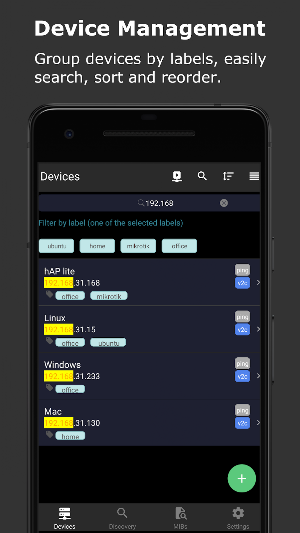
• Multiple SNMP device management. Support SNMPv2c. Group devices by labels. Search routers by name, host, or labels. Monitor device ping with ms and TTL. Discover neighbor network devices.
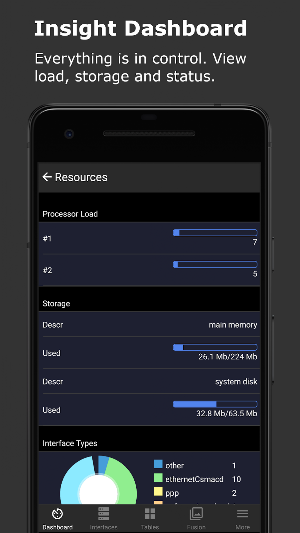
• Insight Dashboard. System information, description, name and uptime. Processor load, storage name, storage used size, storage total size and storage used percentage bar. Fetch interval is 3 seconds.
• Common Tables. TCP connections, show from/to address and port. UDP connections, local address and port. MAC table(ipNetToMedia), show MAC(PhysAddress) and ip(NetAddress). Route table(ipRouteTable), show ipRouteDest, ipRouteNextHop and ipRouteMask.
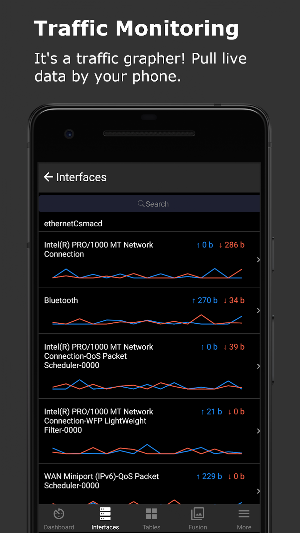
• Traffic Monitoring. Statistics interface types, show grid and pie chart. Live interface rate list, show last tx/rx and mini line chart. fetch interval is 3 seconds. Live interface detail view, show tx/rx last, max and average and large line chart.
• Fusion Charts. Create chart groups and add what you need. For example, create a group with cpu load, memory usage, ether1 traffic rate and wlan traffic rate.
• SNMP Console. Manual snmpget submit form. Manual snmpwalk submit form. Save your favorite commands and run it latter. Find history commands if needed.
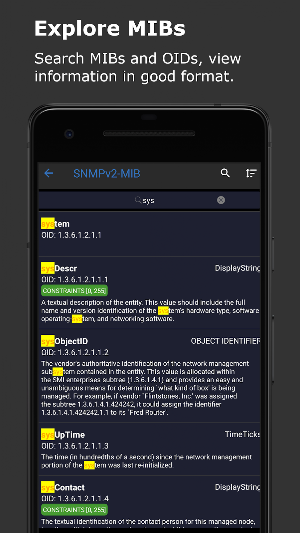
• MIB explorer. The app includes commonly used MIBs. Search MIB or OID information, view detials in good format.
• Simple and easy to use interface. Support light theme and dark theme.
Supported devices:
• Router, Cisco, Juniper, Avaya, Mikrotik RouterOS and others.
• Linux, Ubuntu, Debian, Redhat, CentOS, Fedora, Arch Linux, openSUSE and others.
• Windows, Windows 7, Windows 8, Windows 10 and others.
• Mac OS X, macOS.
• All devices that support SNMP.
Supported protocol:
• SNMP v2c. Community string.
Simple Network Management Protocol(SNMP) is a component of the Internet Protocol Suite as defined by the Internet Engineering Task Force (IETF).
Features:
• Multiple SNMP device management. Support SNMPv2c. Group devices by labels. Search routers by name, host, or labels. Monitor device ping with ms and TTL. Discover neighbor network devices.
• Insight Dashboard. System information, description, name and uptime. Processor load, storage name, storage used size, storage total size and storage used percentage bar. Fetch interval is 3 seconds.
• Common Tables. TCP connections, show from/to address and port. UDP connections, local address and port. MAC table(ipNetToMedia), show MAC(PhysAddress) and ip(NetAddress). Route table(ipRouteTable), show ipRouteDest, ipRouteNextHop and ipRouteMask.
• Traffic Monitoring. Statistics interface types, show grid and pie chart. Live interface rate list, show last tx/rx and mini line chart. fetch interval is 3 seconds. Live interface detail view, show tx/rx last, max and average and large line chart.
• Fusion Charts. Create chart groups and add what you need. For example, create a group with cpu load, memory usage, ether1 traffic rate and wlan traffic rate.
• SNMP Console. Manual snmpget submit form. Manual snmpwalk submit form. Save your favorite commands and run it latter. Find history commands if needed.
• MIB explorer. The app includes commonly used MIBs. Search MIB or OID information, view detials in good format.
• Simple and easy to use interface. Support light theme and dark theme.
Supported devices:
• Router, Cisco, Juniper, Avaya, Mikrotik RouterOS and others.
• Linux, Ubuntu, Debian, Redhat, CentOS, Fedora, Arch Linux, openSUSE and others.
• Windows, Windows 7, Windows 8, Windows 10 and others.
• Mac OS X, macOS.
• All devices that support SNMP.
Supported protocol:
• SNMP v2c. Community string.
Simple Network Management Protocol(SNMP) is a component of the Internet Protocol Suite as defined by the Internet Engineering Task Force (IETF).
What’s new
Version 3.0 · Updated April 29, 2026
Bug fixes and stability improvements.
User reviews

It works like a charm

Good

Clean and friendly interface, non intrusive ad implementation, very well done.

Working properly with outdated rv042 also. Thanks 👍

Seems to work fine. Connected to mikrotik for basic info

Simple & User friendly.....
Alternatives to SNMP Router Traffic Grapher
Looking for apps like SNMP Router Traffic Grapher? Here are 4 similar Android apps on Google Play. The highest rated is First Source (4.5/5), and all 4 are free to download.



| App | Rating | Price | Installs | Last updated | Compare |
|---|---|---|---|---|---|
| SNMP Router Traffic Grapher | 4.7 / 5 | Free | 10,000+ | Apr 29, 2026 | |
| NETGEAR WiFi Analytics | 3.6 / 5 | Free | 1,000,000+ | Apr 25, 2014 | Compare |
| Netradar network analysis | 3.7 / 5 | Free | 10,000+ | Sep 4, 2026 | Compare |
| Gryphon Connect | 4.1 / 5 | Free | 10,000+ | Oct 2, 2026 | Compare |
| First Source | 4.5 / 5 | Free | 10,000+ | Sep 17, 2026 | Compare |