
Easy PWA
SeNSSoFT Tools In-app purchases
Turn websites into apps: custom icons, shortcuts and cloud backup included!
- Rating
- 4.4
- 52 ratings
- Downloads
- 32.7K+
- on Google Play
- Price
- Free
- In-app purchases
- Updated
- Oct 6
- 2026 · v1.3.1
Screenshots


About Easy PWA
Turn websites into apps! Easy PWA helps you create home screen shortcuts to any website with custom icons and cloud backup included.
WHY EASY PWA WAS CREATED
As a developer working with Arduino/ESP32-based IoT devices, I needed a simple way to create landing pages and configuration interfaces for the gadgets I built. Progressive Web Apps (PWAs) were perfect: just a few extra lines in HTML, and users could access device settings through their browsers without installing specific Android and iOS apps.
However, recent browser changes broke this workflow. Modern browsers now require extensive PWA configuration, service workers, manifests, and HTTPS certificates just to add a simple shortcut to the home screen. What used to take 5 minutes now requires hours of setup.
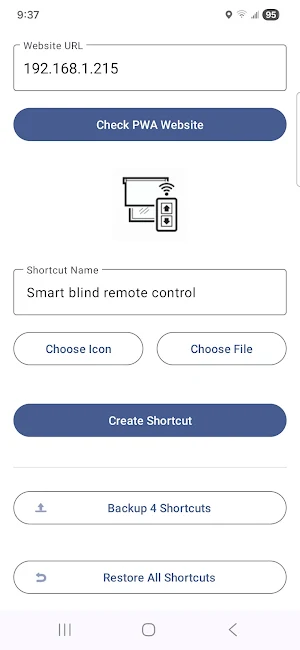
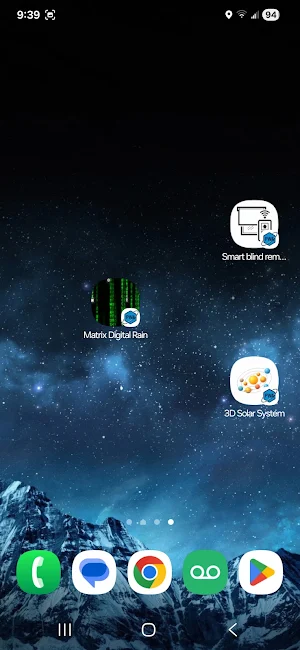
Easy PWA solves this problem by bringing back the simplicity. Just enter a URL, customize the icon, and create your shortcut - no complex PWA setup required!
FEATURES
✓ Create unlimited PWA shortcuts (Premium)
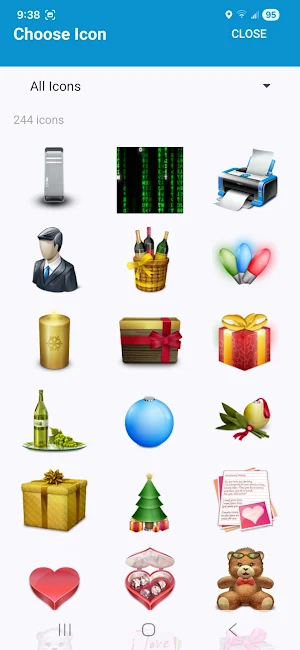
✓ Choose from 200+ beautiful 3D icons
✓ Upload custom icons from your gallery
✓ Google Drive backup & restore
✓ Sync shortcuts across devices
✓ URL history with autocomplete
✓ Full hardware access for PWA websites
✓ No ads, no tracking, no data collection
FREE VERSION
- Create 1 home screen shortcut
- Access to icon library
- Custom icon upload
- Full PWA functionality
PREMIUM VERSION (One-time purchase)
- Unlimited shortcuts
- Google Drive backup
- Restore shortcuts on new devices
- Sync across devices
PERFECT FOR
- IoT device interfaces (ESP32, Arduino, Raspberry Pi)
- Home automation dashboards
- Self-hosted services (Home Assistant, Nextcloud)
- Web apps you use frequently
- Progressive Web Apps
- Development and testing
- Personal projects
PRIVACY & PERMISSIONS
Easy PWA respects your privacy:
- NO data collection
- NO analytics or tracking
- NO advertisements
- All shortcuts stored locally on your device
The app requests various permissions (Camera, Microphone, Location, Bluetooth, Body Sensors) to enable full PWA functionality. These permissions are used ONLY by the websites you visit through the app, NOT by Easy PWA itself.
For example:
- Camera: For video calls on WhatsApp Web, photo upload on Instagram
- Microphone: For voice calls on Google Meet, Discord
- Location: For maps, weather apps
- Bluetooth: For connecting smart devices
- Body Sensors: For fitness and health tracking apps
When a website requests any permission, Android will show you a permission dialog - you stay in control!
Google Drive access is used exclusively for backing up your shortcuts and URL history, making it easy to restore them on other devices. Your backup is stored in YOUR Google Drive AppData folder, accessible only by you and the app.
WHY A PAID VERSION?
This app has no ads and no tracking. The small one-time fee helps recover development costs and ensures the app remains ad-free and privacy-focused forever. I believe in transparent monetization - you pay once, you own it, no subscriptions, no hidden costs.
FULL HARDWARE ACCESS
Unlike regular browsers, Easy PWA gives websites full access to device hardware (with your permission), making it ideal for:
- Video conferencing (camera + microphone)
- QR code scanners
- Fitness trackers (sensors)
- Smart home controls (Bluetooth)
- Location-based services
- And much more!
HOW IT WORKS
1. Enter website URL
2. App checks the website and suggests a name
3. Choose an icon (from library or gallery)
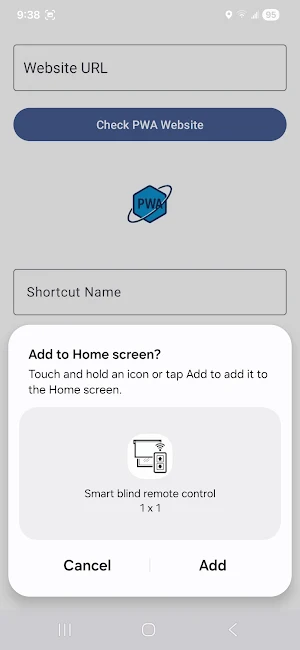
4. Create shortcut
5. Access your PWA from home screen!
TECHNICAL DETAILS
- Based on Android WebView with full hardware access
- Supports all modern web standards
- Works with any website (HTTPS or HTTP)
- No server-side processing - everything runs locally
- Open-source friendly approach
SUPPORT
Questions or issues? Contact: [email protected]
Made with love by a developer who got tired of complex PWA requirements.
Try Easy PWA today and bring back the simplicity of Progressive Web Apps!
WHY EASY PWA WAS CREATED
As a developer working with Arduino/ESP32-based IoT devices, I needed a simple way to create landing pages and configuration interfaces for the gadgets I built. Progressive Web Apps (PWAs) were perfect: just a few extra lines in HTML, and users could access device settings through their browsers without installing specific Android and iOS apps.
However, recent browser changes broke this workflow. Modern browsers now require extensive PWA configuration, service workers, manifests, and HTTPS certificates just to add a simple shortcut to the home screen. What used to take 5 minutes now requires hours of setup.
Easy PWA solves this problem by bringing back the simplicity. Just enter a URL, customize the icon, and create your shortcut - no complex PWA setup required!
FEATURES
✓ Create unlimited PWA shortcuts (Premium)
✓ Choose from 200+ beautiful 3D icons
✓ Upload custom icons from your gallery
✓ Google Drive backup & restore
✓ Sync shortcuts across devices
✓ URL history with autocomplete
✓ Full hardware access for PWA websites
✓ No ads, no tracking, no data collection
FREE VERSION
- Create 1 home screen shortcut
- Access to icon library
- Custom icon upload
- Full PWA functionality
PREMIUM VERSION (One-time purchase)
- Unlimited shortcuts
- Google Drive backup
- Restore shortcuts on new devices
- Sync across devices
PERFECT FOR
- IoT device interfaces (ESP32, Arduino, Raspberry Pi)
- Home automation dashboards
- Self-hosted services (Home Assistant, Nextcloud)
- Web apps you use frequently
- Progressive Web Apps
- Development and testing
- Personal projects
PRIVACY & PERMISSIONS
Easy PWA respects your privacy:
- NO data collection
- NO analytics or tracking
- NO advertisements
- All shortcuts stored locally on your device
The app requests various permissions (Camera, Microphone, Location, Bluetooth, Body Sensors) to enable full PWA functionality. These permissions are used ONLY by the websites you visit through the app, NOT by Easy PWA itself.
For example:
- Camera: For video calls on WhatsApp Web, photo upload on Instagram
- Microphone: For voice calls on Google Meet, Discord
- Location: For maps, weather apps
- Bluetooth: For connecting smart devices
- Body Sensors: For fitness and health tracking apps
When a website requests any permission, Android will show you a permission dialog - you stay in control!
Google Drive access is used exclusively for backing up your shortcuts and URL history, making it easy to restore them on other devices. Your backup is stored in YOUR Google Drive AppData folder, accessible only by you and the app.
WHY A PAID VERSION?
This app has no ads and no tracking. The small one-time fee helps recover development costs and ensures the app remains ad-free and privacy-focused forever. I believe in transparent monetization - you pay once, you own it, no subscriptions, no hidden costs.
FULL HARDWARE ACCESS
Unlike regular browsers, Easy PWA gives websites full access to device hardware (with your permission), making it ideal for:
- Video conferencing (camera + microphone)
- QR code scanners
- Fitness trackers (sensors)
- Smart home controls (Bluetooth)
- Location-based services
- And much more!
HOW IT WORKS
1. Enter website URL
2. App checks the website and suggests a name
3. Choose an icon (from library or gallery)
4. Create shortcut
5. Access your PWA from home screen!
TECHNICAL DETAILS
- Based on Android WebView with full hardware access
- Supports all modern web standards
- Works with any website (HTTPS or HTTP)
- No server-side processing - everything runs locally
- Open-source friendly approach
SUPPORT
Questions or issues? Contact: [email protected]
Made with love by a developer who got tired of complex PWA requirements.
Try Easy PWA today and bring back the simplicity of Progressive Web Apps!
User reviews

amazing

great but can you add an option like useragent and selecting a browser to open pwa app just like mint os pwa Manager has.

Updating the Rating for the Developer's Response System.

Great app, I love it!

Works great! Developer is very receptive to feature suggestions.

It does just what it should, best pwa app
Alternatives to Easy PWA
Looking for apps like Easy PWA? Here are 3 similar Android apps on Google Play. The highest rated is Coast: Native Work Order CMMS (4.4/5), and all 3 are free to download.



| App | Rating | Price | Installs | Last updated | Compare |
|---|---|---|---|---|---|
| Easy PWA | 4.4 / 5 | Free | 10,000+ | Oct 6, 2026 | |
| OnePageCRM - Simple CRM System | 4.3 / 5 | Free | 10,000+ | Oct 27, 2026 | Compare |
| Coast: Native Work Order CMMS | 4.4 / 5 | Free | 50,000+ | Oct 26, 2026 | Compare |
| OPERI | – | Free | 5,000+ | Aug 31, 2026 | Compare |
Compare Easy PWA with the top alternatives: ratings, updates, ASO score and keyword gaps →