
MagicFTP: SFTP & FTP Client
senova.app Tools In-app purchases
SFTP, FTPS & FTP client with file manager, sync, code editor & transfer
- Downloads
- 1K+
- on Google Play
- Price
- Free
- In-app purchases
- Updated
- Sep 14
- 2026 · v1.1.7
Screenshots


About MagicFTP: SFTP & FTP Client
MagicFTP is a powerful FTP, FTPS and SFTP client for Android featuring a file manager, server-to-server transfers, folder comparison, automatic synchronization, encrypted backups, per-server bandwidth limits, SSH key authentication and a built-in code editor with HTML preview.
Manage websites, servers, backups and files directly from your Android device. Connect securely to FTP, FTPS and SFTP servers, edit files directly on the server and transfer data quickly and reliably.
🚀 Built for system administrators, web developers, agencies and power users.
🔗 FTP, FTPS & SFTP
- FTP, FTPS (Explicit & Implicit) and SFTP
- Password and SSH key authentication
- Passphrase-protected SSH keys
- Secure credential storage
- Unlimited server connections
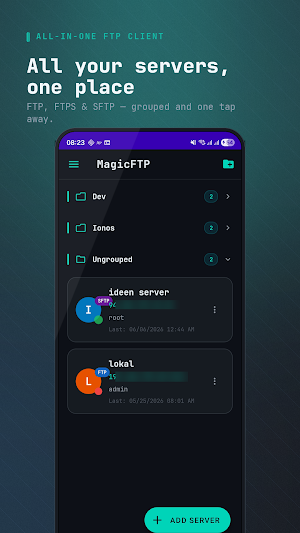
- Server groups — organize servers into collapsible groups
- Encrypted server backups — AES-256 export for safe migration
📁 Powerful File Manager
- Upload, download, rename, move, delete
- Create directories, change CHMOD permissions
- Easy navigation through large directory structures
📤 Fast Uploads & Downloads
- Real-time progress and speed tracking
- Background transfers
- Transfer queue, cancel and retry
- Large file support
⚡ Power Transfer
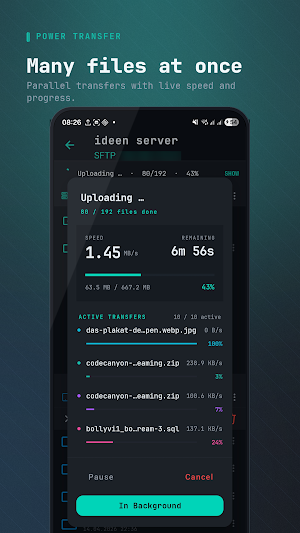
Accelerate transfers with multiple parallel uploads and downloads.
- Up to 10 simultaneous transfers
- Adjustable parallel slots
- Higher throughput for large queues
- Runs in the background
- Ideal for backups, media libraries, large projects
🎚️ Bandwidth Limits
Set upload and download speed limits individually for every server.
- Per-server upload and download throttle
- KB/s or MB/s units
- Empty = unlimited
- Ideal for mobile connections, shared bandwidth or AWS egress cost control
🔄 Resume Uploads & Downloads
Interrupted transfers can be resumed — saves time and bandwidth.
🌐 Direct Server-to-Server Transfers
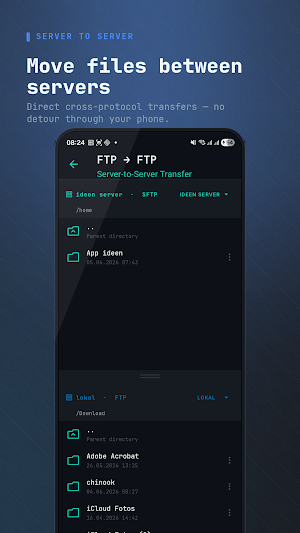
Transfer files directly between servers without routing them through your device.
Supports cross-protocol transfers: FTP ↔ FTP/FTPS/SFTP, FTPS ↔ SFTP, SFTP ↔ SFTP.
Perfect for website migrations, hosting changes and backups.
🔍 Folder Compare
See exactly what differs between two FTP servers and sync selectively.
- Recursive directory comparison between two servers
- Visual diff with status indicators (identical, different, only source, only target)
- Clear reason for each difference (size, date, or both)
- Filter and bulk-select with one tap
- Selective apply — pick exactly which files to copy or delete
- Fast-scroll for large directory trees
- Perfect for deploys, backup verification and server migrations
⚡ Automatic Synchronization
- Custom sync profiles, upload or download direction
- Configurable intervals, optional Wi-Fi only mode
- Background sync, automatic deletion sync
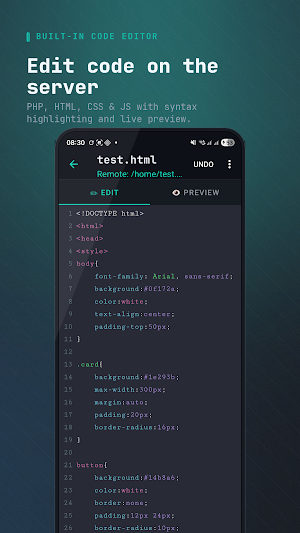
💻 Built-in Code Editor
Edit files directly on the server.
Supports: PHP, HTML, CSS, JavaScript, JSON, XML, YAML, SQL, TXT.
👁️ HTML Preview
Preview webpages directly inside the app — no extra apps needed.
🖥️ Multiple Active Sessions
Multiple connections, quick switching, central session overview.
🔒 Security & Privacy
- Biometric protection (fingerprint, Face Unlock — device dependent)
- Secure storage of sensitive data
📡 Server Status Monitoring
Online/offline detection at a glance.
⭐ Bookmarks
Save frequently used directories for instant access.
🌐 Supported Protocols
FTP • FTPS (Explicit & Implicit) • SFTP
MagicFTP combines an FTP client, FTPS client, SFTP client, file manager, folder comparison, file synchronization, server-to-server transfers, encrypted backups and a code editor in one powerful Android app.
Manage websites, servers, backups and files directly from your Android device. Connect securely to FTP, FTPS and SFTP servers, edit files directly on the server and transfer data quickly and reliably.
🚀 Built for system administrators, web developers, agencies and power users.
🔗 FTP, FTPS & SFTP
- FTP, FTPS (Explicit & Implicit) and SFTP
- Password and SSH key authentication
- Passphrase-protected SSH keys
- Secure credential storage
- Unlimited server connections
- Server groups — organize servers into collapsible groups
- Encrypted server backups — AES-256 export for safe migration
📁 Powerful File Manager
- Upload, download, rename, move, delete
- Create directories, change CHMOD permissions
- Easy navigation through large directory structures
📤 Fast Uploads & Downloads
- Real-time progress and speed tracking
- Background transfers
- Transfer queue, cancel and retry
- Large file support
⚡ Power Transfer
Accelerate transfers with multiple parallel uploads and downloads.
- Up to 10 simultaneous transfers
- Adjustable parallel slots
- Higher throughput for large queues
- Runs in the background
- Ideal for backups, media libraries, large projects
🎚️ Bandwidth Limits
Set upload and download speed limits individually for every server.
- Per-server upload and download throttle
- KB/s or MB/s units
- Empty = unlimited
- Ideal for mobile connections, shared bandwidth or AWS egress cost control
🔄 Resume Uploads & Downloads
Interrupted transfers can be resumed — saves time and bandwidth.
🌐 Direct Server-to-Server Transfers
Transfer files directly between servers without routing them through your device.
Supports cross-protocol transfers: FTP ↔ FTP/FTPS/SFTP, FTPS ↔ SFTP, SFTP ↔ SFTP.
Perfect for website migrations, hosting changes and backups.
🔍 Folder Compare
See exactly what differs between two FTP servers and sync selectively.
- Recursive directory comparison between two servers
- Visual diff with status indicators (identical, different, only source, only target)
- Clear reason for each difference (size, date, or both)
- Filter and bulk-select with one tap
- Selective apply — pick exactly which files to copy or delete
- Fast-scroll for large directory trees
- Perfect for deploys, backup verification and server migrations
⚡ Automatic Synchronization
- Custom sync profiles, upload or download direction
- Configurable intervals, optional Wi-Fi only mode
- Background sync, automatic deletion sync
💻 Built-in Code Editor
Edit files directly on the server.
Supports: PHP, HTML, CSS, JavaScript, JSON, XML, YAML, SQL, TXT.
👁️ HTML Preview
Preview webpages directly inside the app — no extra apps needed.
🖥️ Multiple Active Sessions
Multiple connections, quick switching, central session overview.
🔒 Security & Privacy
- Biometric protection (fingerprint, Face Unlock — device dependent)
- Secure storage of sensitive data
📡 Server Status Monitoring
Online/offline detection at a glance.
⭐ Bookmarks
Save frequently used directories for instant access.
🌐 Supported Protocols
FTP • FTPS (Explicit & Implicit) • SFTP
MagicFTP combines an FTP client, FTPS client, SFTP client, file manager, folder comparison, file synchronization, server-to-server transfers, encrypted backups and a code editor in one powerful Android app.
What’s new
Version 1.1.7 · Updated September 14, 2026
- New: Stream videos, audio and images from your server — no download. Tap a file to play. - New: Privacy-first Support page with WhatsApp and email. No account, no tracking. - Improved: Clearer permissions dialog and server header. Smaller, faster app. - Fixed: Stability and language improvements.
Alternatives to MagicFTP: SFTP & FTP Client
Looking for apps like MagicFTP: SFTP & FTP Client? Here are 3 similar Android apps on Google Play. The highest rated is Mobile Link for Generators (4.6/5), and all 3 are free to download.



| App | Rating | Price | Installs | Last updated | Compare |
|---|---|---|---|---|---|
| MagicFTP: SFTP & FTP Client | – | Free | 1,000+ | Sep 14, 2026 | |
| Mobile Link for Generators | 4.6 / 5 | Free | 500,000+ | – | Compare |
| Solid Explorer File Manager | 4.4 / 5 | Free | 10,000,000+ | Sep 22, 2026 | Compare |
| Hamilton Aquatics | – | Free | 10,000+ | Sep 2, 2026 | Compare |