
Contacts Transfer
Tools
Fast offline contacts transfer via WiFi. Share phone to phone instantly!
- Downloads
- 6.6K+
- on Google Play
- Price
- Free
- No in-app purchases
- Updated
- Oct 5
- 2026 · v1.6
Screenshots
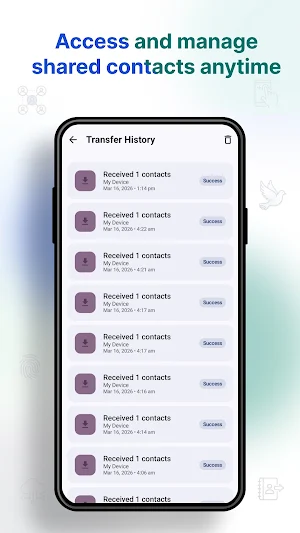


About Contacts Transfer
Got a new phone and need to transfer contacts quickly? Skip the hassle of cables, slow Bluetooth, or complicated cloud syncing. Contacts Transfer is the ultimate solution for fast, secure, and seamless phone to phone transfer.Whether you are upgrading your device or just need quick contact sharing with a colleague, our app makes it effortless. No internet? No problem! Enjoy lightning-fast WiFi transfer without consuming a single megabyte of your mobile data.🚀 Key Features
• 100% Offline Transfer: Move your phonebook securely using a direct WiFi connection. No internet required!
• Lightning Fast Speed: Experience android transfer speeds significantly faster than traditional methods.
• Lightweight & Simple: The perfect Smart Switch alternative. It focuses solely on your address book—no heavy, bloated software, just quick results.
• Secure Contact Sharing: Your data never leaves your local network. True privacy is guaranteed.
• Instant Contact Backup: Safely copy and move your entire address book to a new device in seconds.
• No File Size Limits: Transfer 10 contacts or 10,000 without any restrictions.🛠️ How It Works (Just 3 Simple Steps!)
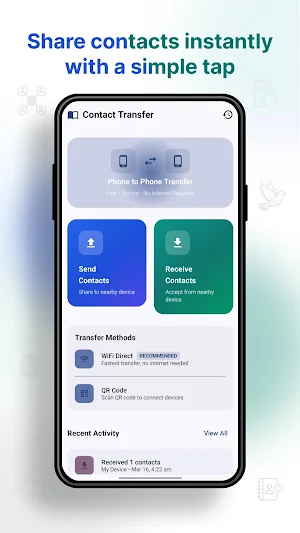
Open the app on both Android devices.
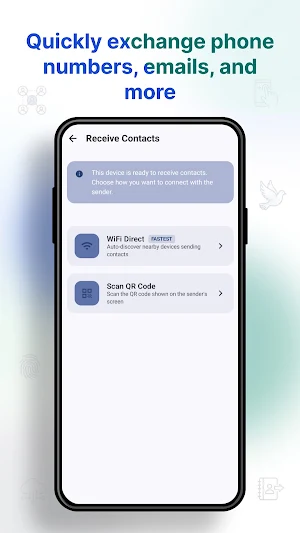
Select "Send" on your old phone and "Receive" on your new phone.
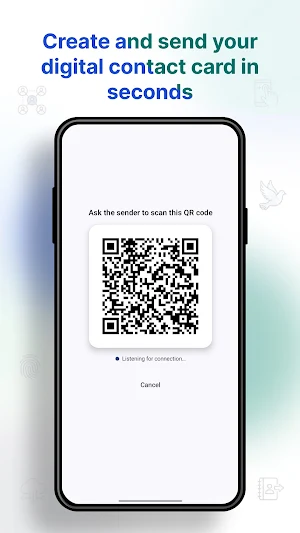
Connect via the secure WiFi prompt and watch your contacts transfer instantly!
🌟 Why Choose Contacts Transfer?
If you are looking for a fast, hassle-free way to move your numbers, this app is designed for you. Unlike heavy Phone Clone apps that take forever to set up, our tool is incredibly lightweight and gets straight to the point.
• Zero Data Usage: Completely free offline transfer saves your mobile data plan.
• No Cloud Accounts Needed: Forget about remembering passwords or syncing to third-party servers.
• User-Friendly Interface: Designed for everyone. You don’t need to be tech-savvy to move your phonebook.📱 Perfect Use Cases:
• You just bought a new phone and need an immediate contact backup and transfer.
• You want to share a large batch of business contacts with a partner at an event.
• You need a reliable, quick tool when you don't have internet access or cell service.💡 Important Tips & Notes:
• Ensure both devices have the Contacts Transfer app installed and open.
• Keep both phones close to each other during the transfer for the best WiFi connection.
• Location/Nearby Devices permissions are required strictly by Android to establish the direct WiFi connection. We respect your privacy and never track your location!
Download Contacts Transfer today and experience the easiest way to move your phonebook!
• 100% Offline Transfer: Move your phonebook securely using a direct WiFi connection. No internet required!
• Lightning Fast Speed: Experience android transfer speeds significantly faster than traditional methods.
• Lightweight & Simple: The perfect Smart Switch alternative. It focuses solely on your address book—no heavy, bloated software, just quick results.
• Secure Contact Sharing: Your data never leaves your local network. True privacy is guaranteed.
• Instant Contact Backup: Safely copy and move your entire address book to a new device in seconds.
• No File Size Limits: Transfer 10 contacts or 10,000 without any restrictions.🛠️ How It Works (Just 3 Simple Steps!)
Open the app on both Android devices.
Select "Send" on your old phone and "Receive" on your new phone.
Connect via the secure WiFi prompt and watch your contacts transfer instantly!
🌟 Why Choose Contacts Transfer?
If you are looking for a fast, hassle-free way to move your numbers, this app is designed for you. Unlike heavy Phone Clone apps that take forever to set up, our tool is incredibly lightweight and gets straight to the point.
• Zero Data Usage: Completely free offline transfer saves your mobile data plan.
• No Cloud Accounts Needed: Forget about remembering passwords or syncing to third-party servers.
• User-Friendly Interface: Designed for everyone. You don’t need to be tech-savvy to move your phonebook.📱 Perfect Use Cases:
• You just bought a new phone and need an immediate contact backup and transfer.
• You want to share a large batch of business contacts with a partner at an event.
• You need a reliable, quick tool when you don't have internet access or cell service.💡 Important Tips & Notes:
• Ensure both devices have the Contacts Transfer app installed and open.
• Keep both phones close to each other during the transfer for the best WiFi connection.
• Location/Nearby Devices permissions are required strictly by Android to establish the direct WiFi connection. We respect your privacy and never track your location!
Download Contacts Transfer today and experience the easiest way to move your phonebook!
What’s new
Version 1.6 · Updated October 5, 2026
Bugs Fixes
User reviews

superb
Alternatives to Contacts Transfer
Looking for apps like Contacts Transfer? Here are 4 similar Android apps on Google Play. The highest rated is Soliom Pro (4.7/5), and all 4 are free to download.




| App | Rating | Price | Installs | Last updated | Compare |
|---|---|---|---|---|---|
| Contacts Transfer | – | Free | 5,000+ | Oct 5, 2026 | |
| Card Suite Pro | 3.4 / 5 | Free | 5,000+ | Sep 22, 2026 | Compare |
| FAX Desk: Send Fax from Phone | 4.6 / 5 | Free | 10,000+ | Dec 19, 2025 | Compare |
| Soliom Pro | 4.7 / 5 | Free | 10,000+ | Sep 5, 2025 | Compare |
| Exos | 4.1 / 5 | Free | 10,000+ | Sep 24, 2026 | Compare |
Compare Contacts Transfer with the top alternatives: ratings, updates, ASO score and keyword gaps →