
Screen Recording Converter
Namaste Nepal Tea Tools Contains ads
Trim screen recordings, extract audio, save & share — fully on your device.
- Downloads
- 19+
- on Google Play
- Price
- Free
- No in-app purchases
- Updated
- Oct 9
- 2026 · v1.6
Screenshots
About Screen Recording Converter
Screen Recording Converter is a fast, private way to clean up your screen recordings right on your phone — no sign-up, no uploads, and no waiting on a server.
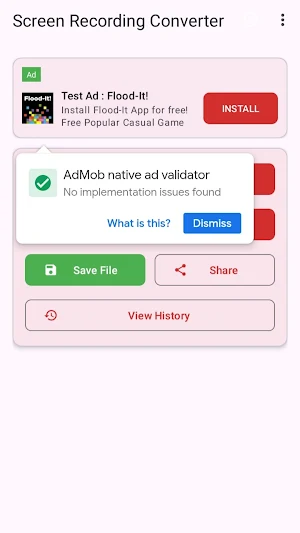
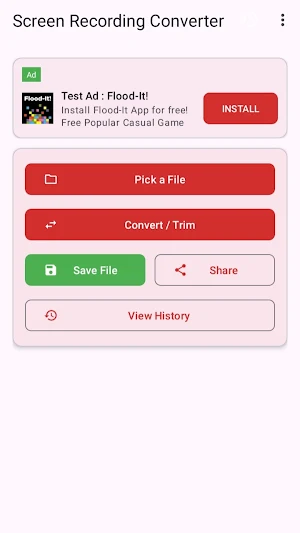
Pick a recording from your device, trim it to just the part you need or pull out its audio, then save or share the result. Everything happens locally, so your videos never leave your device.
WHAT YOU CAN DO
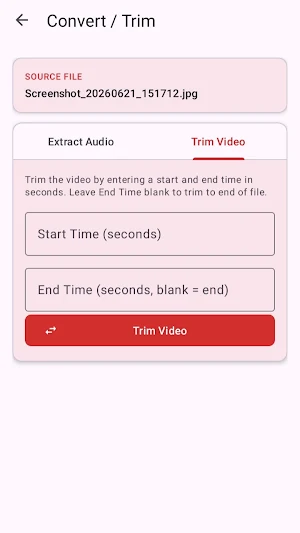
- Trim videos — set a start and end time in seconds and keep only the section you want. Trimming copies the video stream directly, so it's quick and preserves the original quality.
- Extract audio — save the audio track of any video as an M4A file in a couple of taps.
- Save anywhere — write the finished file to any folder using your device's built-in file picker.
- Share instantly — send your trimmed clip or extracted audio to other apps through the standard Android share sheet.
RECENT FILES
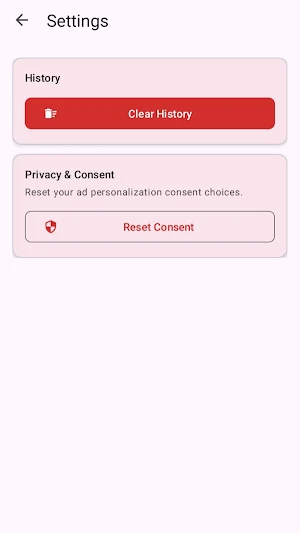
Your recent conversions are kept in a simple history list. Reopen, rename, or remove any entry — and clear the whole list whenever you like.
BUILT WITH PRIVACY IN MIND
- 100% on-device processing — your recordings are never uploaded.
- No account and no sign-in required.
- No activity tracking or analytics.
- File access is granted one file at a time through Android's secure picker — the app never scans your whole storage.
COMFORTABLE TO USE
- Clean, modern Material Design interface.
- Light and dark themes.
- Progress notifications so you know the moment a conversion finishes.
FREE TO USE
The app is free and supported by ads. You're asked for ad-personalization consent where required, and you can review or reset that choice anytime in Settings.
PERFECT FOR
Trimming tutorials and gameplay clips, cutting recordings down before sharing, grabbing the audio from a recording, and quickly prepping clips for messaging or social apps.
Questions or feedback? Email us at [email protected]
Pick a recording from your device, trim it to just the part you need or pull out its audio, then save or share the result. Everything happens locally, so your videos never leave your device.
WHAT YOU CAN DO
- Trim videos — set a start and end time in seconds and keep only the section you want. Trimming copies the video stream directly, so it's quick and preserves the original quality.
- Extract audio — save the audio track of any video as an M4A file in a couple of taps.
- Save anywhere — write the finished file to any folder using your device's built-in file picker.
- Share instantly — send your trimmed clip or extracted audio to other apps through the standard Android share sheet.
RECENT FILES
Your recent conversions are kept in a simple history list. Reopen, rename, or remove any entry — and clear the whole list whenever you like.
BUILT WITH PRIVACY IN MIND
- 100% on-device processing — your recordings are never uploaded.
- No account and no sign-in required.
- No activity tracking or analytics.
- File access is granted one file at a time through Android's secure picker — the app never scans your whole storage.
COMFORTABLE TO USE
- Clean, modern Material Design interface.
- Light and dark themes.
- Progress notifications so you know the moment a conversion finishes.
FREE TO USE
The app is free and supported by ads. You're asked for ad-personalization consent where required, and you can review or reset that choice anytime in Settings.
PERFECT FOR
Trimming tutorials and gameplay clips, cutting recordings down before sharing, grabbing the audio from a recording, and quickly prepping clips for messaging or social apps.
Questions or feedback? Email us at [email protected]
What’s new
Version 1.6 · Updated October 9, 2026
Bug fixes and improvement.
Alternatives to Screen Recording Converter
Looking for apps like Screen Recording Converter? Here are 6 similar Android apps on Google Play. All of them are free to download.
-
XML to JSON Data Converter
-
PDF to TXT Text Converter
-
MOBI to EPUB eBook Converter
-
SVG to PNG Image Converter
-
Parking Meter Timer Tracker
-
Private Photo Vault Locker
| App | Rating | Price | Installs | Last updated | Compare |
|---|---|---|---|---|---|
| Screen Recording Converter | – | Free | 10+ | Oct 9, 2026 | |
| XML to JSON Data Converter | – | Free | 5+ | Aug 20, 2026 | Compare |
| PDF to TXT Text Converter | – | Free | 10+ | Aug 21, 2026 | Compare |
| MOBI to EPUB eBook Converter | – | Free | 50+ | Oct 8, 2026 | Compare |
| SVG to PNG Image Converter | – | Free | 5+ | Oct 8, 2026 | Compare |
| Parking Meter Timer Tracker | – | Free | 1+ | – | Compare |
| Private Photo Vault Locker | – | Free | 10+ | Aug 20, 2026 | Compare |
Similar apps on Google Play
- XML to JSON Data Converter
- PDF to TXT Text Converter
- MOBI to EPUB eBook Converter
- SVG to PNG Image Converter
- Parking Meter Timer Tracker
- Private Photo Vault Locker
- Earthquake Seismograph App
- Sound Level Meter dB Detector
- GIF to Video Maker Converter
- TIFF to JPG Image Converter
- EPUB to PDF eBook Converter
- PNG to JPG Image Converter
- HTML to PDF File Converter
- Presentation Speech Timer
- Clinometer Tilt Angle Meter
- Flooring Cost Calculator
- Work Shift Management Clock
- FB2 to PDF eBook Converter
- RTF to PDF File Converter
- OCR Scanner Text Extractor
- OGG to MP3 Audio Converter
- HEIC to JPG Image Converter
- Tiff to Pdf File Converter
- CHM to PDF File Converter
- Brick Wall Calculator
- Screen Timeout Extender
- TDEE Calculator
- Vehicle Oil Change Reminder
- Pregnancy Due Date Calculator
- Spirit Level
- Markdown Editor Viewer
- LatTeX Editor
- STL 3D File Viewer
- CDR File Viewer and Converter