
InkThink: Handwritten Planner
Productivity In-app purchases
Handwritten Planner using Pen Stylus - To-Do List, Calendar, Notes & Canvas!
- Rating
- 3.4
- 9 ratings
- Downloads
- 1.7K+
- on Google Play
- Price
- Free
- In-app purchases
- Updated
- Oct 24
- 2026 · v1347.0
Screenshots




About InkThink: Handwritten Planner
*** LIMITED TIME LAUNCH OFFER: Get Pro Features Free with Base App Purchase ***
InkThink is a groundbreaking stylus-first productivity suite designed for thinkers, creators, and note-takers who prefer ink over taps. Whether you're sketching out your day, brainstorming ideas, or building a visual mind map, InkThink gives you a fluid, pen-powered canvas to organize your thoughts your way.
A quantum leap over traditional 'Pen Planner' apps where you just draw over a PDF, or even traditional pen enabled notebooks with templates.
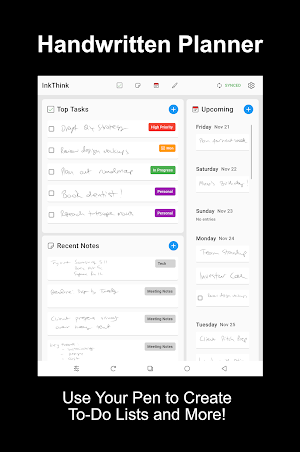
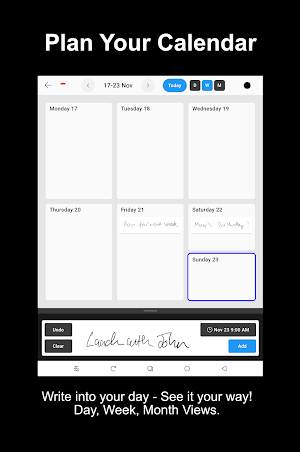
InkThink features unique intelligent ink where handwritten tasks can be re-ordered, handwritten calendar entries are date aware and actually show across your different Calendar views (Day, Week, Month - no longer just simply inking over a date box in a PDF and which don't show on other views.
InkThink is what you have been waiting for from an intelligent ink-based diary and planner app - a true pen powered To-Do list and handwritten Calendar.
🗂️ Ink Tasks
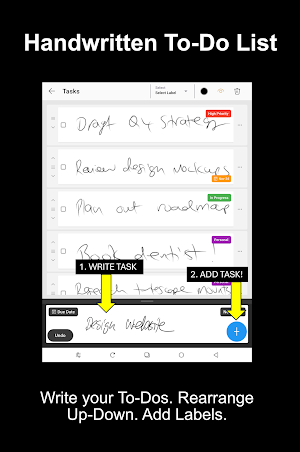
Draw your to-do list with your stylus in long ink blocks. Easily add, rearrange, and manage tasks in a tactile, visual format. The bottom of the screen becomes your ink input zone — just write and watch your tasks flow into place.
🌩️ Notes
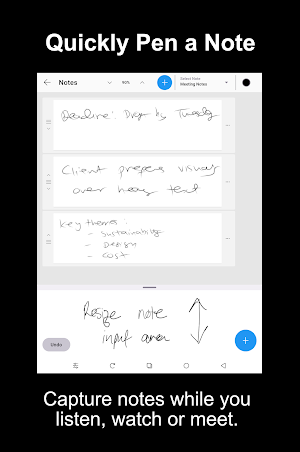
Capture individual ideas in real time — during meetings, while watching videos, or listening to audio. Notes lets you jot down key points in ink and save them as “thinking sessions” notes.
📅 Ink Calendar
Draw directly into your calendar. Each inked date can be seen across different layouts - Day, Week and Month. It’s not just handwriting — it’s interactive ink.
🧠 Thinking Canvas
Create movable ink index cards on a freeform canvas. Sketch, connect, and rearrange your thoughts like sticky notes on a whiteboard — but smarter and stylus-native. Capture you brainstorm and mind map your ideas.
InkThink is modular, intuitive, and built for the future of stylus powered creative productivity. No typing. No distractions. Just your pen, your ideas, and an app that connects and thinks with you.
Built for tablets, e-ink devices, and stylus-enabled Android phones and tablets like Samsung Ultra phones and Galaxy tables, Motorola G Stylus, Lenovo Idea and Yoga tablets, and even e-Ink devices from Boox and Viwoods powered by Android. InkThink transforms handwriting into a dynamic, movable, and meaningful workspace. InkThink coming to Windows and iOS soon.
7 Day Free Trial - No Sign Up needed. Can work fully offline.
Base App (One Time Purchase): All core features including Tasks, Calendar, Notes and Canvas. Sync. Can use on all devices.
Pro Features (Optional Subscription): Filter by Task Label, Add Due Dates, Mindfulness Task Mode, View Tasks with Due Dates on Calendar... and more...
Special Launch Offer: Pro Subscription offered free if you buy the Base App during 7 Day Trial.
InkThink : To-Do, Notes, Calendar, MindMap Planner designed for Pen Stylus.
Take back control with your mind and pen!
What’s new
Version 1347.0 · Updated October 24, 2026
- New! Google and Microsoft 365 Calendar Integration - Projects view - quadrant of Tasks, High Priority, Milestones and Notes - Multiple Calendar options. Split Screen view on Home Page - Habit Dashboard! Label Tasks as Habits and track progress - Add audio - record up to 10 minutes and transcribe to text. - Improved Notebooks and Canvas organizer - Support for Text. Add text to a Task/Note/Event/Canvas item
User reviews

crashes on start. I have a Book Note Air 5C. UPDATE: Developer has responded that they are looking into a fix.
Alternatives to InkThink: Handwritten Planner
Looking for apps like InkThink: Handwritten Planner? Here are 3 similar Android apps on Google Play. The highest rated is Adamans (4.7/5), and all 3 are free to download.



| App | Rating | Price | Installs | Last updated | Compare |
|---|---|---|---|---|---|
| InkThink: Handwritten Planner | 3.4 / 5 | Free | 1,000+ | Oct 24, 2026 | |
| Aduro | 4.7 / 5 | Free | 50,000+ | Sep 26, 2026 | Compare |
| Aardvark Book Club | 3.2 / 5 | Free | 10,000+ | Jul 22, 2026 | Compare |
| Adamans | 4.7 / 5 | Free | 10,000+ | – | Compare |