
Accessimind Screen Reader
Sarper Ar%C4%B1kan Tools
The screen reader solution for android OS.
- Rating
- 3.8
- 30 ratings
- Downloads
- 1K+
- on Google Play
- Price
- Free
- No in-app purchases
- Updated
- Sep 25
- 2026 · vAccessiMind 25/09/2026 - Sürüm 114-19
Screenshots
About Accessimind Screen Reader
Accessimind Reader is a screen reader application developed to enable visually impaired and partially sighted users to use their Android phones more clearly, quickly, and independently.
Using Accessibility Service
Accessimind Reader uses the Android AccessibilityService API to provide screen reading functions. AccessibilityService is used to provide audio versions of on-screen content, detect user interface elements, navigate with gestures, provide audio feedback on focused items, and deliver a screen reader experience. This service is necessary for the screen reading feature, which is the core function of the application, to work.
Accessimind Reader does not use AccessibilityService for user tracking, displaying advertisements, remotely recording calls, bypassing Android security mechanisms, or modifying user settings without permission.
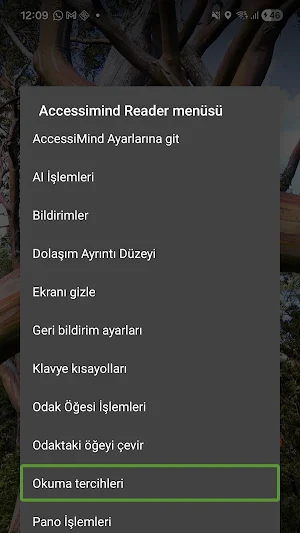
The application presents audio feedback, gesture navigation, keyboard shortcuts, clipboard operations, reading preferences, and tools for the focused item in a practical accessibility flow. The context menu provides quick access to frequently used areas such as reading controls, clipboard operations, notification access, focused item operations, and Accessimind settings.
Key Features:
• Screen reading with clear voice feedback
• Alphabetically sorted context menu operations
• Clipboard operations for text in focus, last read phrase, and selected screen text
• Access to Notifications area from context menu and selectable notification list
• Reading preferences and position reading controls
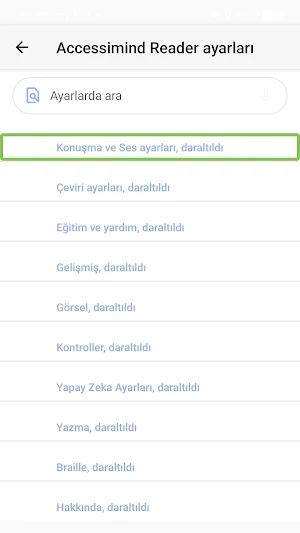
• Voice search in settings
• Turkish and English interface support
• Accessibility-focused navigation for phones and compatible Android devices
Accessimind Reader is designed for users who need voice output and fast navigation. It focuses on providing predictable controls, understandable labels, and quick access to frequently used screen reader operations.
---
Accessimind Reader is an Android screen reader designed to make everyday phone use clearer, faster, and more independent for blind and low-vision users.
Accessibility Service Usage
Accessimind Reader uses the Android AccessibilityService API to provide screen-reading functionality. The Accessibility Service is used to detect on-screen content, provide spoken feedback, support gesture-based navigation, identify focused user interface elements, and deliver the core screen-reader experience. AccessibilityService is required for the application's primary functionality as a screen reader.
Accessimind Reader does not use AccessibilityService for user tracking, advertising, remote call recording, bypassing Android security controls or modifying user settings without permission.
The app provides spoken feedback, gesture navigation, keyboard shortcuts, clipboard actions, reading preferences and focused-item tools in a practical accessibility workflow. The context menu helps users reach common actions quickly, including reading controls, clipboard operations, notification access, focused item actions and Accessimind settings.
Key features:
• Screen reading with clear spoken feedback
• Context menu with alphabetically ordered actions
• Clipboard actions for focused text, last spoken phrase and selected screen text
• Notification area access from the context menu with a selectable notification list
• Reading preferences and read-from-position controls
• Voice search in settings
• Turkish and English interface support
• Accessibility-first navigation for phones and compatible Android devices
Accessimind Reader is built for users who rely on speech output and efficient navigation. It focuses on predictable controls, understandable labels and fast access to common screen-reader tasks.
Using Accessibility Service
Accessimind Reader uses the Android AccessibilityService API to provide screen reading functions. AccessibilityService is used to provide audio versions of on-screen content, detect user interface elements, navigate with gestures, provide audio feedback on focused items, and deliver a screen reader experience. This service is necessary for the screen reading feature, which is the core function of the application, to work.
Accessimind Reader does not use AccessibilityService for user tracking, displaying advertisements, remotely recording calls, bypassing Android security mechanisms, or modifying user settings without permission.
The application presents audio feedback, gesture navigation, keyboard shortcuts, clipboard operations, reading preferences, and tools for the focused item in a practical accessibility flow. The context menu provides quick access to frequently used areas such as reading controls, clipboard operations, notification access, focused item operations, and Accessimind settings.
Key Features:
• Screen reading with clear voice feedback
• Alphabetically sorted context menu operations
• Clipboard operations for text in focus, last read phrase, and selected screen text
• Access to Notifications area from context menu and selectable notification list
• Reading preferences and position reading controls
• Voice search in settings
• Turkish and English interface support
• Accessibility-focused navigation for phones and compatible Android devices
Accessimind Reader is designed for users who need voice output and fast navigation. It focuses on providing predictable controls, understandable labels, and quick access to frequently used screen reader operations.
---
Accessimind Reader is an Android screen reader designed to make everyday phone use clearer, faster, and more independent for blind and low-vision users.
Accessibility Service Usage
Accessimind Reader uses the Android AccessibilityService API to provide screen-reading functionality. The Accessibility Service is used to detect on-screen content, provide spoken feedback, support gesture-based navigation, identify focused user interface elements, and deliver the core screen-reader experience. AccessibilityService is required for the application's primary functionality as a screen reader.
Accessimind Reader does not use AccessibilityService for user tracking, advertising, remote call recording, bypassing Android security controls or modifying user settings without permission.
The app provides spoken feedback, gesture navigation, keyboard shortcuts, clipboard actions, reading preferences and focused-item tools in a practical accessibility workflow. The context menu helps users reach common actions quickly, including reading controls, clipboard operations, notification access, focused item actions and Accessimind settings.
Key features:
• Screen reading with clear spoken feedback
• Context menu with alphabetically ordered actions
• Clipboard actions for focused text, last spoken phrase and selected screen text
• Notification area access from the context menu with a selectable notification list
• Reading preferences and read-from-position controls
• Voice search in settings
• Turkish and English interface support
• Accessibility-first navigation for phones and compatible Android devices
Accessimind Reader is built for users who rely on speech output and efficient navigation. It focuses on predictable controls, understandable labels and fast access to common screen-reader tasks.
What’s new
Version AccessiMind 25/09/2026 - Sürüm 114-19 · Updated September 25, 2026
114-19: Improved sound feedback playback and Google TalkBack based custom sound themes. Please report missing sounds or issues customizing themes.
User reviews

We really liked this new screen reader, but I have one complaint. Its swipe works slowly just like TalkBack, so please fix it so that it works faster than TalkBack too. We want this to be the most advance powerful screen reader of the future. This happens in exactly the same way as TalkBack does when you swipe up, a...

please add feature custom sound scheme Thank you very much for making such a good screen reader. One problem I would like to point out: The sound screen management feature is not working. As soon as I click on sound screen management, it is not clicking. Fix it. And bring some unique sound scheme. Remove the talkbac...
Alternatives to Accessimind Screen Reader
Looking for apps like Accessimind Screen Reader? Here are 6 similar Android apps on Google Play. All of them are free to download.





| App | Rating | Price | Installs | Last updated | Compare |
|---|---|---|---|---|---|
| Accessimind Screen Reader | 3.8 / 5 | Free | 1,000+ | Sep 25, 2026 | |
| DARVISO | – | Free | 50+ | Nov 7, 2025 | Compare |
| SDG | – | Free | 5+ | – | Compare |
| Qattah | قطه | – | Free | 100+ | Mar 1, 2026 | Compare |
| CoolClean | – | Free | 50+ | Sep 15, 2026 | Compare |
| Ar-Rahmah | – | Free | 100+ | – | Compare |
| myMacDon | – | Free | 100+ | Sep 23, 2026 | Compare |
Similar apps on Google Play
- DARVISO
- SDG
- Qattah | قطه
- CoolClean
- Ar-Rahmah
- myMacDon
- Solar Forecast App: SolarBytez
- KineraMusic
- До Зп: Займ Кредит
- Micro View
- BLSairbag
- TECEsmartconnect
- U2C Mobile
- nova ماي نت
- ElementApp
- LarpBank: Fake Bank and Crypto
- SAMCard
- Your GPS
- GapaSea
- PackPal: Moving Box Inventory
- Stegg
- Unit Converter: Convert Units
- MKM: Minimal Kernel Manager
- Agre
- XZCam : Record Video Privately