

RoboAuto - Arduino Bluetooth Joystick for Android™
Tools Contains ads
RoboAuto is Joystick Remote for HC-05 based robots.
- Downloads
- 1K+
- on Google Play
- Price
- Free
- No in-app purchases
- Updated
- Aug 16
- 2019 · v1.3
Screenshots


About RoboAuto - Arduino Bluetooth Joystick for Android™
Control your Bluetooth powered Arduino robots using your Android™ Device.
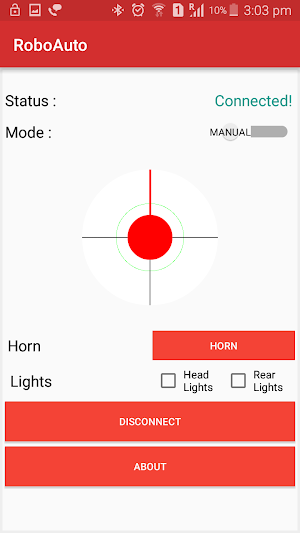
RoboAuto has a Virtual Joystick using which you have one thumb control of your robot.
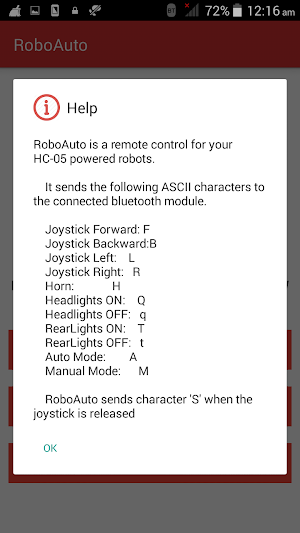
The Joystick sends the following characters via the Bluetooth on multiple directions:
Forward: F
Backward: B
Left: L
Right: R
Default: S
RoboAuto also has additional buttons like Mode, Head Lights, Rear Lights and Horn which you can use as specified or whatever your creativity demands. The characters sent by these buttons have been specified in the help menu.
Instructions:
- Pair HC-05 Module with the bluetooth of your Android™ Device using the default bluetooth setting. Generally the default pin is "1234" or "0000"
- Launch RoboAuto , Enable Bluetooth on prompt if not enabled.
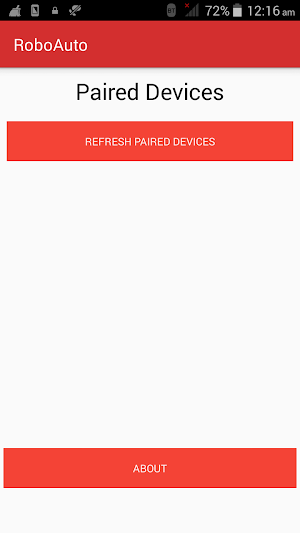
- Tap on "Refresh Paired Devices". Your newly added module will be displayed.
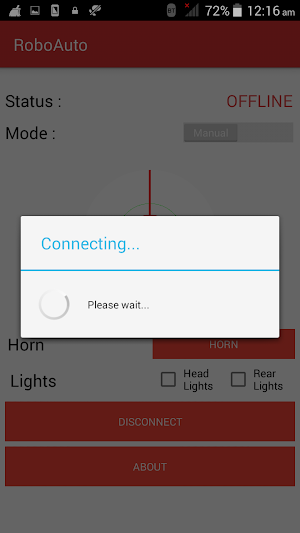
- Tap on your HC-05 device and You will be connected in a jiffy.
- Have Fun!
Explaining Permissions:
BLUETOOTH : To Transmit via Bluetooth
BLUETOOTH_ADMIN : To Pair and Discover Bluetooth devices.
INTERNET : To Fetch Feedback form and Display Ad.
The Application has an in-built feedback form where it is not mandatory to provide your email address, thus feature requests, comments and bug reports can be sent anonymously.
RoboAuto has a Virtual Joystick using which you have one thumb control of your robot.
The Joystick sends the following characters via the Bluetooth on multiple directions:
Forward: F
Backward: B
Left: L
Right: R
Default: S
RoboAuto also has additional buttons like Mode, Head Lights, Rear Lights and Horn which you can use as specified or whatever your creativity demands. The characters sent by these buttons have been specified in the help menu.
Instructions:
- Pair HC-05 Module with the bluetooth of your Android™ Device using the default bluetooth setting. Generally the default pin is "1234" or "0000"
- Launch RoboAuto , Enable Bluetooth on prompt if not enabled.
- Tap on "Refresh Paired Devices". Your newly added module will be displayed.
- Tap on your HC-05 device and You will be connected in a jiffy.
- Have Fun!
Explaining Permissions:
BLUETOOTH : To Transmit via Bluetooth
BLUETOOTH_ADMIN : To Pair and Discover Bluetooth devices.
INTERNET : To Fetch Feedback form and Display Ad.
The Application has an in-built feedback form where it is not mandatory to provide your email address, thus feature requests, comments and bug reports can be sent anonymously.
What’s new
Version 1.3 · Updated August 16, 2019
Integrated Arduino™ code Added circuit diagram for reference Added parts and specs for new hobbyists Optimised system pipeline
Alternatives to RoboAuto - Arduino Bluetooth Joystick for Android™
Looking for apps like RoboAuto - Arduino Bluetooth Joystick for Android™? Here are 3 similar Android apps on Google Play. The highest rated is Shh Silence: Anti Snoring App (3.3/5), and all 3 are free to download.


| App | Rating | Price | Installs | Last updated | Compare |
|---|---|---|---|---|---|
| RoboAuto - Arduino Bluetooth Joystick for Android™ | – | Free | 1,000+ | Aug 16, 2019 | |
| Shh Silence: Anti Snoring App | 3.3 / 5 | Free | 10,000+ | Aug 1, 2026 | Compare |
| Turret : Last Hope | – | Free | 100+ | Nov 20, 2019 | Compare |
| StorkLight - Open Source Side | – | Free | 100+ | Aug 17, 2019 | Compare |