
Nitros Pro PDF Editor
Nitros PDF Editor Productivity Contains ads
Natro PDF editing app that allows you to manage, edit, and convert your PDFs
- Rating
- 3.0
- 66 ratings
- Downloads
- 86.1K+
- on Google Play
- Price
- Free
- No in-app purchases
- Updated
- Aug 25
- 2026 · v1.0.0
Screenshots
About Nitros Pro PDF Editor
Nitros PDF Editor is a professional-grade PDF editing tool designed to help you easily view, edit, and manage your PDF documents on the go. With a sleek, intuitive interface, this app offers a powerful suite of features that make working with PDFs a breeze. Whether you're at the office, at home, or on the move, Nitros PDF Editor allows you to perform advanced PDF editing tasks without the need for a desktop or complex software.
Key Features:
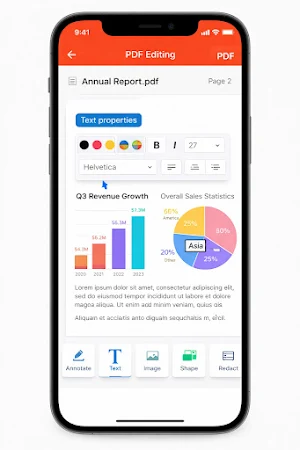
Edit Text: Modify the text in your PDF files with ease. Change fonts, size, style, and colors to tailor your documents to your needs.
Annotate PDFs: Highlight, underline, or strike through text in your PDFs. Add comments, shapes, and freehand drawings to highlight key sections.
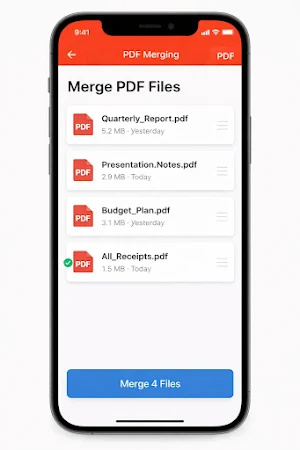
Page Management: Rearrange, rotate, split, or delete pages to create the perfect PDF document. Combine multiple PDFs into one file.
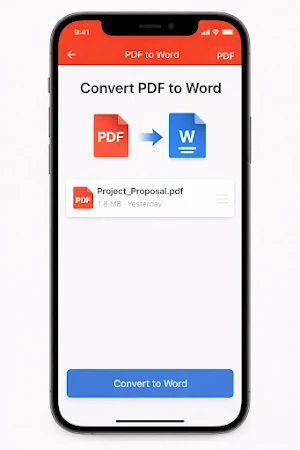
PDF Conversion: Convert your PDFs to other formats (Word, Excel, JPG, etc.) and back. Convert scanned documents into editable files using OCR technology.
Secure PDFs: Protect your PDF documents with password encryption or set permissions to prevent unauthorized access.
Fill & Sign: Complete forms and add digital signatures to documents, making your workflow faster and more efficient.
Cloud Integration: Access, store, and sync your PDFs across multiple devices with support for popular cloud storage providers.
User-Friendly Interface:
Nitros PDF Editor boasts a clean, minimalist design that prioritizes ease of use. Its simple navigation makes it easy for users of all skill levels to quickly get the job done. The app is optimized for both personal and professional use, whether you're working with contracts, presentations, or general document management.
Why Choose Nitros PDF Editor?
Fast & Efficient: Edit PDFs seamlessly without the need for complicated software or desktop setups.
Professional Features: Enjoy a complete set of advanced editing tools designed for users who need more than just basic viewing.
Secure: Nitros ensures that your documents stay safe with password protection and encryption features.
Cross-Platform: Work across devices and keep your documents synchronized for a smooth, integrated experience.
Perfect for:
Business professionals who need to quickly modify and secure important documents.
Students and academics who need to annotate and convert research papers and books.
Anyone who regularly works with forms, contracts, invoices, and other PDF files.
Nitros PDF Editor is the all-in-one solution for anyone who needs to manage and edit PDFs on the go. Download now and experience the power of professional PDF editing in the palm of your hand!
Key Features:
Edit Text: Modify the text in your PDF files with ease. Change fonts, size, style, and colors to tailor your documents to your needs.
Annotate PDFs: Highlight, underline, or strike through text in your PDFs. Add comments, shapes, and freehand drawings to highlight key sections.
Page Management: Rearrange, rotate, split, or delete pages to create the perfect PDF document. Combine multiple PDFs into one file.
PDF Conversion: Convert your PDFs to other formats (Word, Excel, JPG, etc.) and back. Convert scanned documents into editable files using OCR technology.
Secure PDFs: Protect your PDF documents with password encryption or set permissions to prevent unauthorized access.
Fill & Sign: Complete forms and add digital signatures to documents, making your workflow faster and more efficient.
Cloud Integration: Access, store, and sync your PDFs across multiple devices with support for popular cloud storage providers.
User-Friendly Interface:
Nitros PDF Editor boasts a clean, minimalist design that prioritizes ease of use. Its simple navigation makes it easy for users of all skill levels to quickly get the job done. The app is optimized for both personal and professional use, whether you're working with contracts, presentations, or general document management.
Why Choose Nitros PDF Editor?
Fast & Efficient: Edit PDFs seamlessly without the need for complicated software or desktop setups.
Professional Features: Enjoy a complete set of advanced editing tools designed for users who need more than just basic viewing.
Secure: Nitros ensures that your documents stay safe with password protection and encryption features.
Cross-Platform: Work across devices and keep your documents synchronized for a smooth, integrated experience.
Perfect for:
Business professionals who need to quickly modify and secure important documents.
Students and academics who need to annotate and convert research papers and books.
Anyone who regularly works with forms, contracts, invoices, and other PDF files.
Nitros PDF Editor is the all-in-one solution for anyone who needs to manage and edit PDFs on the go. Download now and experience the power of professional PDF editing in the palm of your hand!
What’s new
Version 1.0.0 · Updated August 25, 2026
App update 🎊
User reviews

Nitros PDF Editor delivers a powerful and user-friendly solution for managing PDF documents, making it an excellent choice for both personal and professional use. With its clean interface and robust feature set, the app simplifies complex PDF tasks without overwhelming the user.

superb

Nice Amazing app ❤

The Nitro Pro PDF Editor is very easy to use and has powerful editing features. I highly recommend it for professional PDF management

Kaafi useful app hai 😀😀😀 Large files bhi bina hang kiye open ho jati hain. Bohat acha experience!

Perfect tool for everyday PDF reading 😀😀😀 The layout is clean and everything works instantly.
Alternatives to Nitros Pro PDF Editor
Looking for apps like Nitros Pro PDF Editor? Here are 6 similar Android apps on Google Play. The highest rated is SignNow: Sign & Fill PDF Docs (4.5/5), and all 6 are free to download.
-
pdfFiller Edit, fill, sign PDF 3.9
-
Foxit PDF Editor 4.1
-
PDF Editor & Reader | Xodo 4.2
-
UPDF - AI-Powered PDF Editor 3.7
-
SignNow: Sign & Fill PDF Docs 4.5
-
Smallpdf: Scanner & PDF Editor 4.5
| App | Rating | Price | Installs | Last updated | Compare |
|---|---|---|---|---|---|
| Nitros Pro PDF Editor | 3.0 / 5 | Free | 50,000+ | Aug 25, 2026 | |
| pdfFiller Edit, fill, sign PDF | 3.9 / 5 | Free | 5,000,000+ | Oct 22, 2026 | Compare |
| Foxit PDF Editor | 4.1 / 5 | Free | 10,000,000+ | – | Compare |
| PDF Editor & Reader | Xodo | 4.2 / 5 | Free | 10,000,000+ | Oct 6, 2026 | Compare |
| UPDF - AI-Powered PDF Editor | 3.7 / 5 | Free | 1,000,000+ | – | Compare |
| SignNow: Sign & Fill PDF Docs | 4.5 / 5 | Free | 5,000,000+ | Sep 18, 2026 | Compare |
| Smallpdf: Scanner & PDF Editor | 4.5 / 5 | Free | 5,000,000+ | Oct 7, 2026 | Compare |
Similar apps on Google Play
- pdfFiller Edit, fill, sign PDF
- Foxit PDF Editor
- PDF Editor & Reader | Xodo
- UPDF - AI-Powered PDF Editor
- SignNow: Sign & Fill PDF Docs
- Smallpdf: Scanner & PDF Editor
- PDF E-Sign
- PDF Editor – Edit Everything!
- Falcon PDF - Editor & Tools
- PDF Reader(KDAN PDF): Edit PDF
- PDFelement-PDF Editor & Reader
- PDF Merge: Scan, Sign & Edit
- Mobi PDF・Editor・Scanner・Reader
- iLovePDF: PDF Editor & Scanner
- Polaris Office: Edit&View, PDF
- OfficeSuite Pro + PDF
- Document Reader, PDF Converter
- NoteLedge - Digital Notebook
- DT Driver
- Quotation Maker
- Office Word Reader Docx Editor