
Route4Me - Curbside Pickup App
Shopping
For businesses that want to offer curbside order pickup from multiple locations
- Downloads
- 100+
- on Google Play
- Price
- Free
- No in-app purchases
- Updated
- Oct 23
- 2020 · v1.0.0
Screenshots


About Route4Me - Curbside Pickup App
Stores and Warehouses with the curbside pickup app know the truth: being able to allow customer pickup at the curbside is great for business.
However, curbside pickup introduces a new set of problems for your store.
How do you match the order with the customer?
How long till the customer arrives?
Which location did the customer choose for pickup?
How long has the customer been waiting?
How do we identify the customer once they arrive?
Route4Me Curbside Pickup App solves them all.
How to Start Using the Route4Me - Curbside Pickup App
1. Log into your Route4Me account. (If you haven’t done so, you must first register for a Route4Me Web account.)
2. Select your preferred Routing Package.
3. As a Route4Me Web user, make sure that you have the Curbside Pickup module enabled for your Route4Me Web account through the Feature Manager.
4. Integrate your Route4Me account with your e-commerce platform or any other system where your orders are generated. For help with integration, please contact Route4Me’s Customer Success Team.
5. Log into the Route4Me Curbside Pickup App with your integrated Route4Me Web Account and start managing your incoming pickups.
Simple, Fast & Smart for You
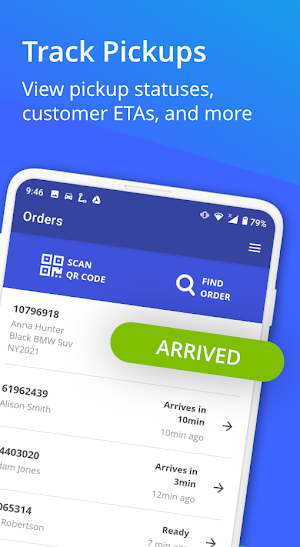
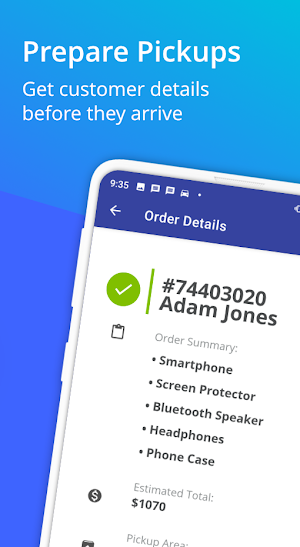
With our Curbside Pickup app, you’ll know when each customer will arrive to pick up their order, so you can have it ready for them.
And once they’ve arrived, Route4Me - Curbside Pickup App notifies you. It even reminds you that they are waiting until you’ve confirmed the pickup.
Route4Me - Curbside Pickup App helps you match the order to the customer, so you don’t waste time with mismatched orders.
You can see at a glance all the customers who are in transit and scheduled to arrive soon. This helps you queue up the right orders.
Route4Me - Curbside Pickup App supports multiple pickup locations, so you can provide curbside service from all your stores.
Easy for Your Customer
After the customer completes their order, they will receive an order confirmation that includes a QR code and a numerical security code to identify their particular order.
This extra layer of security helps you be sure you deliver the right order to the right customer.
The order confirmation message includes the precise location of the pickup point. Customers can send that location information to Google Maps, so they can navigate directly to the pickup point.
From the order confirmation screen, the customer can notify you that they are on the way.
Route4Me - Curbside Pickup App allows you to ensure contactless delivery to the customer’s vehicle. And there’s even a way for them to provide information about their vehicle. That makes it easy for you to find them when they arrive.
The Information You Need, When You Need It
At each location where customers want curbside pickup, the manager in charge needs to know:
Which order belongs to which customer?
Where in the store can each order be found?
When will the customer arrive?
Has the customer already arrived?
How long has the customer been waiting?
Which vehicle is the customer driving?
Did we deliver the right order to the customer?
Where to meet the customer?
Did the customer pay for the delivery?
Did the customer pay the right amount?
Route4Me - Curbside Pickup App answers every question in an easy-to-use mobile app.
Our Android Curbside Pickup app integrates with your favorite eCommerce and payment platforms.
However, curbside pickup introduces a new set of problems for your store.
How do you match the order with the customer?
How long till the customer arrives?
Which location did the customer choose for pickup?
How long has the customer been waiting?
How do we identify the customer once they arrive?
Route4Me Curbside Pickup App solves them all.
How to Start Using the Route4Me - Curbside Pickup App
1. Log into your Route4Me account. (If you haven’t done so, you must first register for a Route4Me Web account.)
2. Select your preferred Routing Package.
3. As a Route4Me Web user, make sure that you have the Curbside Pickup module enabled for your Route4Me Web account through the Feature Manager.
4. Integrate your Route4Me account with your e-commerce platform or any other system where your orders are generated. For help with integration, please contact Route4Me’s Customer Success Team.
5. Log into the Route4Me Curbside Pickup App with your integrated Route4Me Web Account and start managing your incoming pickups.
Simple, Fast & Smart for You
With our Curbside Pickup app, you’ll know when each customer will arrive to pick up their order, so you can have it ready for them.
And once they’ve arrived, Route4Me - Curbside Pickup App notifies you. It even reminds you that they are waiting until you’ve confirmed the pickup.
Route4Me - Curbside Pickup App helps you match the order to the customer, so you don’t waste time with mismatched orders.
You can see at a glance all the customers who are in transit and scheduled to arrive soon. This helps you queue up the right orders.
Route4Me - Curbside Pickup App supports multiple pickup locations, so you can provide curbside service from all your stores.
Easy for Your Customer
After the customer completes their order, they will receive an order confirmation that includes a QR code and a numerical security code to identify their particular order.
This extra layer of security helps you be sure you deliver the right order to the right customer.
The order confirmation message includes the precise location of the pickup point. Customers can send that location information to Google Maps, so they can navigate directly to the pickup point.
From the order confirmation screen, the customer can notify you that they are on the way.
Route4Me - Curbside Pickup App allows you to ensure contactless delivery to the customer’s vehicle. And there’s even a way for them to provide information about their vehicle. That makes it easy for you to find them when they arrive.
The Information You Need, When You Need It
At each location where customers want curbside pickup, the manager in charge needs to know:
Which order belongs to which customer?
Where in the store can each order be found?
When will the customer arrive?
Has the customer already arrived?
How long has the customer been waiting?
Which vehicle is the customer driving?
Did we deliver the right order to the customer?
Where to meet the customer?
Did the customer pay for the delivery?
Did the customer pay the right amount?
Route4Me - Curbside Pickup App answers every question in an easy-to-use mobile app.
Our Android Curbside Pickup app integrates with your favorite eCommerce and payment platforms.
Alternatives to Route4Me - Curbside Pickup App
Looking for apps like Route4Me - Curbside Pickup App? Here are 6 similar Android apps on Google Play. The highest rated is Olive Garden Italian Kitchen (4.6/5), and all 6 are free to download.
-
Publix Delivery & Curbside 4.6
-
Postmates - Food Delivery 4.2
-
Olive Garden Italian Kitchen 4.6
-
Hannaford 3.8
-
Papa Johns Pizza & Delivery 4.5
-
MOOYAH 4.6
| App | Rating | Price | Installs | Last updated | Compare |
|---|---|---|---|---|---|
| Route4Me - Curbside Pickup App | – | Free | 100+ | Oct 23, 2020 | |
| Publix Delivery & Curbside | 4.6 / 5 | Free | 1,000,000+ | Oct 9, 2026 | Compare |
| Postmates - Food Delivery | 4.2 / 5 | Free | 10,000,000+ | Oct 22, 2026 | Compare |
| Olive Garden Italian Kitchen | 4.6 / 5 | Free | 1,000,000+ | Oct 15, 2026 | Compare |
| Hannaford | 3.8 / 5 | Free | 500,000+ | Oct 6, 2026 | Compare |
| Papa Johns Pizza & Delivery | 4.5 / 5 | Free | 10,000,000+ | Oct 16, 2026 | Compare |
| MOOYAH | 4.6 / 5 | Free | 100,000+ | Oct 5, 2026 | Compare |
Similar apps on Google Play
- Publix Delivery & Curbside
- Postmates - Food Delivery
- Olive Garden Italian Kitchen
- Hannaford
- Papa Johns Pizza & Delivery
- MOOYAH
- LongHorn Steakhouse®
- Saladworks
- Baskin-Robbins
- Shipt: Same-day delivery
- Wegmans
- Caviar - Order Food Delivery
- Shuttle
- Golden Corral
- The Fresh Grocer
- Ashley
- Denny's
- MARTIN'S
- QuikTrip: Food, Coupons & Fuel
- Dunkin’
- Grubhub: Food Delivery
- ReadyRefresh®
- Anycart: Grocery Delivery
- Chipotle - Fresh Food Fast
- Cinnabon
- Shipt Shopper: Shop for Pay
- 10Box Cost-Plus
- Chick-fil-A®
- Gerbes
- Sherwin-Williams PRO+
- Minibar Delivery: Get Alcohol
- Cheddar's Scratch Kitchen
- Automower® Connect
- Boxed Wholesale
- Wawa
- Truckloads – Truck Load Board
- Walmart InHome Delivery
- EatStreet: Local Food Delivery
- Stater Bros. Markets