

Rostrum: Video Teleprompter
Ahmed Elnoor Entertainment In-app purchases
Teleprompter for video: read your script down the lens, record in 4K.
- Downloads
- 13+
- on Google Play
- Price
- Free
- In-app purchases
- Updated
- Sep 17
- 2026 · v1.0.0
Screenshots


About Rostrum: Video Teleprompter
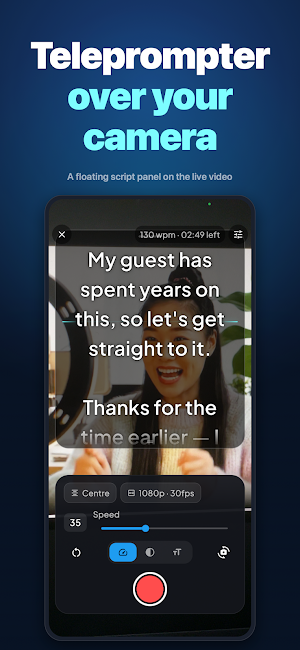
Stop memorising. Stop re-recording. Rostrum puts your script on screen right next to the lens and scrolls it at exactly the speed you speak, so you can look at the camera and just talk.
WHY ROSTRUM?
Recording yourself is hard for one reason: you cannot look at the camera and your notes at the same time. So you glance down, lose your place, and start again. And again.
A teleprompter fixes that, and Rostrum puts one in your pocket. Your words sit at the top of the screen, closest to the lens, moving at your pace — not a generic speed you have to chase. One take, done.
KEY FEATURES
Scrolls At Your Speaking Pace
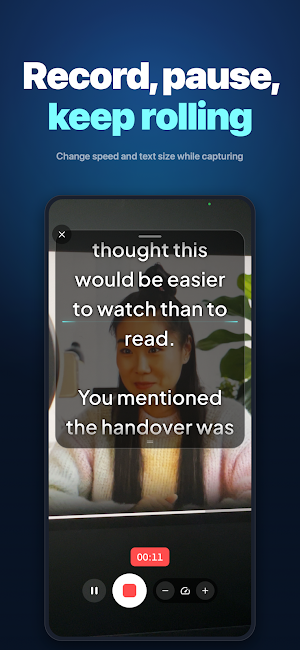
Set your reading speed once and every script matches how you actually talk. Adjust the prompter speed mid-recording without stopping the take.
Script Panel Over Live Camera
Your text sits closest to the lens with a reading line marking exactly where you are, so your eyeline stays where it belongs.
Write, Paste, Import Or Pick
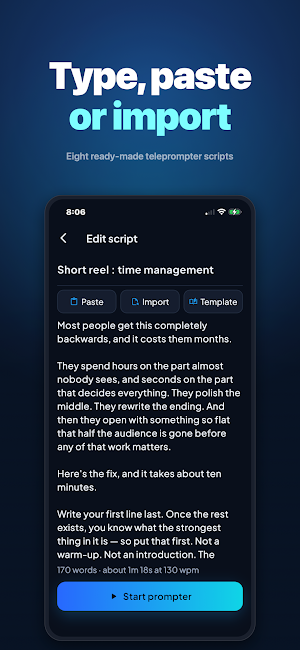
Type your script, paste it from anywhere, import a .txt file, or start from one of eight full ready-made scripts.
Studio-Quality Recording
4K, 60fps and HDR capture with a 3-2-1 countdown, front or rear camera, portrait or landscape.
Trim And Share
Cut the start and end off any take, save it to your gallery, or send it straight to any app on your phone.
Built-In Course
Seven short lessons on pace, eyeline, lighting and sounding natural instead of read-aloud. Three minutes each.
Easy-Read Typography
Adjustable text size, line spacing and background, plus the Lexend typeface for easier reading at a glance.
PERFECT FOR:
- YouTubers and video creators recording to camera
- Reels, Shorts and TikTok creators who need one clean take
- Course creators and teachers recording lessons
- Sales teams sending video messages and demos
- Podcasters reading intros, ads and outros
- Anyone presenting, pitching or speaking on camera
HOW IT WORKS:
1. Write your script, paste it, or pick a template
2. Set the prompter pace to match how you speak
3. Prop your phone up and tap record
4. Read straight down the lens while the words come to you
5. Trim, save, and share
ROSTRUM PRO (OPTIONAL UPGRADE)
- Unlimited scripts and takes
- 4K, 60fps, HDR recording
- No watermark on anything you export
- Mirror mode for beam-splitter teleprompter rigs
- Every future feature included
Try Rostrum Pro free for 3 days, then choose an annual or monthly plan.
FAST, EVERY TIME
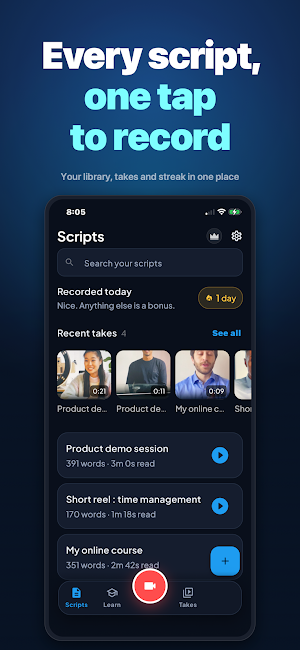
Nothing to wait for and nothing to sync. Open the app, pick your script, and record. Your script library is right there the moment you need it.
PRIVACY FIRST
Your scripts and your recordings are saved on your phone and stay there. They are never shared with us and never seen by anyone else. Your account stores an email address, so your subscription can follow you to a new phone.
MADE FOR PEOPLE WHO TALK TO A LENS
Whether you are recording your first video or your five hundredth, Rostrum does one job properly: it keeps your words where your eyes already are.
Download Rostrum and get your next video in one take.
Questions? Contact us at [email protected]
Visit us at https://249games.com/#rostrum
SUBSCRIPTION TERMS
Payment is charged to your Google Play account at confirmation of purchase. Subscriptions renew automatically unless auto-renew is turned off at least 24 hours before the end of the current period. Your account is charged for renewal within 24 hours prior to the end of the current period. You can manage or cancel your subscription in Google Play > Payments & subscriptions > Subscriptions after purchase.
Privacy Policy: https://249games.com/#rostrum/privacy
Terms of Use: https://249games.com/#rostrum/terms
What’s new
Version 1.0.0 · Updated September 17, 2026
Rostrum 1.0 — a teleprompter that records. • Write, paste or import a script and read it over your live camera • Scrolls at your own speaking pace — calibrate it once • Drag, resize and align the script panel; change speed mid-take • Pause and resume without ending the take • Record in 1080p or 4K, at 30 or 60fps • Trim a take and save it to your camera roll • Seven short lessons on sounding natural on camera
Alternatives to Rostrum: Video Teleprompter
Looking for apps like Rostrum: Video Teleprompter? Here are 6 similar Android apps on Google Play. The highest rated is BIGVU Teleprompter & Captions (4.5/5), and all 6 are free to download.
-
TicNote: AI Recorder & Agent 3.2
-
BIGVU Teleprompter & Captions 4.5
-
HiNotes by HiDock 3.8
-
Besser Sprechen: Voicetraining
-
Loom – Screen and Cam Recorder 3.1
-
Growlink 3.6
| App | Rating | Price | Installs | Last updated | Compare |
|---|---|---|---|---|---|
| Rostrum: Video Teleprompter | – | Free | 10+ | Sep 17, 2026 | |
| TicNote: AI Recorder & Agent | 3.2 / 5 | Free | 10,000+ | Oct 30, 2026 | Compare |
| BIGVU Teleprompter & Captions | 4.5 / 5 | Free | 5,000,000+ | Oct 21, 2026 | Compare |
| HiNotes by HiDock | 3.8 / 5 | Free | 10,000+ | Sep 24, 2026 | Compare |
| Besser Sprechen: Voicetraining | – | Free | 50,000+ | Sep 26, 2026 | Compare |
| Loom – Screen and Cam Recorder | 3.1 / 5 | Free | 1,000,000+ | Oct 13, 2026 | Compare |
| Growlink | 3.6 / 5 | Free | 5,000+ | Mar 30, 2026 | Compare |