
Color Picker & Palette Maker
Ronraj Tech Art & Design In-app purchases Contains ads
Create color palettes from camera, gallery, or automatically generated colors.
- Downloads
- 500+
- on Google Play
- Price
- Free
- In-app purchases
- Updated
- Mar 13
- 2026 · v2.0
Screenshots


About Color Picker & Palette Maker
App Features
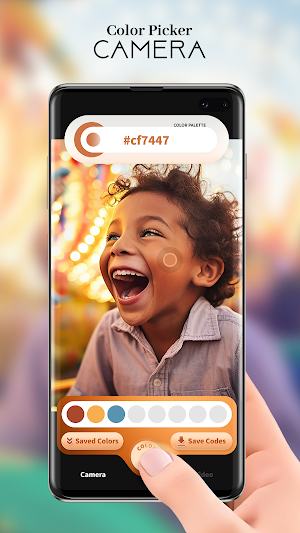
Camera Color Palette
- Open camera to pick colors in real-time.
- Tap the + button to capture a color from the camera.
- Customize the number of colors you want in your palette.
- Saved Colors button to view your saved color list.
- Save button to store the current color palette.
Gallery Color Palette
- Pick any photo from your gallery.
- Change Image button to switch to a different photo.
- Lock Color Picker: tap to enable/disable picking colors.
- Tap anywhere on the image to select a color.
- + button to add the selected color to the palette.
- Auto Color Picker: automatically picks random colors from the image.
- Saved Colors button to view saved color list.
- Save button to store the current color palette.
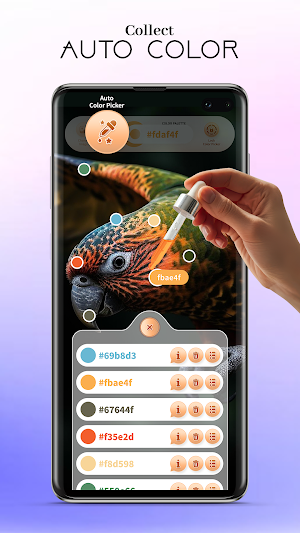
Auto Color Palette
- Instantly generate an automatic palette of 5 colors.
- Tap any color to change it and generate a new one automatically.
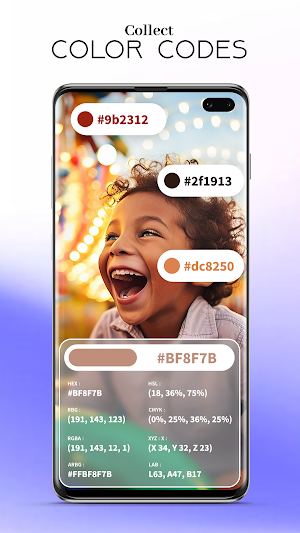
- Info ("i") button shows detailed color codes:
HEX, HSL, RGB, CMYK, RGBA, XYZ, ARGB, LAB → tap to copy the code.
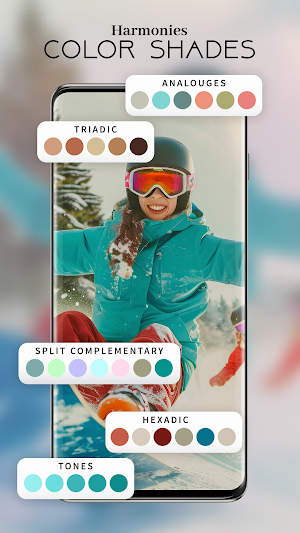
- Explore Color Harmonies:
Monochromatic, Shades, Tints, Tones, Split Complementary,
Square Colors, Hexadic, Double Complementary,
T riadic, Accented Analogous, Analogous.
- Create different palettes using harmony color circles.
- Save button to save color palettes.
- 3-dot menu (Edit Colors):
Adjust via HSL or RGB color pickers.
Apply to update color.
Reset to discard changes.
Color Palette History
- Manage your collection of saved color palettes.
- Delete All button to remove all palettes.
- Delete Palette button for individual palettes.
- Tap a palette to Edit:
Change palette name.
Share palette.
Delete a particular color.
Info ("i") button shows detailed color codes (HEX, HSL, RGB, CMYK, RGBA, XYZ, ARGB, LAB).
- Explore Harmonies (same as Auto section).
- Reset button to discard unwanted changes.
- Save button to save updated palettes.
Palette Size
- Choose how many colors your palette should contain (default size is pre-set, but customizable).
Required Permissions
- Camera → android.permission.CAMERA (for capturing colors using live camera).
- Storage → android.permission.READ_EXTERNAL_STORAGE (for selecting photos from gallery; required only for Android 11 and below).
Note:
We strictly main user privacy.
We are not storing any of user data for our personal use.
Camera Color Palette
- Open camera to pick colors in real-time.
- Tap the + button to capture a color from the camera.
- Customize the number of colors you want in your palette.
- Saved Colors button to view your saved color list.
- Save button to store the current color palette.
Gallery Color Palette
- Pick any photo from your gallery.
- Change Image button to switch to a different photo.
- Lock Color Picker: tap to enable/disable picking colors.
- Tap anywhere on the image to select a color.
- + button to add the selected color to the palette.
- Auto Color Picker: automatically picks random colors from the image.
- Saved Colors button to view saved color list.
- Save button to store the current color palette.
Auto Color Palette
- Instantly generate an automatic palette of 5 colors.
- Tap any color to change it and generate a new one automatically.
- Info ("i") button shows detailed color codes:
HEX, HSL, RGB, CMYK, RGBA, XYZ, ARGB, LAB → tap to copy the code.
- Explore Color Harmonies:
Monochromatic, Shades, Tints, Tones, Split Complementary,
Square Colors, Hexadic, Double Complementary,
T riadic, Accented Analogous, Analogous.
- Create different palettes using harmony color circles.
- Save button to save color palettes.
- 3-dot menu (Edit Colors):
Adjust via HSL or RGB color pickers.
Apply to update color.
Reset to discard changes.
Color Palette History
- Manage your collection of saved color palettes.
- Delete All button to remove all palettes.
- Delete Palette button for individual palettes.
- Tap a palette to Edit:
Change palette name.
Share palette.
Delete a particular color.
Info ("i") button shows detailed color codes (HEX, HSL, RGB, CMYK, RGBA, XYZ, ARGB, LAB).
- Explore Harmonies (same as Auto section).
- Reset button to discard unwanted changes.
- Save button to save updated palettes.
Palette Size
- Choose how many colors your palette should contain (default size is pre-set, but customizable).
Required Permissions
- Camera → android.permission.CAMERA (for capturing colors using live camera).
- Storage → android.permission.READ_EXTERNAL_STORAGE (for selecting photos from gallery; required only for Android 11 and below).
Note:
We strictly main user privacy.
We are not storing any of user data for our personal use.
What’s new
Version 2.0 · Updated March 13, 2026
- Fixed minor bugs and improved overall performance.
Alternatives to Color Picker & Palette Maker
Looking for apps like Color Picker & Palette Maker? Here are 3 similar Android apps on Google Play.



| App | Rating | Price | Installs | Last updated | Compare |
|---|---|---|---|---|---|
| Color Picker & Palette Maker | – | Free | 500+ | Mar 13, 2026 | |
| Game Booster GFX - No Lag | – | – | 500,000+ | Apr 16, 2026 | Compare |
| Photo Background Changer App | – | – | 500,000+ | Oct 9, 2026 | Compare |
| Home Interior Design AI App | – | – | – | Jan 21, 2026 | Compare |