

BG Video Recorder: Pre Record
Roch Apps Tools In-app purchases Contains ads
Background video recorder with pre record buffer for up to 2 minutes.
- Rating
- 3.8
- 73 ratings
- Downloads
- 1K+
- on Google Play
- Price
- Free
- In-app purchases
- Updated
- Aug 29
- 2026 · v1.0.38
Screenshots


About BG Video Recorder: Pre Record
Record video before you press Record.
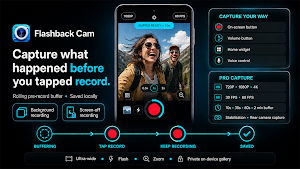
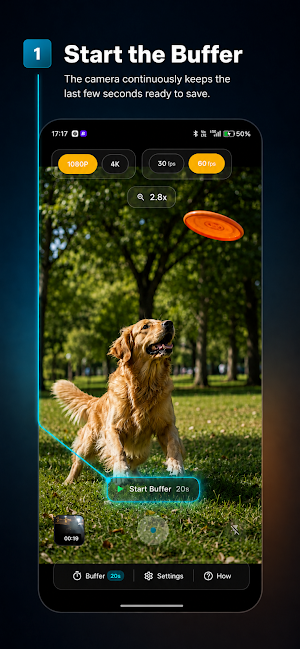
Pre Record Camera & Buffer is a replay buffer camera that pre records moments you would normally miss. Start the buffer and the app keeps recent video and audio ready. When something happens, tap Record to save what happened before your tap together with what happens next.
Perfect for pets, children, sports, wildlife, road trips and spontaneous moments that happen too quickly for a normal camera.
PRE RECORD CAMERA & REPLAY BUFFER
A normal video recorder starts after you press Record. This pre record camera maintains a temporary rolling video buffer, letting you capture previous moments instead.
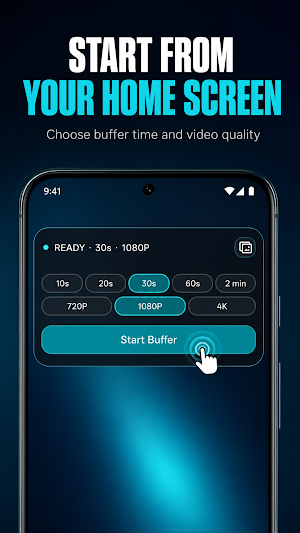
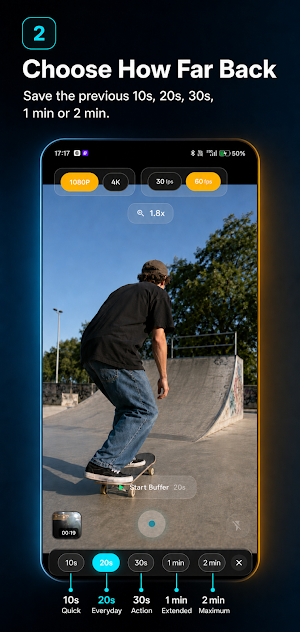
Choose how far back your recording can reach:
• 10-second buffer for everyday moments
• Longer Pro buffers from 20 seconds up to 2 minutes
• Temporary loop recording that replaces older footage
• Synchronized camera and microphone recording
Available durations depend on your plan, device memory, storage, resolution and frame rate. Temporary footage is not added to My Clips unless you record and save it.
BACKGROUND VIDEO RECORDING
Tap Start Buffer while the app is open. Once running, the replay buffer can continue as a user-controlled background video recorder while you switch apps or lock the screen. Widget for recording from the home screen directly.
Camera and microphone buffering can remain active with the screen off. Android displays a persistent camera-and-microphone notification throughout the session. Use Stop buffer to end buffering. While recording, use Stop & save to finish the video. The notification disappears when capture ends.
Capture never starts automatically. It begins only after you press Start Buffer in the app or use an enabled Home screen widget.
INSTANT REPLAY & LOOP RECORDING
The replay buffer works like an instant replay camera. Instead of saving one long recording, the loop video recorder keeps only the latest temporary footage ready.
Press Record when something happens. The app combines the available previous footage with the video captured after your tap, helping you save the moment without filling your gallery with unnecessary recordings.
HD, 4K & 60 FPS VIDEO RECORDER
Use the modes supported by your Android device:
• 1080p HD and 4K video options
• 30 FPS and 60 FPS options
• Front and rear camera support
• Camera zoom and flash controls
Available settings depend on your phone's camera hardware. Longer buffers may use optimized settings for reliable performance.
FAST RECORDING CONTROLS
• Start Buffer, Record and Stop & save controls
• Volume button controls for Pro users
• Android Home screen widgets for Pro users
• Persistent notification controls
BUILT-IN VIDEO GALLERY
Saved recordings appear in My Clips, where you can:
• Watch and manage captured videos
• Review duration, resolution and frame rate
• Check file size and buffer duration
• Share, export or delete selected clips
PERFECT FOR UNPREDICTABLE MOMENTS
• Pets and children's spontaneous reactions
• Football, cricket and sports highlights
• Skateboarding and cycling tricks
• Wildlife and birds taking flight
• Birthdays, family events and road trips
• Action videos and outdoor activities
• Reels, Shorts and social media clips
HOW TO USE
1. Choose the replay buffer duration.
2. Select the resolution and frame rate.
3. Tap Start Buffer.
4. Wait for something worth capturing.
5. Tap Record to save what just happened.
6. Tap Stop & save when finished.
7. Find the video in My Clips.
PRIVATE, VISIBLE & USER CONTROLLED
Camera and microphone capture starts only after a user action. A persistent Android notification remains visible whenever off-screen buffering is active, and you can stop it at any time.
Temporary buffer footage and saved recordings remain on your device unless you explicitly share or export them.
Install Pre Record Camera & Buffer and capture moments your regular camera misses.
Pre Record Camera & Buffer is a replay buffer camera that pre records moments you would normally miss. Start the buffer and the app keeps recent video and audio ready. When something happens, tap Record to save what happened before your tap together with what happens next.
Perfect for pets, children, sports, wildlife, road trips and spontaneous moments that happen too quickly for a normal camera.
PRE RECORD CAMERA & REPLAY BUFFER
A normal video recorder starts after you press Record. This pre record camera maintains a temporary rolling video buffer, letting you capture previous moments instead.
Choose how far back your recording can reach:
• 10-second buffer for everyday moments
• Longer Pro buffers from 20 seconds up to 2 minutes
• Temporary loop recording that replaces older footage
• Synchronized camera and microphone recording
Available durations depend on your plan, device memory, storage, resolution and frame rate. Temporary footage is not added to My Clips unless you record and save it.
BACKGROUND VIDEO RECORDING
Tap Start Buffer while the app is open. Once running, the replay buffer can continue as a user-controlled background video recorder while you switch apps or lock the screen. Widget for recording from the home screen directly.
Camera and microphone buffering can remain active with the screen off. Android displays a persistent camera-and-microphone notification throughout the session. Use Stop buffer to end buffering. While recording, use Stop & save to finish the video. The notification disappears when capture ends.
Capture never starts automatically. It begins only after you press Start Buffer in the app or use an enabled Home screen widget.
INSTANT REPLAY & LOOP RECORDING
The replay buffer works like an instant replay camera. Instead of saving one long recording, the loop video recorder keeps only the latest temporary footage ready.
Press Record when something happens. The app combines the available previous footage with the video captured after your tap, helping you save the moment without filling your gallery with unnecessary recordings.
HD, 4K & 60 FPS VIDEO RECORDER
Use the modes supported by your Android device:
• 1080p HD and 4K video options
• 30 FPS and 60 FPS options
• Front and rear camera support
• Camera zoom and flash controls
Available settings depend on your phone's camera hardware. Longer buffers may use optimized settings for reliable performance.
FAST RECORDING CONTROLS
• Start Buffer, Record and Stop & save controls
• Volume button controls for Pro users
• Android Home screen widgets for Pro users
• Persistent notification controls
BUILT-IN VIDEO GALLERY
Saved recordings appear in My Clips, where you can:
• Watch and manage captured videos
• Review duration, resolution and frame rate
• Check file size and buffer duration
• Share, export or delete selected clips
PERFECT FOR UNPREDICTABLE MOMENTS
• Pets and children's spontaneous reactions
• Football, cricket and sports highlights
• Skateboarding and cycling tricks
• Wildlife and birds taking flight
• Birthdays, family events and road trips
• Action videos and outdoor activities
• Reels, Shorts and social media clips
HOW TO USE
1. Choose the replay buffer duration.
2. Select the resolution and frame rate.
3. Tap Start Buffer.
4. Wait for something worth capturing.
5. Tap Record to save what just happened.
6. Tap Stop & save when finished.
7. Find the video in My Clips.
PRIVATE, VISIBLE & USER CONTROLLED
Camera and microphone capture starts only after a user action. A persistent Android notification remains visible whenever off-screen buffering is active, and you can stop it at any time.
Temporary buffer footage and saved recordings remain on your device unless you explicitly share or export them.
Install Pre Record Camera & Buffer and capture moments your regular camera misses.
What’s new
Version 1.0.38 · Updated August 29, 2026
Bug fixes
User reviews

its actually can prerecord ..this is amazing ..i dont need the action cam anymore

the subscription is really cheap and no false advertising

Hi, app is good. how do I record in landscape mode? it's always in portrait mode.

FlashBack Cam is a smart and genuinely useful video recorder for Android. The buffer video recording feature captures moments even before you hit record, so you never miss sudden reactions or candid scenes. The off camera video recorder works perfectly in the background or with the screen off. Video quality is excel...

flashback cam is the best unique background video recorder I have seen so far. It keeps recording in the buffer. would love this kind of screen recorder app too.

Flashback Cam is a quietly brilliant idea. The ability to capture 30 seconds before you hit record solves a very human problem, we often realize after the moment has passed that it was worth recording!! it beautifully bridges the gap between experience and reaction. Didn’t know I needed this until I used it.. Truly ...
Alternatives to BG Video Recorder: Pre Record
Looking for apps like BG Video Recorder: Pre Record? Here are 3 similar Android apps on Google Play. The highest rated is Studdy: AI Homework Helper (4.6/5), and all 3 are free to download.



| App | Rating | Price | Installs | Last updated | Compare |
|---|---|---|---|---|---|
| BG Video Recorder: Pre Record | 3.8 / 5 | Free | 1,000+ | Aug 29, 2026 | |
| Studdy: AI Homework Helper | 4.6 / 5 | Free | 50,000+ | Jan 14, 2026 | Compare |
| Syd | – | Free | 1,000+ | Oct 2, 2026 | Compare |
| hum kids by Colgate | 3.2 / 5 | Free | 100,000+ | Aug 27, 2026 | Compare |