
ROBOMATION LAB
(%EC%A3%BC)%EB%A1%9C%EB%B3%B4%EB%A9%94%EC%9D%B4%EC%85%98 Education
Robomation Lab · robomationlab · Hamster · Piobot Block Coding Tablet SW Class App
- Downloads
- 208+
- on Google Play
- Price
- Free
- No in-app purchases
- Updated
- Oct 28
- 2026 · v1.0.11
Screenshots
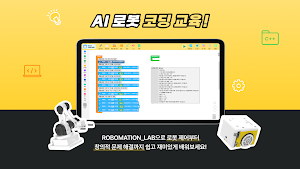
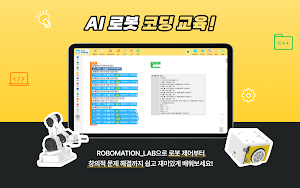
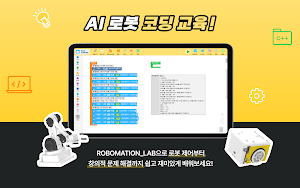
About ROBOMATION LAB
Robomation Lab. The robot block coding environment you used on your PC is now available on iPads and Android tablets. Control BLE robots like Hamster, Piobot, Raccoonbot, and Cheese Stick using block coding.
You can use the block-based visual programming environment you used on your PC web browser directly on your tablet. Create code as if assembling blocks, and move robots connected via Bluetooth (BLE) directly using your own programs.
Without the need to install drivers or plug in a USB dongle, you can start block coding and physical computing immediately anywhere in the classroom with just a tablet.
[Key Features]
- Drag-and-drop block coding editor (Blockly)
- Wireless robot connection via Bluetooth LE (BLE)
- Real-time sensor value reading and motor control
- Built-in editor usable without an internet connection
[Target Audience]
- Teachers and students in elementary and middle school software education settings
- Learners learning robot programming for the first time using block coding
- Institutions operating robot education programs in after-school classes or creative experience activities
[Supported Devices]
- Tablets only.
- Can be installed and used on iPad, Android tablets, and ChromeOS.
- Not distributed for mobile phone (smartphone) form factors.
- Tablets 10 inches or larger are recommended for classes.
[Supported Robots (BLE)]
※ Hamster, Hamster S, and Turtle are not supported on iPad (iPadOS). - Hamster (Android)
- Hamster S (Android)
- Turtle (Android)
- Piobot (iOS/iPadOS, Android)
- Raccoonbot (iOS/iPadOS, Android)
- Beagle (iOS/iPadOS, Android)
- Cheese Stick (iOS/iPadOS, Android)
[Required Permissions]
- Bluetooth: Used to find and connect to nearby robots.
- Location (Optional): This permission is required by the system when searching for Bluetooth devices on some Android versions. Robomation does not collect location information or send it externally.
[Privacy and Data]
- Uses only the minimum data necessary for Bluetooth communication with the robot and editing block programs; personal information is not collected or sent to external servers.
Robot hardware is required to use the main functions. You can learn the block editor even without a robot.
You can use the block-based visual programming environment you used on your PC web browser directly on your tablet. Create code as if assembling blocks, and move robots connected via Bluetooth (BLE) directly using your own programs.
Without the need to install drivers or plug in a USB dongle, you can start block coding and physical computing immediately anywhere in the classroom with just a tablet.
[Key Features]
- Drag-and-drop block coding editor (Blockly)
- Wireless robot connection via Bluetooth LE (BLE)
- Real-time sensor value reading and motor control
- Built-in editor usable without an internet connection
[Target Audience]
- Teachers and students in elementary and middle school software education settings
- Learners learning robot programming for the first time using block coding
- Institutions operating robot education programs in after-school classes or creative experience activities
[Supported Devices]
- Tablets only.
- Can be installed and used on iPad, Android tablets, and ChromeOS.
- Not distributed for mobile phone (smartphone) form factors.
- Tablets 10 inches or larger are recommended for classes.
[Supported Robots (BLE)]
※ Hamster, Hamster S, and Turtle are not supported on iPad (iPadOS). - Hamster (Android)
- Hamster S (Android)
- Turtle (Android)
- Piobot (iOS/iPadOS, Android)
- Raccoonbot (iOS/iPadOS, Android)
- Beagle (iOS/iPadOS, Android)
- Cheese Stick (iOS/iPadOS, Android)
[Required Permissions]
- Bluetooth: Used to find and connect to nearby robots.
- Location (Optional): This permission is required by the system when searching for Bluetooth devices on some Android versions. Robomation does not collect location information or send it externally.
[Privacy and Data]
- Uses only the minimum data necessary for Bluetooth communication with the robot and editing block programs; personal information is not collected or sent to external servers.
Robot hardware is required to use the main functions. You can learn the block editor even without a robot.
What’s new
Version 1.0.11 · Updated October 28, 2026
v1.0.11 - 앱 화면을 21개 언어로 볼 수 있습니다 (기기 언어를 따름) - USB 동글로 로봇을 연결할 수 있습니다 (연결창 위쪽에서 블루투스와 USB 동글 중 선택) - 오프라인 모드에서 블록코딩 화면을 일본어, 중국어로 볼 수 있습니다 - 블루투스로 로봇 2대째, 3대째를 연결할 때 실패하던 문제 수정 - 신호가 약한 로봇이 찾기 목록에 뜨지 않던 문제 수정 - 그 밖의 안정성 개선
Alternatives to ROBOMATION LAB
Looking for apps like ROBOMATION LAB? Here are 4 similar Android apps on Google Play. The highest rated is Lifeboost Coffee (4.8/5), and all 4 are free to download.
-
Vkids Shapes & Colors Learning 4.1
-
Super Robot Bros: Play & Code 3.5
-
Learn German – Studycat 4.5
-
Lifeboost Coffee 4.8
| App | Rating | Price | Installs | Last updated | Compare |
|---|---|---|---|---|---|
| ROBOMATION LAB | – | Free | 100+ | Oct 28, 2026 | |
| Vkids Shapes & Colors Learning | 4.1 / 5 | Free | 50,000+ | Jun 22, 2026 | Compare |
| Super Robot Bros: Play & Code | 3.5 / 5 | Free | 10,000+ | Oct 13, 2026 | Compare |
| Learn German – Studycat | 4.5 / 5 | Free | 100,000+ | – | Compare |
| Lifeboost Coffee | 4.8 / 5 | Free | 10,000+ | Sep 17, 2026 | Compare |
Compare ROBOMATION LAB with the top alternatives: ratings, updates, ASO score and keyword gaps →