

VeinFinder Lite
R%26D's R%26D Medical In-app purchases Contains ads
Free real-time surface vein visualization with your phone’s camera.
- Rating
- 4.2
- 99 ratings
- Downloads
- 8.9K+
- on Google Play
- Price
- Free
- In-app purchases
- Updated
- Oct 16
- 2026 · v1.23
Screenshots


About VeinFinder Lite
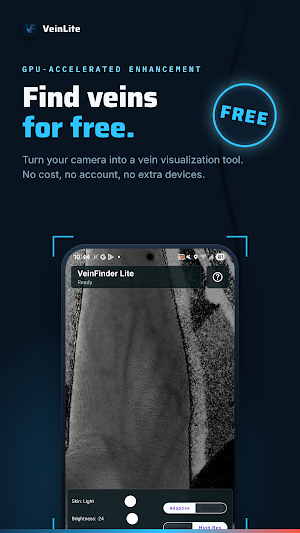
VeinFinder Lite is a free real-time surface vein visualization app for anatomy learning, medical reference, and non-clinical exploration.
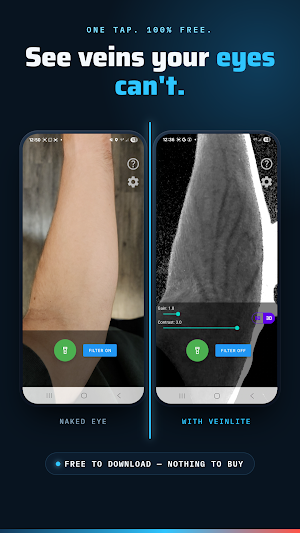
Using your Android phone’s camera and on-device image processing, VeinFinder Lite enhances visible contrast in superficial vein patterns. Compare the original camera view with an enhanced view—no external imaging hardware, infrared attachment, account, or upfront payment is required for the core camera feature.
EXPLORE SURFACE VEINS IN REAL TIME
• View superficial vein patterns through your phone’s camera
• Compare the original and enhanced camera views
• Explore how lighting, distance, angle, skin characteristics, and camera hardware affect visibility
• Support anatomy study, classroom demonstrations, and non-clinical training
• Try real-time vein visualization before choosing optional premium controls
DESIGNED FOR
• Nursing and medical students studying superficial venous anatomy
• Phlebotomy trainees learning venipuncture concepts and terminology
• Educators demonstrating anatomy and image-processing principles
• Healthcare learners exploring how surface veins appear under different viewing conditions
• Anyone interested in real-time camera enhancement and venous anatomy
FREE CORE EXPERIENCE
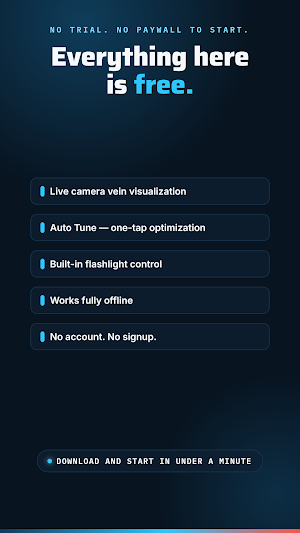
The main camera visualization feature is free to use. VeinFinder Lite is supported by ads so the core experience remains available without an upfront purchase.
OPTIONAL PREMIUM UPGRADE
Unlock VeinFinder Lite Premium with an optional one-time purchase:
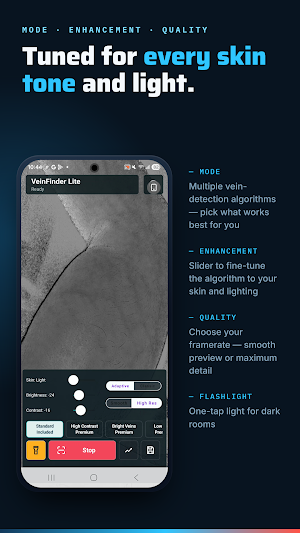
• Additional enhancement modes for different lighting and viewing conditions
• Manual contrast, brightness, and image controls
• An ad-free experience
• Save and export images without a watermark
PRIVACY
Camera-image processing occurs locally on your device. VeinFinder Lite does not upload your camera images.
The app includes advertising and billing services, which may process other information as described in the VeinFinder Lite privacy policy.
TIPS FOR BETTER VISUALIZATION
• Use soft, even lighting and avoid direct glare
• Hold the phone approximately 10–20 cm from the skin
• Keep the camera steady and allow it to focus
• Try different angles, distances, and enhancement settings
• Areas with less hair may provide a clearer image
• Results vary by phone model, camera sensor, lighting, skin characteristics, movement, and settings
COMPATIBILITY AND LIMITATIONS
VeinFinder Lite requires an Android device with a functioning rear camera. Image quality and performance vary between devices. The app may not display every vein and may produce shadows, edges, noise, or other image artifacts.
Tested devices include:
• Samsung Galaxy S22 (2022
• Motorola Edge (2021)
Results on other Android devices may vary.
IMPORTANT MEDICAL DISCLAIMER
VeinFinder Lite is not a medical device and does not diagnose, treat, cure, or prevent any medical condition.
VeinFinder Lite is not intended to locate or select veins for venipuncture, IV placement, injections, blood draws, cannulation, plasma donation, or any other clinical procedure.
Do not use the app for patient care, clinical decision-making, anatomical identification, or to guide needle or catheter placement.
Always use approved medical equipment and follow institutional protocols for clinical procedures. Consult a qualified healthcare professional for medical advice, diagnosis, or treatment.
Download VeinFinder Lite to explore surface vein visualization in real time using your phone’s camera - free, with no extra imaging hardware required.
Using your Android phone’s camera and on-device image processing, VeinFinder Lite enhances visible contrast in superficial vein patterns. Compare the original camera view with an enhanced view—no external imaging hardware, infrared attachment, account, or upfront payment is required for the core camera feature.
EXPLORE SURFACE VEINS IN REAL TIME
• View superficial vein patterns through your phone’s camera
• Compare the original and enhanced camera views
• Explore how lighting, distance, angle, skin characteristics, and camera hardware affect visibility
• Support anatomy study, classroom demonstrations, and non-clinical training
• Try real-time vein visualization before choosing optional premium controls
DESIGNED FOR
• Nursing and medical students studying superficial venous anatomy
• Phlebotomy trainees learning venipuncture concepts and terminology
• Educators demonstrating anatomy and image-processing principles
• Healthcare learners exploring how surface veins appear under different viewing conditions
• Anyone interested in real-time camera enhancement and venous anatomy
FREE CORE EXPERIENCE
The main camera visualization feature is free to use. VeinFinder Lite is supported by ads so the core experience remains available without an upfront purchase.
OPTIONAL PREMIUM UPGRADE
Unlock VeinFinder Lite Premium with an optional one-time purchase:
• Additional enhancement modes for different lighting and viewing conditions
• Manual contrast, brightness, and image controls
• An ad-free experience
• Save and export images without a watermark
PRIVACY
Camera-image processing occurs locally on your device. VeinFinder Lite does not upload your camera images.
The app includes advertising and billing services, which may process other information as described in the VeinFinder Lite privacy policy.
TIPS FOR BETTER VISUALIZATION
• Use soft, even lighting and avoid direct glare
• Hold the phone approximately 10–20 cm from the skin
• Keep the camera steady and allow it to focus
• Try different angles, distances, and enhancement settings
• Areas with less hair may provide a clearer image
• Results vary by phone model, camera sensor, lighting, skin characteristics, movement, and settings
COMPATIBILITY AND LIMITATIONS
VeinFinder Lite requires an Android device with a functioning rear camera. Image quality and performance vary between devices. The app may not display every vein and may produce shadows, edges, noise, or other image artifacts.
Tested devices include:
• Samsung Galaxy S22 (2022
• Motorola Edge (2021)
Results on other Android devices may vary.
IMPORTANT MEDICAL DISCLAIMER
VeinFinder Lite is not a medical device and does not diagnose, treat, cure, or prevent any medical condition.
VeinFinder Lite is not intended to locate or select veins for venipuncture, IV placement, injections, blood draws, cannulation, plasma donation, or any other clinical procedure.
Do not use the app for patient care, clinical decision-making, anatomical identification, or to guide needle or catheter placement.
Always use approved medical equipment and follow institutional protocols for clinical procedures. Consult a qualified healthcare professional for medical advice, diagnosis, or treatment.
Download VeinFinder Lite to explore surface vein visualization in real time using your phone’s camera - free, with no extra imaging hardware required.
What’s new
Version 1.23 · Updated October 16, 2026
- Resolved issues with saving screenshot - Introduced new red/green algorithm option
User reviews

Very useful and accurate. Best free vein finder I've tried so far!♥️

Uninstalled immediately... In order to get the pro version. 😎
Alternatives to VeinFinder Lite
Looking for apps like VeinFinder Lite? Here are 3 similar Android apps on Google Play. The highest rated is VeinFinder (3.2/5), and 2 of the 3 are free to download.



| App | Rating | Price | Installs | Last updated | Compare |
|---|---|---|---|---|---|
| VeinFinder Lite | 4.2 / 5 | Free | 5,000+ | Oct 16, 2026 | |
| Immunity: RogueCell | – | Free | 50+ | Jun 18, 2026 | Compare |
| Acuity: PANCE Exam Prep 2026 | – | Free | 10+ | Jun 10, 2026 | Compare |
| VeinFinder | 3.2 / 5 | 3.99 USD | 1,000+ | Jul 16, 2026 | Compare |
Compare VeinFinder Lite with the top alternatives: ratings, updates, ASO score and keyword gaps →