
LowResoEditor
Aoumiusi Photography In-app purchases
A simple image editor that converts photos into low-resolution, pixel-art style images.
- Downloads
- 9+
- on Google Play
- Price
- Free
- In-app purchases
- Updated
- Oct 27
- 2026 · v1.5
Screenshots
About LowResoEditor
Low Reso Editor is a simple image editor that can convert photos and illustrations into retro, low-resolution, pixel-art style images.
【Basic Functions (Free)】
● Downscale resolution to a maximum side of 256px
● Reduce color count to 16 colors using the median cut method
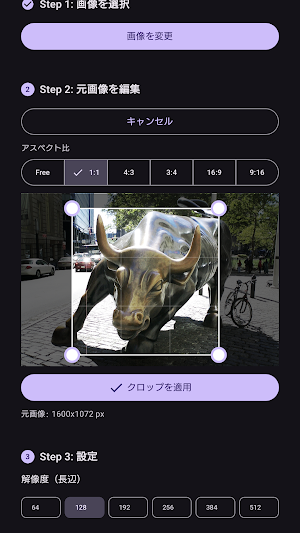
● Adjust composition with cropping and rotation
● Save to gallery in PNG format, or share to other apps
● Directly send and convert images from other apps (sharing function)
【Features unlocked in Pro version (one-time purchase)】
● Freely select resolution: 64 / 128 / 192 / 384 / 512px
● No color reduction (downscale only)
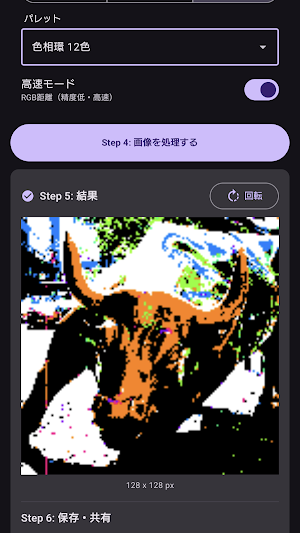
● Unify color tone with 5 fixed palettes
– Windows 16 colors / Web representative colors 16 colors / Paint 12 colors / Hue wheel 12 colors / Web safe 216 colors
● Flexible color count setting: 4 / 8 / 32 / 64 / 256 colors
● Monochrome conversion
● High-speed mode (simplified calculation using RGB distance)
【How to Use】
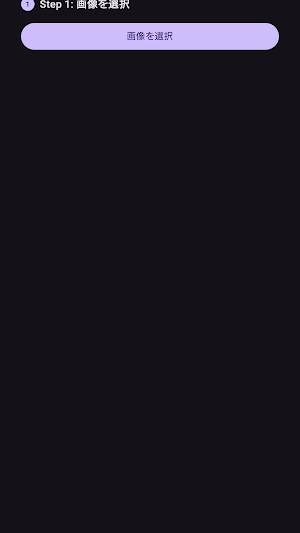
1. 1. Select an image
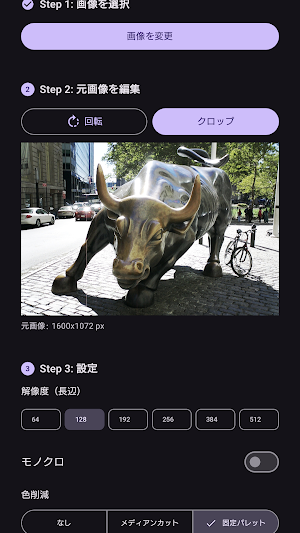
2. Adjust the composition by rotating and cropping
3. Set the resolution, color reduction method, etc.
4. Tap the "Process" button
5. Review the results and rotate
6. Save or share
With its simple step-by-step structure, anyone can use it without getting lost.
[Supported Languages]
Japanese / English
No ads, no subscriptions. The Pro version is a one-time purchase for lifetime use.
【Basic Functions (Free)】
● Downscale resolution to a maximum side of 256px
● Reduce color count to 16 colors using the median cut method
● Adjust composition with cropping and rotation
● Save to gallery in PNG format, or share to other apps
● Directly send and convert images from other apps (sharing function)
【Features unlocked in Pro version (one-time purchase)】
● Freely select resolution: 64 / 128 / 192 / 384 / 512px
● No color reduction (downscale only)
● Unify color tone with 5 fixed palettes
– Windows 16 colors / Web representative colors 16 colors / Paint 12 colors / Hue wheel 12 colors / Web safe 216 colors
● Flexible color count setting: 4 / 8 / 32 / 64 / 256 colors
● Monochrome conversion
● High-speed mode (simplified calculation using RGB distance)
【How to Use】
1. 1. Select an image
2. Adjust the composition by rotating and cropping
3. Set the resolution, color reduction method, etc.
4. Tap the "Process" button
5. Review the results and rotate
6. Save or share
With its simple step-by-step structure, anyone can use it without getting lost.
[Supported Languages]
Japanese / English
No ads, no subscriptions. The Pro version is a one-time purchase for lifetime use.
What’s new
Version 1.5 · Updated October 27, 2026
メモリの最適化。権限変更。
Alternatives to LowResoEditor
Looking for apps like LowResoEditor? Here are 6 similar Android apps on Google Play. The highest rated is Ink Cards (4.8/5), and all 6 are free to download.
-
PicWish: AI Photo Editor 2.8
-
PixAI: AI Anime Art Generator 4.3
-
Lift: AI Photo Editor 4.2
-
Ink Cards 4.8
-
Photo Editor by BeFunky 3.7
-
Pixilart - Make Pixel Art 4.1
| App | Rating | Price | Installs | Last updated | Compare |
|---|---|---|---|---|---|
| LowResoEditor | – | Free | 5+ | Oct 27, 2026 | |
| PicWish: AI Photo Editor | 2.8 / 5 | Free | 5,000,000+ | Oct 28, 2026 | Compare |
| PixAI: AI Anime Art Generator | 4.3 / 5 | Free | 1,000,000+ | Sep 29, 2026 | Compare |
| Lift: AI Photo Editor | 4.2 / 5 | Free | 1,000,000+ | Jul 10, 2026 | Compare |
| Ink Cards | 4.8 / 5 | Free | 1,000,000+ | Oct 9, 2026 | Compare |
| Photo Editor by BeFunky | 3.7 / 5 | Free | 10,000,000+ | – | Compare |
| Pixilart - Make Pixel Art | 4.1 / 5 | Free | 1,000,000+ | Mar 31, 2026 | Compare |
Compare LowResoEditor with the top alternatives: ratings, updates, ASO score and keyword gaps →