
Hotspot Link Manager
Tools Contains ads
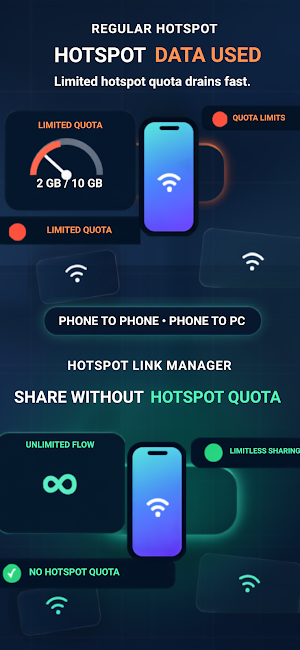
Enables unlimited internet sharing.
- Downloads
- 100+
- on Google Play
- Price
- Free
- No in-app purchases
- Updated
- Jul 28
- 2026 · v2.0.4
Screenshots

About Hotspot Link Manager
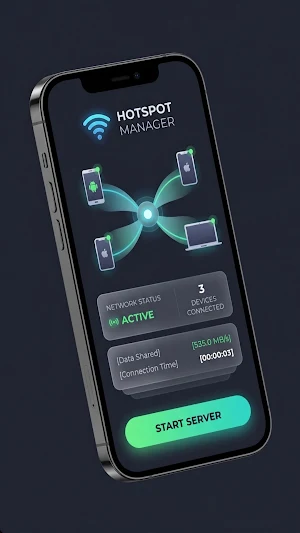
Hotspot Link Manager turns your Android phone into a powerful WiFi hotspot, allowing you to effortlessly share your internet connection with iPhone, iPad, Mac, Windows, and other Android devices.
📶 START SHARING WITH ONE TAP
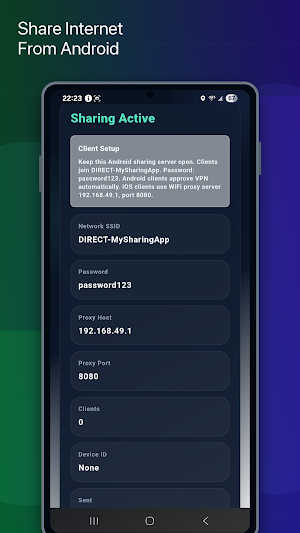
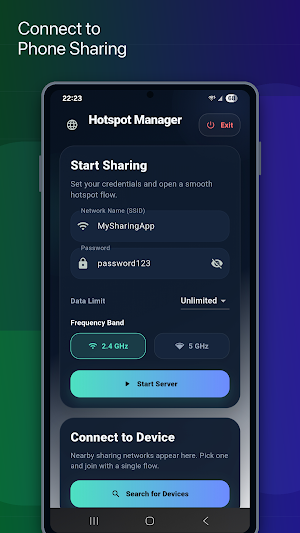
No complex settings required. Set your network name and password, tap the "Start Server" button — and your Android device instantly becomes a WiFi Direct hotspot.
🔄 CROSS-PLATFORM COMPATIBILITY
• Android → Android (WiFi Direct + VPN tunnel)
• Android → iOS (iPhone hotspot connection)
• Android → macOS / Windows (Proxy configuration)
• iOS → Any device (via Personal Hotspot)
🌐 SMART PROXY AND VPN SUPPORT
Seamlessly route all internet traffic from connected devices with built-in SOCKS5 proxy and VPN tunnel support. No manual proxy setup required — everything is automatic.
📊 DATA USAGE TRACKING
Monitor how much data you share in real-time. Set limits to unlimited, 100 MB, 500 MB, 1 GB, 5 GB, 10 GB, or a custom data limit — sharing automatically stops when the limit is reached.
🔍 AUTOMATIC DEVICE DISCOVERY
Automatically scan for nearby sharing networks. View WiFi networks and peer devices in a single list, and connect with just one tap.
🌍 80+ LANGUAGE SUPPORT
Full interface support in English, Turkish, German, French, Spanish, Arabic, Russian, Chinese, Japanese, and dozens of other languages.
🎨 PREMIUM DESIGN
A modern user experience featuring a dark theme, glassmorphism effects, smooth animations, and an eye-friendly color palette.
⚡ KEY FEATURES
• Create a hotspot in seconds via WiFi Direct
• Data limit control (supports custom MB/GB input)
• Automatic device and WiFi network scanning
• Connected devices list and connection status
• Packet loss and transmitted data statistics
• Battery optimization alerts
• Quick redirect to settings if WiFi is turned off
• Frequency band selection (2.4 GHz / 5 GHz)
• Remember connection details (no need to re-enter passwords)
• Quick access from the notification bar
📱 REQUIREMENTS
• Android 9 (Pie) and above
• WiFi Direct support (available on most modern devices)
• Location permission (Android requirement for WiFi scanning)
🔒 PRIVACY
Hotspot Manager does not collect or share your personal data with third parties. It only uses mandatory system permissions required to function.
💡 USE CASES
• Sharing phone internet with a laptop while traveling
• Connecting multiple devices at home using a single mobile data plan
• Setting up a temporary network in the office
• Instant internet sharing with friends
• Quickly connecting IoT devices to a network
📶 START SHARING WITH ONE TAP
No complex settings required. Set your network name and password, tap the "Start Server" button — and your Android device instantly becomes a WiFi Direct hotspot.
🔄 CROSS-PLATFORM COMPATIBILITY
• Android → Android (WiFi Direct + VPN tunnel)
• Android → iOS (iPhone hotspot connection)
• Android → macOS / Windows (Proxy configuration)
• iOS → Any device (via Personal Hotspot)
🌐 SMART PROXY AND VPN SUPPORT
Seamlessly route all internet traffic from connected devices with built-in SOCKS5 proxy and VPN tunnel support. No manual proxy setup required — everything is automatic.
📊 DATA USAGE TRACKING
Monitor how much data you share in real-time. Set limits to unlimited, 100 MB, 500 MB, 1 GB, 5 GB, 10 GB, or a custom data limit — sharing automatically stops when the limit is reached.
🔍 AUTOMATIC DEVICE DISCOVERY
Automatically scan for nearby sharing networks. View WiFi networks and peer devices in a single list, and connect with just one tap.
🌍 80+ LANGUAGE SUPPORT
Full interface support in English, Turkish, German, French, Spanish, Arabic, Russian, Chinese, Japanese, and dozens of other languages.
🎨 PREMIUM DESIGN
A modern user experience featuring a dark theme, glassmorphism effects, smooth animations, and an eye-friendly color palette.
⚡ KEY FEATURES
• Create a hotspot in seconds via WiFi Direct
• Data limit control (supports custom MB/GB input)
• Automatic device and WiFi network scanning
• Connected devices list and connection status
• Packet loss and transmitted data statistics
• Battery optimization alerts
• Quick redirect to settings if WiFi is turned off
• Frequency band selection (2.4 GHz / 5 GHz)
• Remember connection details (no need to re-enter passwords)
• Quick access from the notification bar
📱 REQUIREMENTS
• Android 9 (Pie) and above
• WiFi Direct support (available on most modern devices)
• Location permission (Android requirement for WiFi scanning)
🔒 PRIVACY
Hotspot Manager does not collect or share your personal data with third parties. It only uses mandatory system permissions required to function.
💡 USE CASES
• Sharing phone internet with a laptop while traveling
• Connecting multiple devices at home using a single mobile data plan
• Setting up a temporary network in the office
• Instant internet sharing with friends
• Quickly connecting IoT devices to a network
What’s new
Version 2.0.4 · Updated July 28, 2026
• Server and Client modes • Wi-Fi Direct support • Support for 84 languages • Performance improvements and bug fixes
Alternatives to Hotspot Link Manager
Looking for apps like Hotspot Link Manager? Here are 3 similar Android apps on Google Play. The highest rated is REsimpli (4.8/5), and all 3 are free to download.