

Regiment Wob 2048
Vzvsvd Casual
Welcome to join Regiment Wob 2048
- Downloads
- 1+
- on Google Play
- Price
- Free
- No in-app purchases
- Updated
- Jun 20
- 2026 · v1.0
Screenshots
About Regiment Wob 2048
"## ?? Main functions
### Core game features
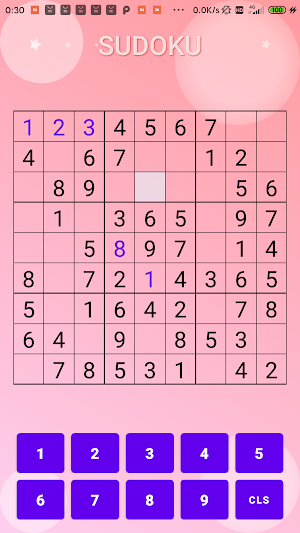
- **Classic Sudoku gameplay**: 9×9 standard Sudoku grid
- **Multiple difficulty levels**:
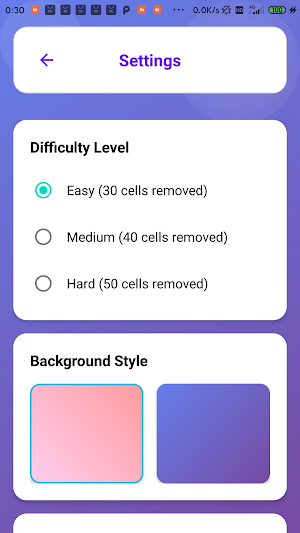
- Easy: remove 30 numbers
- Medium: Remove 40 numbers
- Difficulty: Remove 50 numbers
- **Smart Prompt System**: Friendly prompts are provided when a cell is not selected or a fixed number is selected.
- **Game Statistics**: Record game time, moves and best scores
### Custom options
- **Symbol Selection**:
-Number mode: use numbers 1-9
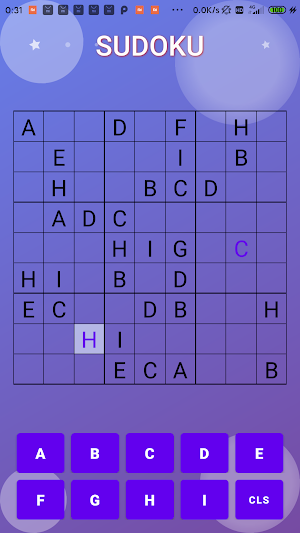
- Alphabet mode: use letters A-I
- **Background Theme**:
- Default gradient background
- pattern background 1
- pattern background 2
- Game-specific backgrounds
### User experience
- **Immersive Status Bar**: Full screen gaming experience
- **Smooth Animation**: Button click feedback, title animation, decorative element animation
- **Game Records**: Save the latest 5 game records
- **Success/Failure Dialog**: Beautiful prompt interface at the end of the game
## ?? Gameplay
### Basic Rules
1. **Goal**: Fill in the numbers (or letters) in the 9×9 grid so that each row, each column, and each 3×3 square contains 1-9 (or A-I)
2. **Rules**:
- Each line can only contain 1-9 (or A-I) once each
- Each column can only contain 1-9 (or A-I) once each
- Each 3×3 square can only contain 1-9 (or A-I) once each
- The initial number (black) cannot be modified
- The number entered by the user (blue) can be modified
### How to operate
1. **Select cells**: Click on any cell in the Sudoku grid
2. **Fill in numbers/letters**: Click the number/letter button at the bottom
3. **Clear Content**: Click the Clear button to delete the contents of the selected cell.
4. **Game Over**: All cells filled or an error occurred
### Game flow
1. Start the game and select the difficulty level
2. Click on a blank cell to select
3. Use the buttons at the bottom to fill in the corresponding numbers/letters
4. Continue filling until the entire grid is complete
5. Display completion dialog box and statistical information when the game is successful
## ⚙️ Setting options
### Difficulty setting
- **Easy**: suitable for beginners, remove 30 numbers
- **Medium**: Standard difficulty, remove 40 numbers
- **Hard**: Challenge mode, remove 50 numbers
### Symbol settings
- **Number Mode**: Traditional 1-9 numbers
- **Letter Mode**: A-I letters, added game changes
### Background settings
- **Default Background**: classic gradient background
- **Pattern Background 1**: Simple geometric pattern
- **Pattern Background 2**: Soft gradient colors
- **Game Background**: Dedicated game theme background"
### Core game features
- **Classic Sudoku gameplay**: 9×9 standard Sudoku grid
- **Multiple difficulty levels**:
- Easy: remove 30 numbers
- Medium: Remove 40 numbers
- Difficulty: Remove 50 numbers
- **Smart Prompt System**: Friendly prompts are provided when a cell is not selected or a fixed number is selected.
- **Game Statistics**: Record game time, moves and best scores
### Custom options
- **Symbol Selection**:
-Number mode: use numbers 1-9
- Alphabet mode: use letters A-I
- **Background Theme**:
- Default gradient background
- pattern background 1
- pattern background 2
- Game-specific backgrounds
### User experience
- **Immersive Status Bar**: Full screen gaming experience
- **Smooth Animation**: Button click feedback, title animation, decorative element animation
- **Game Records**: Save the latest 5 game records
- **Success/Failure Dialog**: Beautiful prompt interface at the end of the game
## ?? Gameplay
### Basic Rules
1. **Goal**: Fill in the numbers (or letters) in the 9×9 grid so that each row, each column, and each 3×3 square contains 1-9 (or A-I)
2. **Rules**:
- Each line can only contain 1-9 (or A-I) once each
- Each column can only contain 1-9 (or A-I) once each
- Each 3×3 square can only contain 1-9 (or A-I) once each
- The initial number (black) cannot be modified
- The number entered by the user (blue) can be modified
### How to operate
1. **Select cells**: Click on any cell in the Sudoku grid
2. **Fill in numbers/letters**: Click the number/letter button at the bottom
3. **Clear Content**: Click the Clear button to delete the contents of the selected cell.
4. **Game Over**: All cells filled or an error occurred
### Game flow
1. Start the game and select the difficulty level
2. Click on a blank cell to select
3. Use the buttons at the bottom to fill in the corresponding numbers/letters
4. Continue filling until the entire grid is complete
5. Display completion dialog box and statistical information when the game is successful
## ⚙️ Setting options
### Difficulty setting
- **Easy**: suitable for beginners, remove 30 numbers
- **Medium**: Standard difficulty, remove 40 numbers
- **Hard**: Challenge mode, remove 50 numbers
### Symbol settings
- **Number Mode**: Traditional 1-9 numbers
- **Letter Mode**: A-I letters, added game changes
### Background settings
- **Default Background**: classic gradient background
- **Pattern Background 1**: Simple geometric pattern
- **Pattern Background 2**: Soft gradient colors
- **Game Background**: Dedicated game theme background"
Alternatives to Regiment Wob 2048
Looking for apps like Regiment Wob 2048? Here are 6 similar Android apps on Google Play. The highest rated is Math Ascension: Times Tables (4.9/5), and 1 of the 6 are free to download.
-
Colors Match Wear
-
Cryptic
-
Math Ascension: Times Tables 4.9
-
Word Hunter: Words+
-
Osakagram
-
Ultimate Math Master Pro
| App | Rating | Price | Installs | Last updated | Compare |
|---|---|---|---|---|---|
| Regiment Wob 2048 | – | Free | 1+ | Jun 20, 2026 | |
| Colors Match Wear | – | 1.99 USD | 0+ | Feb 26, 2026 | Compare |
| Cryptic | – | 1.99 USD | 10+ | – | Compare |
| Math Ascension: Times Tables | 4.9 / 5 | Free | 10,000+ | Jan 5, 2026 | Compare |
| Word Hunter: Words+ | – | 6.99 USD | 5+ | Feb 24, 2026 | Compare |
| Osakagram | – | 0.99 USD | 500+ | Jan 20, 2026 | Compare |
| Ultimate Math Master Pro | – | 0.49 USD | 1,000+ | Jan 13, 2026 | Compare |
Compare Regiment Wob 2048 with the top alternatives: ratings, updates, ASO score and keyword gaps →