
Duplicate Contacts Remover
Galaxy studio apps Tools In-app purchases Contains ads
Duplicate Contacts Remover helps the user to remove copies of the same contacts
- Rating
- 4.5
- 2.2K ratings
- Downloads
- 180K+
- on Google Play
- Price
- Free
- In-app purchases
- Updated
- Sep 10
- 2024 · v4.0.1
Screenshots


About Duplicate Contacts Remover
If you are exhausted with numerous phone numbers saved of the same person and want to clean your phonebook without much effort and lose any data by doing it manually. Then you are at the right place. No more worries about your overfilled phone book containing the same contacts because you got the best and easiest way to get rid of your repeated contacts. Duplicate Contacts Remover: Contacts Backup will take charge of your contacts cleaner.
Duplicate Contacts Remover: Contacts Backup removes your contacts that are saved multiple times. It syncs phone numbers from phone books which are saved in the phone’s memory. It detects duplicate contact numbers which are saved with different names. The application plays the role of organizing your phone numbers book.
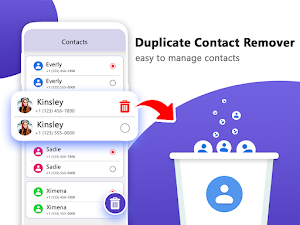
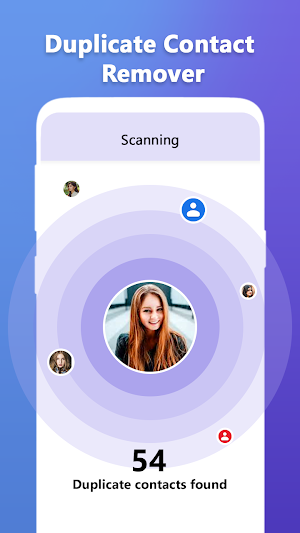
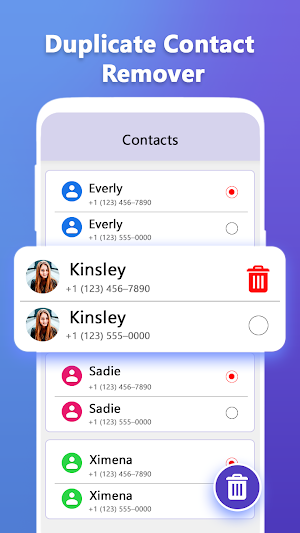
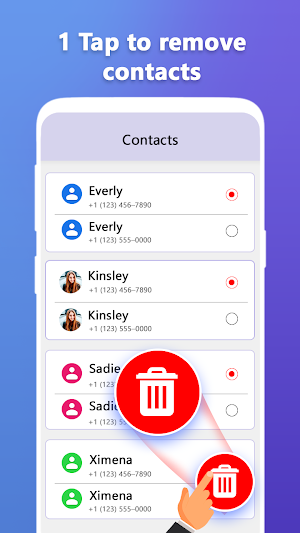
Our phone book is always very much crowded with the same numbers saved multiple times because they are at a time saved in the phone’s memory. To get rid of this problem. Duplicate Contacts Remover: Contacts Backup provides you the facility to scan all contacts, shows you duplicates and their locations. You can tick the one you want to remove. Once the cleanup is complete, an organized contact list will remain in your device’s built-in phone book. Duplicate Contacts Remover: Contacts Backup directly scans and removes duplicate contacts from the device’s phone book. While cleaning, you can select which from all duplicates to keep and which to delete. Duplicate Contacts Remover: Contacts Backup has a feature of creating two types of backups. One is of all phone numbers before removing duplicates and the other one is of deleted numbers. You can either select which you want, anyone, or both. This feature makes it easy to get access to any lost data whenever we need it back.
Duplicate Contacts Remover: Contacts Backup contains a simple and understandable interface with amateur-level graphics of icons. You don’t need to worry about any type of resources to use this application because it works without any network or connection. The application runs with low power usage and it occupies a very small space of your storage. A complete recovery file of all contacts is created before removing extra data and a backup of removed data in the VCF file in the phone’s memory. Once you delete the application you will lose all the recoveries. A new and updated separate recovery file is created after every cleanup inside the application.
Salient features of Duplicate Contacts Remover: Contacts Backup:
1. Scanning phone book and any other application using the phone number and save them separately in phone book after the cleaning process.
2. Retain the final remaining ones in the built-in phone book.
3. Creates a recovery of all contacts before the cleanup process.
4. Creates a recovery of all the deleted/removed data.
5. Low power usage
6. Runs without any connection
7. Occupy less space.
8. Easy to understand user interface.
Working of Duplicate Contacts Remover: Contacts Backup:
Open application (home page)-select scan contacts- (all phone numbers will appear combining duplicate numbers, with different or same names) tick all the versions of a contact which you want to remove and then press on bin icon on the bottom left corner of the screen, it will delete all unwanted copies you selected-Cleaned list will appear and the same list will be updated in device’s built-in phone book.
To find backups:
Before removing repetitive contacts, a user can create the backups of that contacts by using the below instructions.
Open application (home page) – press recoveries – backup appears (It contains all the backups separately as you did. If you never did then it will be empty)
If you face any problems or you have any queries, please feel free to contact us on the below email.
[email protected]
Duplicate Contacts Remover: Contacts Backup removes your contacts that are saved multiple times. It syncs phone numbers from phone books which are saved in the phone’s memory. It detects duplicate contact numbers which are saved with different names. The application plays the role of organizing your phone numbers book.
Our phone book is always very much crowded with the same numbers saved multiple times because they are at a time saved in the phone’s memory. To get rid of this problem. Duplicate Contacts Remover: Contacts Backup provides you the facility to scan all contacts, shows you duplicates and their locations. You can tick the one you want to remove. Once the cleanup is complete, an organized contact list will remain in your device’s built-in phone book. Duplicate Contacts Remover: Contacts Backup directly scans and removes duplicate contacts from the device’s phone book. While cleaning, you can select which from all duplicates to keep and which to delete. Duplicate Contacts Remover: Contacts Backup has a feature of creating two types of backups. One is of all phone numbers before removing duplicates and the other one is of deleted numbers. You can either select which you want, anyone, or both. This feature makes it easy to get access to any lost data whenever we need it back.
Duplicate Contacts Remover: Contacts Backup contains a simple and understandable interface with amateur-level graphics of icons. You don’t need to worry about any type of resources to use this application because it works without any network or connection. The application runs with low power usage and it occupies a very small space of your storage. A complete recovery file of all contacts is created before removing extra data and a backup of removed data in the VCF file in the phone’s memory. Once you delete the application you will lose all the recoveries. A new and updated separate recovery file is created after every cleanup inside the application.
Salient features of Duplicate Contacts Remover: Contacts Backup:
1. Scanning phone book and any other application using the phone number and save them separately in phone book after the cleaning process.
2. Retain the final remaining ones in the built-in phone book.
3. Creates a recovery of all contacts before the cleanup process.
4. Creates a recovery of all the deleted/removed data.
5. Low power usage
6. Runs without any connection
7. Occupy less space.
8. Easy to understand user interface.
Working of Duplicate Contacts Remover: Contacts Backup:
Open application (home page)-select scan contacts- (all phone numbers will appear combining duplicate numbers, with different or same names) tick all the versions of a contact which you want to remove and then press on bin icon on the bottom left corner of the screen, it will delete all unwanted copies you selected-Cleaned list will appear and the same list will be updated in device’s built-in phone book.
To find backups:
Before removing repetitive contacts, a user can create the backups of that contacts by using the below instructions.
Open application (home page) – press recoveries – backup appears (It contains all the backups separately as you did. If you never did then it will be empty)
If you face any problems or you have any queries, please feel free to contact us on the below email.
[email protected]
What’s new
Version 4.0.1 · Updated September 10, 2024
Improve functionality of app. Remove minor bugs from new release.
User reviews

Its really good to me and all is ok there for making removing.

It's very amazing application. It is very easy to get a plystore free download. 📩

Duplicate contacts Remover... this application is a very important application very great application...
Duplicate contacts apllication is really a very time save application. We use our lot of time by using this application

This game is too easy game i like to play it its features are too good its too amazing game its levels are too interesting

Duplicate content is very creative and innovative game tool.. I really appreciate it it is very interesting application
Alternatives to Duplicate Contacts Remover
Looking for apps like Duplicate Contacts Remover? Here are 4 similar Android apps on Google Play. The highest rated is Easy Contacts Cleaner (4.6/5), and all 4 are free to download.


| App | Rating | Price | Installs | Last updated | Compare |
|---|---|---|---|---|---|
| Duplicate Contacts Remover | 4.5 / 5 | Free | 100,000+ | Sep 10, 2024 | |
| Easy Contacts Cleaner | 4.6 / 5 | Free | 1,000,000+ | Aug 30, 2026 | Compare |
| Contacts | 4.6 / 5 | Free | 1,000,000+ | Sep 17, 2024 | Compare |
| Contacts Optimizer | 4.3 / 5 | Free | 1,000,000+ | Feb 28, 2019 | Compare |
| Duplicate Contact File Remover | – | Free | 50+ | Mar 31, 2022 | Compare |