

WinaCam: Driverless Webcam
remobax Productivity Contains ads
Turn your phone into a high-quality webcam. Driverless, free 4K, no watermarks.
- Downloads
- 12.9K+
- on Google Play
- Price
- Free
- No in-app purchases
- Updated
- Aug 15
- 2025 · v1.0-17-gdc2661c
Screenshots


About WinaCam: Driverless Webcam
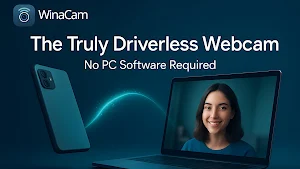
Tired of blurry laptop cams? Turn your Android phone into a driverless webcam for Windows PC with WinaCam – free 4K, no watermarks.
WinaCam transforms your Android device into a high-quality wireless webcam for Windows. Truly driverless – no PC software needed.
*WHY CHOOSE WinaCam:*
🚀 DRIVERLESS SETUP
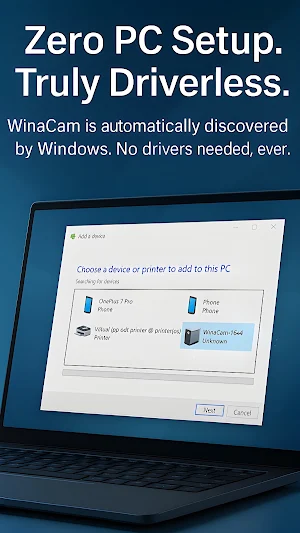
No drivers or apps on PC. Uses Windows' native protocols for instant connection.
✨ FREE 4K HD QUALITY
Unlock your phone's camera potential: up to 4K resolution, no watermarks, perfect for occasional use or pro streams.
🔌 WIRELESS & FLEXIBLE
Move freely, ideal for remote work, OBS streaming, or quick video calls.
🎬 COMPATIBLE WITH ALL APPS
Works as native camera in:
• Zoom
• Microsoft Teams
• OBS Studio
• Skype
• Discord
...and more!
EASY SETUP:
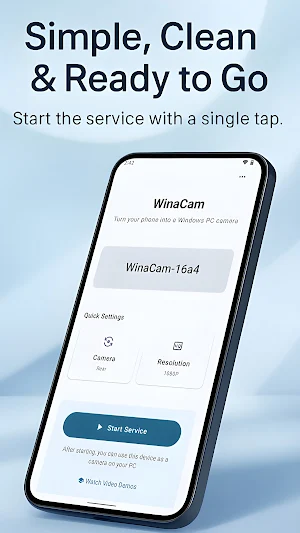
1. Open WinaCam on your phone and start service.
2. On Windows 11: Win + R > ms-settings:camera > Search for cameras > Add WinaCam > Edit advanced options > Turn on Basic camera.
On Windows 10: Win + R > ms-settings:bluetooth > Add device > Everything else > Add WinaCam.
3. Select WinaCam in your video app.
Upgrade your setup today – download WinaCam and share the difference!
WinaCam transforms your Android device into a high-quality wireless webcam for Windows. Truly driverless – no PC software needed.
*WHY CHOOSE WinaCam:*
🚀 DRIVERLESS SETUP
No drivers or apps on PC. Uses Windows' native protocols for instant connection.
✨ FREE 4K HD QUALITY
Unlock your phone's camera potential: up to 4K resolution, no watermarks, perfect for occasional use or pro streams.
🔌 WIRELESS & FLEXIBLE
Move freely, ideal for remote work, OBS streaming, or quick video calls.
🎬 COMPATIBLE WITH ALL APPS
Works as native camera in:
• Zoom
• Microsoft Teams
• OBS Studio
• Skype
• Discord
...and more!
EASY SETUP:
1. Open WinaCam on your phone and start service.
2. On Windows 11: Win + R > ms-settings:camera > Search for cameras > Add WinaCam > Edit advanced options > Turn on Basic camera.
On Windows 10: Win + R > ms-settings:bluetooth > Add device > Everything else > Add WinaCam.
3. Select WinaCam in your video app.
Upgrade your setup today – download WinaCam and share the difference!
What’s new
Version 1.0-17-gdc2661c · Updated August 15, 2025
This update brings official support for Windows 11! - **Windows 11 Ready:** We've added dedicated setup and connection fix guides for a seamless experience on the latest OS. - **Bug Fixes:** Includes general stability improvements and minor bug fixes to keep things running smoothly. Thanks for using WinaCam!
User reviews

Great app! The driverless setup is excellent. Please add USB Webcam mode. A USB connection would provide lower latency, a more stable connection than Wi-Fi, no network interruptions, and keep the phone charging while used as a webcam. Native USB UVC support would make WinaCam one of the best webcam apps for Windows....

the application works remarkably! will there ever be a rotation feature added for this in the future?

Great app, now I don't need to buy webcam.

Best and easiest to use app I've tried multiple others and by FAR this is the smoothest and simplest app that just works✨ love it

I have no idea how this isn't more popular. It worked perfectly with no issues. Legit the hardest part of this was making a makeshift thing to prop my phone up on my desk. By the way, an important piece of info is your PC needs to have Bluetooth in order for this to work.

👍👍👍
Alternatives to WinaCam: Driverless Webcam
Looking for apps like WinaCam: Driverless Webcam? Here are 6 similar Android apps on Google Play. The highest rated is Dzees Home (4.7/5), and all 6 are free to download.
-
Dzees Home 4.7
-
Arenti 4.6
-
InstaVision: Smart & Safe Home 4.6
-
Home V 3.7
-
CloudEdge 4.4
-
Loom – Screen and Cam Recorder 3.2
| App | Rating | Price | Installs | Last updated | Compare |
|---|---|---|---|---|---|
| WinaCam: Driverless Webcam | – | Free | 10,000+ | Aug 15, 2025 | |
| Dzees Home | 4.7 / 5 | Free | 100,000+ | Dec 18, 2025 | Compare |
| Arenti | 4.6 / 5 | Free | 1,000,000+ | Aug 18, 2026 | Compare |
| InstaVision: Smart & Safe Home | 4.6 / 5 | Free | 100,000+ | Oct 27, 2026 | Compare |
| Home V | 3.7 / 5 | Free | 100,000+ | Jun 26, 2026 | Compare |
| CloudEdge | 4.4 / 5 | Free | 1,000,000+ | Oct 29, 2026 | Compare |
| Loom – Screen and Cam Recorder | 3.2 / 5 | Free | 1,000,000+ | Oct 13, 2026 | Compare |