

MX & Enduro Suspension Manager
Offroadtouring Tools
Manage multiple suspension settings with ease for your Mx and Enduro bikes
- Downloads
- 500+
- on Google Play
- Price
- Free
- No in-app purchases
- Updated
- Jan 11
- 2022 · v1.0.5
Screenshots


About MX & Enduro Suspension Manager
How many times did you tweak the settings on your bike and completely lost track of what you did? Did you end up dialing everything back to factory settings like most of us? Did you resort to set and forget your clickers as a result? Then this app is for you.
Not only will it keep track of your different track settings, it will also help you effortlessly switch from one to another making only the relative changes that make up the difference between the two. Never loose track of your settings again while experimenting and trying to find that perfectly balanced suspension! Find the optimal settings - and save them for next time!
The app supports the basic adjusters found on most dirt bikes.
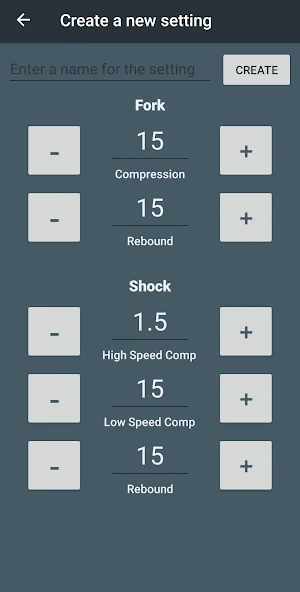
Fork: Compression & Rebound
Shock: High & Low Speed Compression, Rebound
The Shock High Speed adjuster can be set in steps of 1/4 turns (0.25) and the rest of the adjusters range from 0 and upwards in increments of 1.
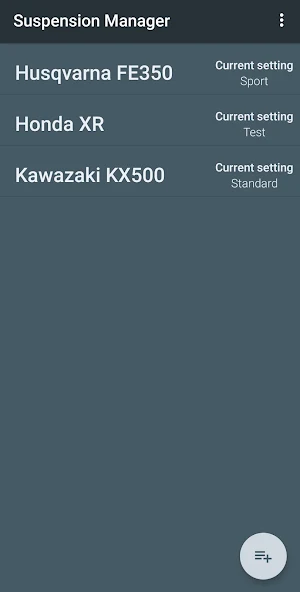
You can create multiple bikes and each bike can hold multiple settings of which only one is the 'current setting' that matches the actual physical setting on your bike.
How to get started:
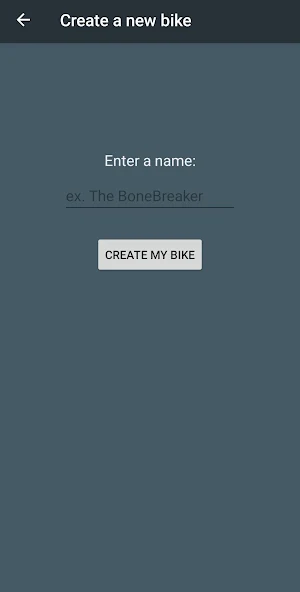
1. First, Click the 'add' button to create a new bike. Give it a cool name and click 'Create'.
2. Select the bike to go to it's settings screen.
3. Click the 'add' button to make a new setting for your bike.
4. Give it a name and make adjustments to it using the controls. When you are done click 'Create'
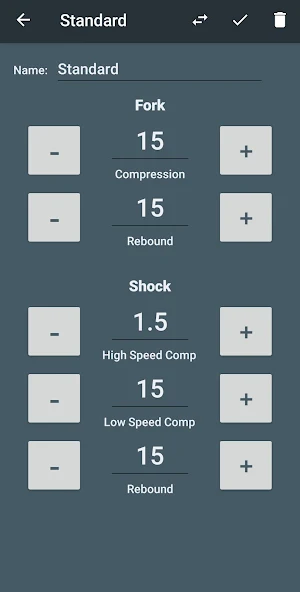
Tip: The first setting you create should match the actual settings on your bikes suspension adjusters. It will automatically be tagged as your 'current' setting.
Next step - create more settings, as many as you like. You switch between settings by clicking the double arrow symbol on the setting that you wish to use. Follow the instructions on the screen and make the appropriate adjustments on your bike. The setting you switched to will now be tagged as your current setting.
Not only will it keep track of your different track settings, it will also help you effortlessly switch from one to another making only the relative changes that make up the difference between the two. Never loose track of your settings again while experimenting and trying to find that perfectly balanced suspension! Find the optimal settings - and save them for next time!
The app supports the basic adjusters found on most dirt bikes.
Fork: Compression & Rebound
Shock: High & Low Speed Compression, Rebound
The Shock High Speed adjuster can be set in steps of 1/4 turns (0.25) and the rest of the adjusters range from 0 and upwards in increments of 1.
You can create multiple bikes and each bike can hold multiple settings of which only one is the 'current setting' that matches the actual physical setting on your bike.
How to get started:
1. First, Click the 'add' button to create a new bike. Give it a cool name and click 'Create'.
2. Select the bike to go to it's settings screen.
3. Click the 'add' button to make a new setting for your bike.
4. Give it a name and make adjustments to it using the controls. When you are done click 'Create'
Tip: The first setting you create should match the actual settings on your bikes suspension adjusters. It will automatically be tagged as your 'current' setting.
Next step - create more settings, as many as you like. You switch between settings by clicking the double arrow symbol on the setting that you wish to use. Follow the instructions on the screen and make the appropriate adjustments on your bike. The setting you switched to will now be tagged as your current setting.
What’s new
Version 1.0.5 · Updated January 11, 2022
- Improved API compatibility - Fixed some stability issues Information on permissions: The app will now ask your permission to use the internet to send anonymous usage data to Google Firebase. This is so that we can get information on crashes and general usage data to make future improvements.
Alternatives to MX & Enduro Suspension Manager
Looking for apps like MX & Enduro Suspension Manager? Here are 6 similar Android apps on Google Play. All of them are free to download.
-
Mode Ipad Pro Pubg
-
Broen T650
-
DownTube: Video Downloader
-
Connect
-
Skibidi toilet mod for Melon
-
Trading Strategy Tester
| App | Rating | Price | Installs | Last updated | Compare |
|---|---|---|---|---|---|
| MX & Enduro Suspension Manager | – | Free | 500+ | Jan 11, 2022 | |
| Mode Ipad Pro Pubg | – | Free | 5,000+ | Sep 8, 2023 | Compare |
| Broen T650 | – | Free | 100+ | Sep 12, 2025 | Compare |
| DownTube: Video Downloader | – | Free | 1,000+ | Nov 2, 2023 | Compare |
| Connect | – | Free | 10+ | Feb 2, 2023 | Compare |
| Skibidi toilet mod for Melon | – | Free | 5,000+ | Sep 11, 2023 | Compare |
| Trading Strategy Tester | – | Free | 10,000+ | May 1, 2025 | Compare |
Similar apps on Google Play
- Mode Ipad Pro Pubg
- Broen T650
- DownTube: Video Downloader
- Connect
- Skibidi toilet mod for Melon
- Trading Strategy Tester
- Passerelle Coach
- Nice Mining
- Yafi Tesa Video Call Prank
- DJI Mini 3 Pro guide
- Wellue oximeter Guide
- Heli Pinion Calculator
- Delus Calculator
- CIPP Epoxy Calculator
- a9 wifi mini camera Guide
- Volume Convertion Old Table 54
- dLox
- Arlink Smart
- Huawei fit 2 watch guide
- MTP SPW
- Messi Skin for MCPE
- Smart VPN - Safer VPN
- VIR T650
- Traf Calculator
- taskmaster