
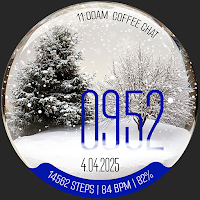
Reddice Snowfall WSH10
Personalization
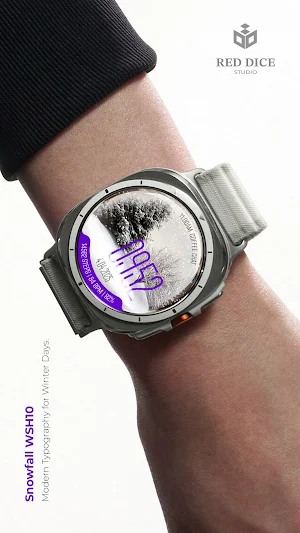
A winter watch face with animated snowfall, battery display, and smart data.
- Downloads
- 8+
- on Google Play
- Price
- $2.49
- No in-app purchases
- Updated
- Aug 26
- 2026
Screenshots


About Reddice Snowfall WSH10
🔹 Premium Watch Faces for Wear OS – minimalist watch face with AOD mode! Designed with love by Red Dice Studio!
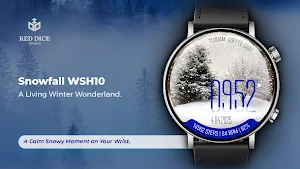
Snowfall WSH10 captures the quiet beauty of winter.
With gently falling animated snow and a peaceful forest scene, this watch face brings a sense of calm and elegance to your wrist.
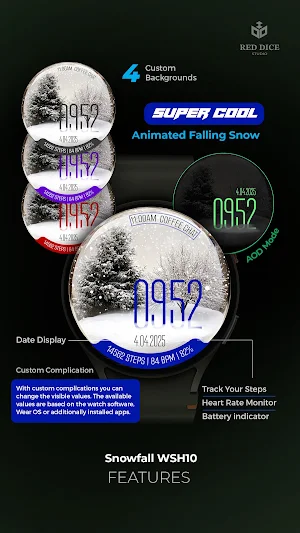
Designed for clarity and comfort, Snowfall WSH10 combines atmospheric visuals with everyday functionality. Track your activity, monitor battery level, and access your favorite feature through a customizable complication — all presented in a clean, minimalist layout.
From soft daytime tones to a glowing night mode, Snowfall WSH10 is perfect for winter lovers and anyone who appreciates a serene design.
Key Features
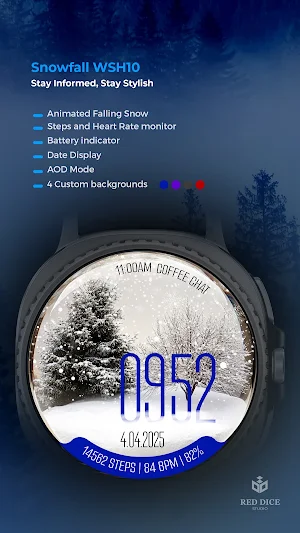
Animated Falling Snow: soft, continuous snowfall for a calming winter atmosphere
Customizable Complication: quick access to your preferred app or feature
Health Data: steps and heart rate are displayed clearly
Battery Indicator: replace weather with practical power awareness
Date Display: clean and easy to read
Always-On Display (AOD): subtle glow designed for night-time visibility
Multiple Color Accents: daytime and luminous night style
A Moment of Winter Calm
Snowfall WSH10 transforms your smartwatch into a peaceful winter scene — gentle, quiet, and beautifully animated. A perfect companion for cold days and calm nights.
Installation & Usage:
Download and open the companion app on your smartphone from Google Play, and follow the step-by-step guide to install the watch face on your smartwatch. Alternatively, you can install the app directly on your watch from Google Play.
Privacy Friendly:
This watch face does not collect or share any user data
Red Dice Studio is committed to transparency and user protection.
Support Email: [email protected]
Phone: +31635674000
All prices include VAT where applicable.
Refund Policy: Refunds are managed according to Google Play's refund policy. If you encounter any issues, please contact support.
This watch face is a one-time purchase. No subscriptions or additional fees.
After purchase, you’ll receive a confirmation via Google Play.
This watch face is a paid product. Please check the details before purchase.
For details, please refer to our Privacy Policy and Terms of Service.
https://sites.google.com/view/app-priv/watch-face-privacy-policy
🔗 Stay Updated with Red Dice Studio:
Website: https://reddicestudio.com
Instagram: https://www.instagram.com/reddice.studio/profilecard/?igsh=MWQyYWVmY250dm1rOA==
X (Twitter): https://x.com/ReddiceStudio
Telegram: https://t.me/reddicestudio
YouTube: https://www.youtube.com/@ReddiceStudio/videos
LinkedIn:https://www.linkedin.com/company/106233875/admin/dashboard/
Snowfall WSH10 captures the quiet beauty of winter.
With gently falling animated snow and a peaceful forest scene, this watch face brings a sense of calm and elegance to your wrist.
Designed for clarity and comfort, Snowfall WSH10 combines atmospheric visuals with everyday functionality. Track your activity, monitor battery level, and access your favorite feature through a customizable complication — all presented in a clean, minimalist layout.
From soft daytime tones to a glowing night mode, Snowfall WSH10 is perfect for winter lovers and anyone who appreciates a serene design.
Key Features
Animated Falling Snow: soft, continuous snowfall for a calming winter atmosphere
Customizable Complication: quick access to your preferred app or feature
Health Data: steps and heart rate are displayed clearly
Battery Indicator: replace weather with practical power awareness
Date Display: clean and easy to read
Always-On Display (AOD): subtle glow designed for night-time visibility
Multiple Color Accents: daytime and luminous night style
A Moment of Winter Calm
Snowfall WSH10 transforms your smartwatch into a peaceful winter scene — gentle, quiet, and beautifully animated. A perfect companion for cold days and calm nights.
Installation & Usage:
Download and open the companion app on your smartphone from Google Play, and follow the step-by-step guide to install the watch face on your smartwatch. Alternatively, you can install the app directly on your watch from Google Play.
Privacy Friendly:
This watch face does not collect or share any user data
Red Dice Studio is committed to transparency and user protection.
Support Email: [email protected]
Phone: +31635674000
All prices include VAT where applicable.
Refund Policy: Refunds are managed according to Google Play's refund policy. If you encounter any issues, please contact support.
This watch face is a one-time purchase. No subscriptions or additional fees.
After purchase, you’ll receive a confirmation via Google Play.
This watch face is a paid product. Please check the details before purchase.
For details, please refer to our Privacy Policy and Terms of Service.
https://sites.google.com/view/app-priv/watch-face-privacy-policy
🔗 Stay Updated with Red Dice Studio:
Website: https://reddicestudio.com
Instagram: https://www.instagram.com/reddice.studio/profilecard/?igsh=MWQyYWVmY250dm1rOA==
X (Twitter): https://x.com/ReddiceStudio
Telegram: https://t.me/reddicestudio
YouTube: https://www.youtube.com/@ReddiceStudio/videos
LinkedIn:https://www.linkedin.com/company/106233875/admin/dashboard/
Alternatives to Reddice Snowfall WSH10
Looking for apps like Reddice Snowfall WSH10? Here are 6 similar Android apps on Google Play. The highest rated is TVV Christmas - Animated (4.4/5), and 1 of the 6 are free to download.
-
Independent: Flower Watch Face
-
Merry Christmas Tree Lights
-
TVV Celebration Watch Face
-
CC Digital 26 watch face
-
TVV Christmas - Animated 4.4
-
Frosted Glow
| App | Rating | Price | Installs | Last updated | Compare |
|---|---|---|---|---|---|
| Reddice Snowfall WSH10 | – | $2.49 | 5+ | Aug 26, 2026 | |
| Independent: Flower Watch Face | – | 0.99 USD | 100+ | Jul 29, 2024 | Compare |
| Merry Christmas Tree Lights | – | 1.49 USD | 10+ | Aug 17, 2026 | Compare |
| TVV Celebration Watch Face | – | 0.99 USD | 100+ | Aug 18, 2026 | Compare |
| CC Digital 26 watch face | – | 0.99 USD | 10+ | Jul 25, 2025 | Compare |
| TVV Christmas - Animated | 4.4 / 5 | 0.99 USD | 500+ | Aug 13, 2026 | Compare |
| Frosted Glow | – | Free | 5+ | Jun 24, 2026 | Compare |
Similar apps on Google Play
- Independent: Flower Watch Face
- Merry Christmas Tree Lights
- TVV Celebration Watch Face
- CC Digital 26 watch face
- TVV Christmas - Animated
- Frosted Glow
- Coffee Brown Café Cup Espresso
- Christmas Cozy Cabin
- TVV Christmas Countdown
- Winter Night
- Christmas Tree Blue Sparkles
- Romance
- Christmas Snow Watchface ULTRA
- Animated snow watch
- Christmas Watch Face 001
- Natural Weather - Watch face
- Snow Night - watch face
- Iris565 Christmas Watch Face
- Reddice SakuraTime D5
- Aureon
- Winter to Spring Watch Face
- ReS71 - Northern Christmas
- Ultra Weather - Watch face
- Earth Space & Galaxy - ReS25
- ML2U 161 Watch Face
- Animated North Pole Christmas
- EXD034: Summer Bloom Face
- EXD123: Winter Hybrid Face
- CC Clean 25 Watch Face