
esp relay wifi controller
redd app Tools
Buton fi Control your relay devices over local Wi-Fi. Simple, fast.
- Downloads
- 10+
- on Google Play
- Price
- $0.99
- No in-app purchases
- Updated
- Apr 30
- 2026 · v1.0.4
Screenshots
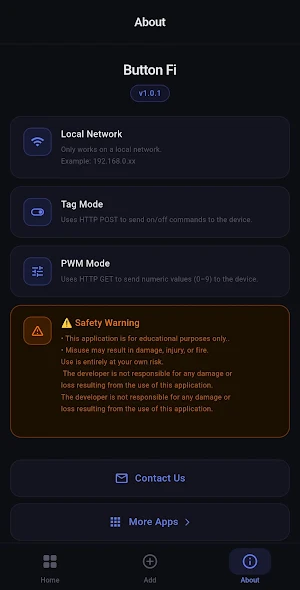


About esp relay wifi controller
Smart Relay Controller Butonfi
Control your relay devices over local Wi-Fi network with a single tap.
Designed for makers, hobbyists, and home automation enthusiasts.
🔧 KEY FEATURES
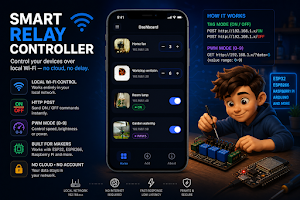
• Tag Mode – Send HTTP POST commands to turn devices ON or OFF instantly.
• PWM Mode – Control speed, brightness or intensity via HTTP GET (values 0–9).
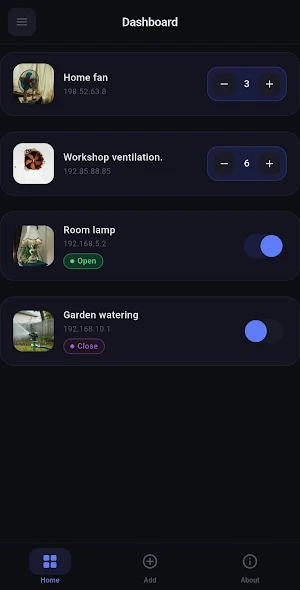
• Multi-Device Dashboard – Manage all your relay devices from one screen.
• Local Network Only – No cloud, no account, no internet required.
• Custom Device Images – Assign photos to identify devices easily.
• Swipe to Delete – Remove devices with a simple swipe gesture.
🛠 COMPATIBLE DEVICES
Button Fi sends standard HTTP requests — works with any board that
runs a web server on local Wi-Fi:
• ESP32 (recommended)
• ESP8266 (NodeMCU, Wemos D1)
• Raspberry Pi (with Flask or similar)
• Arduino + Ethernet/Wi-Fi shield
• Any microcontroller with HTTP server support
📡 HOW IT WORKS — TAG MODE
Your ESP32/ESP8266 listens for HTTP POST requests:
POST http://192.168.0.x/ON → Relay turns ON
POST http://192.168.0.x/OFF → Relay turns OFF
Set Tag1 = ON and Tag2 = OFF in the app. That's it.
🎛 HOW IT WORKS — PWM MODE
Your device listens for HTTP GET with a data parameter:
GET http://192.168.0.x/?data=5 → Sends value 5 (range: 0–9)
Map 0–9 to 0–255 on your microcontroller for full PWM control.
Perfect for fan speed, LED brightness, motor control and more.
🏠 USE CASES
- Smart home lighting and fan control
- Greenhouse pump and ventilation automation
- Workshop equipment switching
- Laboratory relay control
- DIY IoT projects with ESP32 / ESP8266
- Raspberry Pi GPIO control via Flask API
- Any HTTP-based relay or actuator system
⚙ QUICK ESP32 SETUP
1. Upload a simple WebServer sketch to your ESP32
2. Connect ESP32 to your local Wi-Fi
3. Find the IP address from Serial Monitor
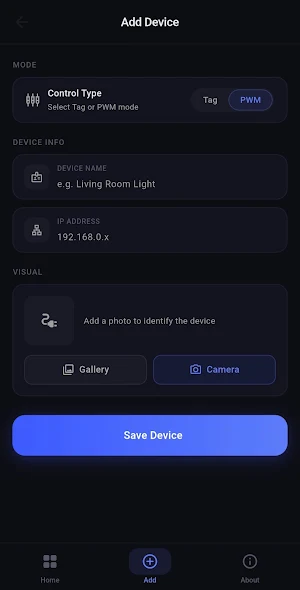
4. Add the device in Button Fi with that IP
5. Set your ON/OFF tags or enable PWM mode
6. Control your relay instantly from the dashboard
No pairing process. No Bluetooth. No cloud sync.
Pure local HTTP — fast, reliable, private.
⚠ SAFETY NOTICE
Button Fi controls real electrical relay devices.
Improper wiring may cause damage, injury, or fire.
Always have wiring done by a qualified electrician.
The developer is not responsible for any harm or
damage resulting from the use of this application.
Use entirely at your own risk.
Keywords: ESP32 relay control, ESP8266 WiFi switch, smart relay app,
IoT HTTP controller, local network relay, PWM Android controller,
Raspberry Pi GPIO app, home automation relay, HTTP POST switch,
DIY smart home Android, WebServer ESP32 app, relay module control, buton fi
Control your relay devices over local Wi-Fi network with a single tap.
Designed for makers, hobbyists, and home automation enthusiasts.
🔧 KEY FEATURES
• Tag Mode – Send HTTP POST commands to turn devices ON or OFF instantly.
• PWM Mode – Control speed, brightness or intensity via HTTP GET (values 0–9).
• Multi-Device Dashboard – Manage all your relay devices from one screen.
• Local Network Only – No cloud, no account, no internet required.
• Custom Device Images – Assign photos to identify devices easily.
• Swipe to Delete – Remove devices with a simple swipe gesture.
🛠 COMPATIBLE DEVICES
Button Fi sends standard HTTP requests — works with any board that
runs a web server on local Wi-Fi:
• ESP32 (recommended)
• ESP8266 (NodeMCU, Wemos D1)
• Raspberry Pi (with Flask or similar)
• Arduino + Ethernet/Wi-Fi shield
• Any microcontroller with HTTP server support
📡 HOW IT WORKS — TAG MODE
Your ESP32/ESP8266 listens for HTTP POST requests:
POST http://192.168.0.x/ON → Relay turns ON
POST http://192.168.0.x/OFF → Relay turns OFF
Set Tag1 = ON and Tag2 = OFF in the app. That's it.
🎛 HOW IT WORKS — PWM MODE
Your device listens for HTTP GET with a data parameter:
GET http://192.168.0.x/?data=5 → Sends value 5 (range: 0–9)
Map 0–9 to 0–255 on your microcontroller for full PWM control.
Perfect for fan speed, LED brightness, motor control and more.
🏠 USE CASES
- Smart home lighting and fan control
- Greenhouse pump and ventilation automation
- Workshop equipment switching
- Laboratory relay control
- DIY IoT projects with ESP32 / ESP8266
- Raspberry Pi GPIO control via Flask API
- Any HTTP-based relay or actuator system
⚙ QUICK ESP32 SETUP
1. Upload a simple WebServer sketch to your ESP32
2. Connect ESP32 to your local Wi-Fi
3. Find the IP address from Serial Monitor
4. Add the device in Button Fi with that IP
5. Set your ON/OFF tags or enable PWM mode
6. Control your relay instantly from the dashboard
No pairing process. No Bluetooth. No cloud sync.
Pure local HTTP — fast, reliable, private.
⚠ SAFETY NOTICE
Button Fi controls real electrical relay devices.
Improper wiring may cause damage, injury, or fire.
Always have wiring done by a qualified electrician.
The developer is not responsible for any harm or
damage resulting from the use of this application.
Use entirely at your own risk.
Keywords: ESP32 relay control, ESP8266 WiFi switch, smart relay app,
IoT HTTP controller, local network relay, PWM Android controller,
Raspberry Pi GPIO app, home automation relay, HTTP POST switch,
DIY smart home Android, WebServer ESP32 app, relay module control, buton fi
What’s new
Version 1.0.4 · Updated April 30, 2026
- Bugs fix. Design improvements have been made.
Alternatives to esp relay wifi controller
Looking for apps like esp relay wifi controller? Here are 4 similar Android apps on Google Play. All of them are free to download.
-
Esp32 bluetooth control
-
Shake skip music – Next Track
-
Daily note sharing server
-
Music Skip App, Auto Song Skip
| App | Rating | Price | Installs | Last updated | Compare |
|---|---|---|---|---|---|
| esp relay wifi controller | – | $0.99 | 10+ | Apr 30, 2026 | |
| Esp32 bluetooth control | – | Free | 500+ | – | Compare |
| Shake skip music – Next Track | – | Free | 100+ | – | Compare |
| Daily note sharing server | – | Free | 10+ | Feb 17, 2026 | Compare |
| Music Skip App, Auto Song Skip | – | Free | 1,000+ | Oct 1, 2026 | Compare |