
Calculator Lock - Photo Video Hide App & Lock File
AST Apps Tools Contains ads
Keep your privacy safe Calculator Locker Vault to lock photos videos & hide app.
- Rating
- 4.8
- 222 ratings
- Downloads
- 1K+
- on Google Play
- Price
- Free
- No in-app purchases
- Updated
- Mar 17
- 2021 · v1.3
Screenshots


About Calculator Lock - Photo Video Hide App & Lock File
If you feel unsecure about your private photos, videos and files?
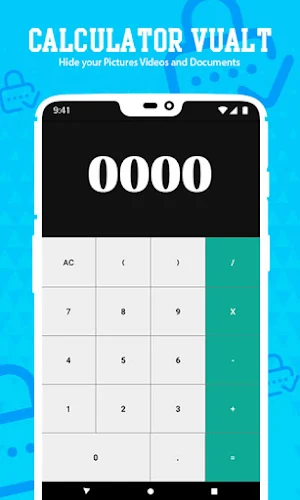
Now don’t worry about your private data because we developed a hidden calculator lock photo vault hide video & hide app which give you many advantages to secure your private data. The secret calculator vault only show the simple calculator’s icon also you can change the calculator lock icon in the app setting without anyone knowing as gallery lock installed in your mobile, It looks as just a standard calculator. Calculator photo vault can secure your private data by hide picture, lock videos and secure your files as file locker. You can import private data like hide pictures, secure video and lock files from gallery or add shortcut of hidden camera calculator lock photo vault built-in camera to take private photos and browse hide photos, hide videos and lock files in calculator vault gallery.
Secret Calculator Vault
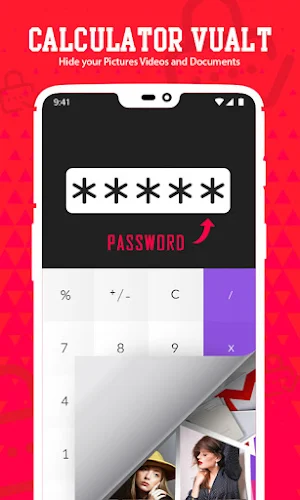
The secret calculator locker photo vault encrypt the contents that you don’t want to share with others and private files format, size without any restrictions. Calculator lock photo vault and hide app is a private photo lock app, file locker and video hide app that let you to hide picture, secret videos and lock files behind the calculator. Lock the calc lock app with a password and also add fingerprint to protect you privacy. You can open hidden files only by typing a correct password into calculator lock photo vault.
✨Top Feature of Calculator Lock Photo Vault: ✨
Hide photos & Hide Videos: you can move from gallery or import pictures to our hidden photo lock calculator. Browse hidden photos in safe calculator lock photo vault. Photo locker supports multiple photo formats: Jpg, Jpeg, gif/ png and more. Also it lock videos and hide videos from gallery, to keep others away from your personal videos, movies in a safe video vault. You can use built in video player to open the private video and play it.
Secure Personal Files: Secure files locker app keep safe you’re all files private and protected. The file locker is the easiest place to create a secure location in your device to protect your important and private files, personal document files which can be accessed only by you.
Safe Internet Browser:Lock Calculator contains built in Safe browser and private browser for your safe browsing, private browsing mode of private websites and downloading of photos from web also lock instantly inside photo vault and leaves no tracks in your phone.
Shake Close calculator vault locker: By Shaking phone the app will quickly close, so using secure calculator lock photo vault app then everything will be in your control. Just enable shake close in calculator lock setting.
Intruder Selfie: In secret calculator if the password that unlock the app is entered incorrectly, then a photo of the intruder will be taken and save here in lock gallery.
Prohibit Screenshots: Private photo vault block screenshots of all the interfaces in the photo lock calculator to keep safe.
How to open?
➥First enter password and press ‘=’ to, again enter your password to confirm password.
➥Enter your password then press this ‘=’ button to open or use finger print if support to fast open.
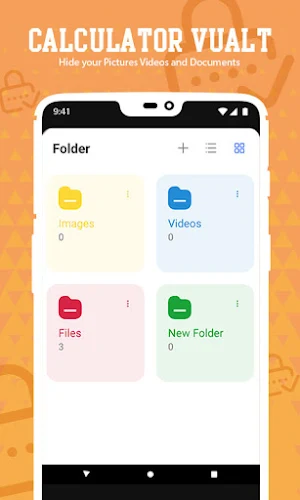
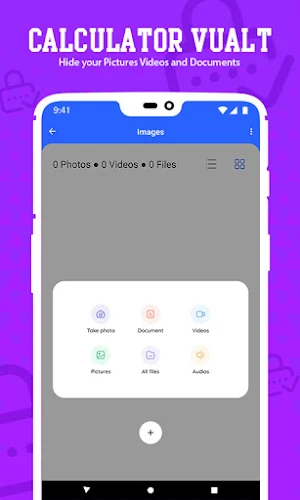
➥There are three built in folders to add hide photos, hide videos and also lock files in these folders.
➥You can create your own folder for private photos, videos and secure files.
➥To restore encrypted file just long press on the encrypted file so you will enter to the edit mode, you can restore by taping restore button in the action bar.
➥Recycle bin folder to restore or delete removed files.
➥To change your current password plz go to the calculator lock app "Settings, Safe then Lock Type" to change the password.
So download calculator lock photo vault and feel free to use this latest calculator lock photo vault now! calculator vault photo hide video file locker can help you to hide any type of data.
Now don’t worry about your private data because we developed a hidden calculator lock photo vault hide video & hide app which give you many advantages to secure your private data. The secret calculator vault only show the simple calculator’s icon also you can change the calculator lock icon in the app setting without anyone knowing as gallery lock installed in your mobile, It looks as just a standard calculator. Calculator photo vault can secure your private data by hide picture, lock videos and secure your files as file locker. You can import private data like hide pictures, secure video and lock files from gallery or add shortcut of hidden camera calculator lock photo vault built-in camera to take private photos and browse hide photos, hide videos and lock files in calculator vault gallery.
Secret Calculator Vault
The secret calculator locker photo vault encrypt the contents that you don’t want to share with others and private files format, size without any restrictions. Calculator lock photo vault and hide app is a private photo lock app, file locker and video hide app that let you to hide picture, secret videos and lock files behind the calculator. Lock the calc lock app with a password and also add fingerprint to protect you privacy. You can open hidden files only by typing a correct password into calculator lock photo vault.
✨Top Feature of Calculator Lock Photo Vault: ✨
Hide photos & Hide Videos: you can move from gallery or import pictures to our hidden photo lock calculator. Browse hidden photos in safe calculator lock photo vault. Photo locker supports multiple photo formats: Jpg, Jpeg, gif/ png and more. Also it lock videos and hide videos from gallery, to keep others away from your personal videos, movies in a safe video vault. You can use built in video player to open the private video and play it.
Secure Personal Files: Secure files locker app keep safe you’re all files private and protected. The file locker is the easiest place to create a secure location in your device to protect your important and private files, personal document files which can be accessed only by you.
Safe Internet Browser:Lock Calculator contains built in Safe browser and private browser for your safe browsing, private browsing mode of private websites and downloading of photos from web also lock instantly inside photo vault and leaves no tracks in your phone.
Shake Close calculator vault locker: By Shaking phone the app will quickly close, so using secure calculator lock photo vault app then everything will be in your control. Just enable shake close in calculator lock setting.
Intruder Selfie: In secret calculator if the password that unlock the app is entered incorrectly, then a photo of the intruder will be taken and save here in lock gallery.
Prohibit Screenshots: Private photo vault block screenshots of all the interfaces in the photo lock calculator to keep safe.
How to open?
➥First enter password and press ‘=’ to, again enter your password to confirm password.
➥Enter your password then press this ‘=’ button to open or use finger print if support to fast open.
➥There are three built in folders to add hide photos, hide videos and also lock files in these folders.
➥You can create your own folder for private photos, videos and secure files.
➥To restore encrypted file just long press on the encrypted file so you will enter to the edit mode, you can restore by taping restore button in the action bar.
➥Recycle bin folder to restore or delete removed files.
➥To change your current password plz go to the calculator lock app "Settings, Safe then Lock Type" to change the password.
So download calculator lock photo vault and feel free to use this latest calculator lock photo vault now! calculator vault photo hide video file locker can help you to hide any type of data.
What’s new
Version 1.3 · Updated March 17, 2021
- Bugs removed.
User reviews

Really good app

Nice

Great app, easy to use and the best photo vault yet. Good job to the developers.

Best hide

Very very good apps. But if I will forget password then how I will unlock again any one please reply.

Very secure
Alternatives to Calculator Lock - Photo Video Hide App & Lock File
Looking for apps like Calculator Lock - Photo Video Hide App & Lock File? Here are 4 similar Android apps on Google Play. The highest rated is SharpVPN-Secure Fast VPN Proxy (4.6/5), and all 4 are free to download.
-
SharpVPN-Secure Fast VPN Proxy 4.6
-
Real HD piano perfect keyboard
-
Joker Face Photo Editor 1.0
-
Motion Photo Editor 3.8
| App | Rating | Price | Installs | Last updated | Compare |
|---|---|---|---|---|---|
| Calculator Lock - Photo Video Hide App & Lock File | 4.8 / 5 | Free | 1,000+ | Mar 17, 2021 | |
| SharpVPN-Secure Fast VPN Proxy | 4.6 / 5 | Free | 1,000,000+ | Jul 28, 2026 | Compare |
| Real HD piano perfect keyboard | – | Free | 100,000+ | – | Compare |
| Joker Face Photo Editor | 1.0 / 5 | Free | 50,000+ | Sep 10, 2026 | Compare |
| Motion Photo Editor | 3.8 / 5 | Free | 50,000+ | – | Compare |