

HM Facial Attendance
Razor Infotech Private Limited Productivity
Face recognition attendance kiosk — punch in & out in seconds, even offline.
- Downloads
- 13+
- on Google Play
- Price
- Free
- No in-app purchases
- Updated
- Aug 31
- 2026 · v2.6.2
Screenshots
About HM Facial Attendance
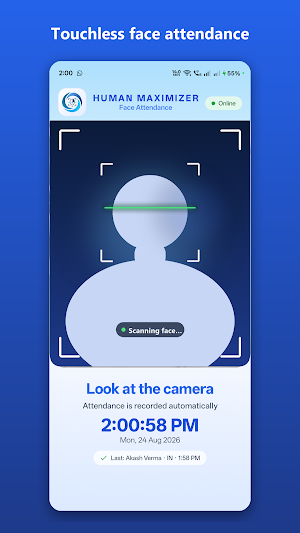
HM Facial Attendance turns any Android phone or tablet into a touchless face-recognition attendance kiosk for your company.
Employees simply look at the camera — the app detects the face, verifies it against your company's enrolled employees, and records the punch in or punch out automatically in seconds. No cards, no fingerprints, no queues at the register.
HOW IT WORKS
• Mount the device at your entrance as a fixed kiosk, or let a supervisor carry it and scan employees anywhere on site
• On-device face detection guides the employee — move closer, look straight, hold still — and captures only when the face is clearly visible
• Attendance is verified and recorded on your company's Human Maximizer (HM) server, with the exact punch time shown on screen
KEY FEATURES
✔ Touchless punch in / punch out with face recognition
✔ Fast verification — a punch takes just a few seconds
✔ Duplicate-scan protection — a second scan moments later shows "Already punched" instead of a wrong punch-out
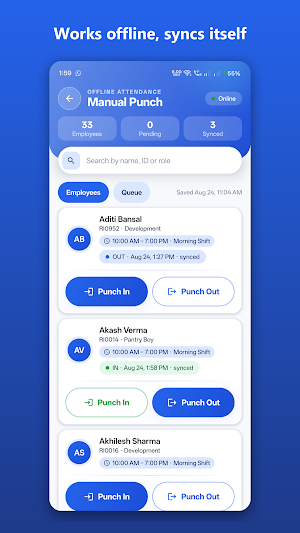
✔ Works offline — record attendance manually during internet outages; punches are saved on the device and sync automatically when the connection returns
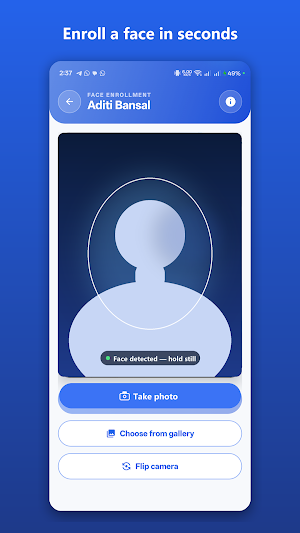
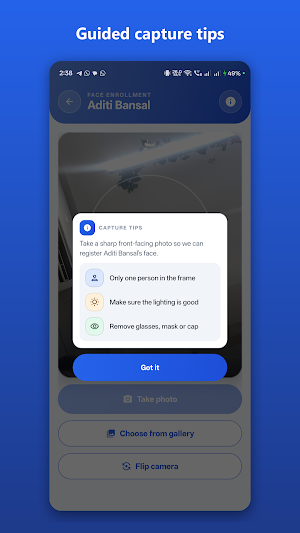
✔ Built-in face enrollment — register employees from the camera or gallery, guided by capture tips
✔ Admin panel protected by PIN: employee list, manual punch, camera and kiosk settings
✔ Kiosk-ready: auto-restart after reboot or crash, screen stays on, night-time screen illumination for dark entrances
✔ Clear guidance for every situation — unregistered faces, poor lighting, and connection problems are all explained on screen
FOR HM CUSTOMERS
This app is a companion to the Human Maximizer HR platform. To activate it you need your company's workspace name, company ID and a kiosk account issued by your HR administrator.
PERMISSIONS
Camera access is required for face scanning and enrollment. Face images are used only for attendance verification against your company's enrolled employees.
Employees simply look at the camera — the app detects the face, verifies it against your company's enrolled employees, and records the punch in or punch out automatically in seconds. No cards, no fingerprints, no queues at the register.
HOW IT WORKS
• Mount the device at your entrance as a fixed kiosk, or let a supervisor carry it and scan employees anywhere on site
• On-device face detection guides the employee — move closer, look straight, hold still — and captures only when the face is clearly visible
• Attendance is verified and recorded on your company's Human Maximizer (HM) server, with the exact punch time shown on screen
KEY FEATURES
✔ Touchless punch in / punch out with face recognition
✔ Fast verification — a punch takes just a few seconds
✔ Duplicate-scan protection — a second scan moments later shows "Already punched" instead of a wrong punch-out
✔ Works offline — record attendance manually during internet outages; punches are saved on the device and sync automatically when the connection returns
✔ Built-in face enrollment — register employees from the camera or gallery, guided by capture tips
✔ Admin panel protected by PIN: employee list, manual punch, camera and kiosk settings
✔ Kiosk-ready: auto-restart after reboot or crash, screen stays on, night-time screen illumination for dark entrances
✔ Clear guidance for every situation — unregistered faces, poor lighting, and connection problems are all explained on screen
FOR HM CUSTOMERS
This app is a companion to the Human Maximizer HR platform. To activate it you need your company's workspace name, company ID and a kiosk account issued by your HR administrator.
PERMISSIONS
Camera access is required for face scanning and enrollment. Face images are used only for attendance verification against your company's enrolled employees.
What’s new
Version 2.6.2 · Updated August 31, 2026
• Fixed text not being visible while typing on Android 10 and older devices • Added Next/Done keys to move between fields during setup and login • App now keeps its own colours when the phone's system-wide dark mode is on
Alternatives to HM Facial Attendance
Looking for apps like HM Facial Attendance? Here are 3 similar Android apps on Google Play. All of them are free to download.



| App | Rating | Price | Installs | Last updated | Compare |
|---|---|---|---|---|---|
| HM Facial Attendance | – | Free | 10+ | Aug 31, 2026 | |
| Human Maximizer HCM | – | Free | 10+ | – | Compare |
| HCM Field Worker | – | Free | 10+ | – | Compare |
| Human Maximizer | – | Free | 500+ | Jul 7, 2026 | Compare |