

Favorite Applications
Ray Adams Tools
Favorite Applications for Wear OS
- Rating
- 4.4
- 71 ratings
- Downloads
- 15.9K+
- on Google Play
- Price
- Free
- No in-app purchases
- Updated
- Sep 9
- 2026 · v1.5.62
Screenshots
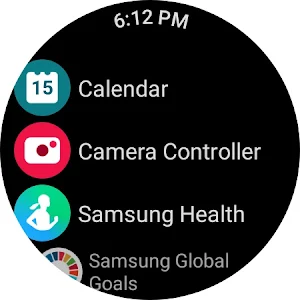
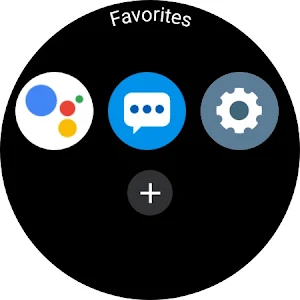
About Favorite Applications
Create a list of your favorite applications and run them easily, from the application itself or tile.
How To:
* Press + to open list of installed application and tap on app to add it into the list.
* Press and hold on icon of app in Favorites screen to remove it from list
* Tile supports up to seven applications
How To:
* Press + to open list of installed application and tap on app to add it into the list.
* Press and hold on icon of app in Favorites screen to remove it from list
* Tile supports up to seven applications
What’s new
Version 1.5.62 · Updated September 9, 2026
Bug fixes
User reviews

With the tile feature this tops even the launchers out there.
Frequently asked questions
How do I add my favorite applications to the list?
Press + to open the list of installed applications and tap on the app to add it into the list.
How do I remove an app from the favorites list?
Press and hold on the icon of the app in the Favorites screen to remove it from the list.
How many applications can the tile support?
The tile supports up to seven applications.
Alternatives to Favorite Applications
Looking for apps like Favorite Applications? Here are 6 similar Android apps on Google Play. 5 of the 6 are free to download.




| App | Rating | Price | Installs | Last updated | Compare |
|---|---|---|---|---|---|
| Favorite Applications | 4.4 / 5 | Free | 10,000+ | Sep 9, 2026 | |
| My QR | – | Free | 100,000+ | Aug 14, 2026 | Compare |
| Water Ejector | – | Free | 10,000+ | Jul 22, 2026 | Compare |
| Wear SysInfo | – | Free | 10,000+ | – | Compare |
| List 2 Array | – | Free | 50+ | – | Compare |
| ICD-10 Table of Drugs | – | 0.99 USD | 10+ | Jul 24, 2026 | Compare |
| Contact 2 QR | – | Free | 1,000+ | Jul 24, 2026 | Compare |