
LabelCam — tag & sync photos
Random Martian Studio Photography In-app purchases Contains ads
Capture photos, add labels, search your library. Optional cloud sync included.
- Downloads
- 2.6K+
- on Google Play
- Price
- Free
- In-app purchases
- Updated
- Sep 17
- 2026 · v1.1.144
Screenshots
About LabelCam — tag & sync photos
LabelCam is a camera app built for people who take photos they'll need to find again — property inspectors, contractors, surveyors, field engineers, site managers, lab technicians, inventory teams, and anyone whose camera roll is already a mystery.
Open the viewfinder, take a photo, tap a few labels, and you're done. Every photo is saved into a fast, searchable library. Sign in with Google to back up your library to the cloud and access it from any device via the web.
─────────────────────────────────────
KEY FEATURES
─────────────────────────────────────
📸 ONE-TAP CAPTURE
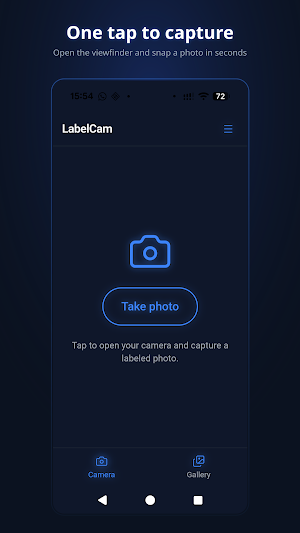
Open the full native camera, snap, and a label input appears instantly. Add a label in seconds or tap a recent-label chip — no typing required.
🔍 SEARCHABLE LIBRARY
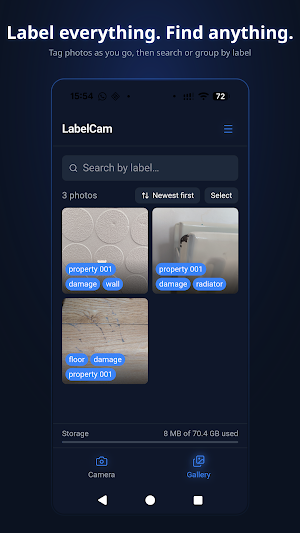
Filter by label, group photos by tag, or sort newest / oldest / A–Z. Find any photo in seconds, even months later.
☁️ OPTIONAL CLOUD SYNC
Sign in with Google for 100 MB of free cloud storage. Your labelled photos are backed up automatically and accessible on any phone, tablet, or desktop browser — no cables required.
🌐 WEB GALLERY
Signed-in users get a full desktop-friendly web gallery at labelcam.randommartian.com. Browse, download singles, or select multiple photos and download a ZIP — great for handing off to clients or colleagues.
✏️ LABEL ANYTHING, ANYTIME
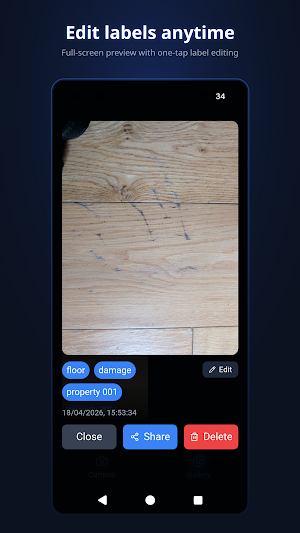
Edit labels after the fact directly from the full-screen lightbox. Pencil icon → type → done.
🖼️ NON-DESTRUCTIVE IMAGE STAMPS
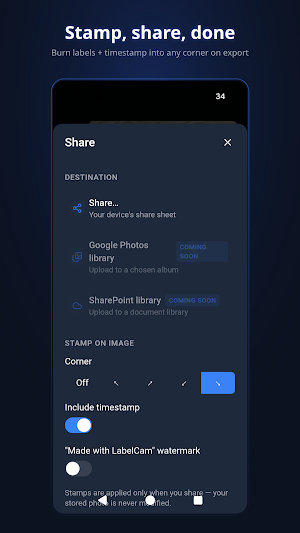
Optionally burn labels, a timestamp, and a small watermark into any corner on export. The stored photo is never modified — the stamp is applied only when you share.
📂 EXIF + XMP METADATA
Labels are written into the JPEG on export, so Google Photos, iOS Photos, Lightroom, and most file viewers show them in their Info / Description fields.
🎛️ FLEXIBLE CAPTURE
Choose Low / Med / High JPEG quality and HD / FHD / 4K resolution. Optionally save a copy to your device's photo gallery.
🎨 THEMES
Dark and light mode, with three neon accent styles (glowing cyan, flat electric blue, glowing blue).
─────────────────────────────────────
USE WITHOUT AN ACCOUNT
─────────────────────────────────────
LabelCam works fully offline with no account. Choose "Continue without account" on first launch and get camera, labels, and on-device gallery — forever free, no signup required.
PRIVATE BY DESIGN (no-account mode)
• No photos ever leave your device unless you choose to share them.
• No analytics, no crash reporting, no tracking.
• All data lives in the app's local storage — uninstalling LabelCam permanently deletes it.
─────────────────────────────────────
CLOUD ACCOUNT (optional, free)
─────────────────────────────────────
Sign in with your Google account to unlock:
✔ 100 MB free cloud storage
✔ Automatic background upload
✔ Web gallery access on any device
✔ Shareable library with colleagues (coming soon)
Cloud data is stored on Kystrom's own UK-based servers — not shared with third-party cloud providers.
─────────────────────────────────────
PERMISSIONS
─────────────────────────────────────
• Camera — to take photos.
• Photo library / Media — only when you enable "Save to device gallery" in Settings.
• Internet — for optional cloud sync and the sign-in flow.
• Ad ID — for the occasional Google AdMob ad shown on multi-photo exports (Android only).
─────────────────────────────────────
LabelCam is developed by Kystrom Technologies (UK) Limited (Glasgow, UK). Privacy policy, terms, and cookie policy are published at labelcam.randommartian.com.
Open the viewfinder, take a photo, tap a few labels, and you're done. Every photo is saved into a fast, searchable library. Sign in with Google to back up your library to the cloud and access it from any device via the web.
─────────────────────────────────────
KEY FEATURES
─────────────────────────────────────
📸 ONE-TAP CAPTURE
Open the full native camera, snap, and a label input appears instantly. Add a label in seconds or tap a recent-label chip — no typing required.
🔍 SEARCHABLE LIBRARY
Filter by label, group photos by tag, or sort newest / oldest / A–Z. Find any photo in seconds, even months later.
☁️ OPTIONAL CLOUD SYNC
Sign in with Google for 100 MB of free cloud storage. Your labelled photos are backed up automatically and accessible on any phone, tablet, or desktop browser — no cables required.
🌐 WEB GALLERY
Signed-in users get a full desktop-friendly web gallery at labelcam.randommartian.com. Browse, download singles, or select multiple photos and download a ZIP — great for handing off to clients or colleagues.
✏️ LABEL ANYTHING, ANYTIME
Edit labels after the fact directly from the full-screen lightbox. Pencil icon → type → done.
🖼️ NON-DESTRUCTIVE IMAGE STAMPS
Optionally burn labels, a timestamp, and a small watermark into any corner on export. The stored photo is never modified — the stamp is applied only when you share.
📂 EXIF + XMP METADATA
Labels are written into the JPEG on export, so Google Photos, iOS Photos, Lightroom, and most file viewers show them in their Info / Description fields.
🎛️ FLEXIBLE CAPTURE
Choose Low / Med / High JPEG quality and HD / FHD / 4K resolution. Optionally save a copy to your device's photo gallery.
🎨 THEMES
Dark and light mode, with three neon accent styles (glowing cyan, flat electric blue, glowing blue).
─────────────────────────────────────
USE WITHOUT AN ACCOUNT
─────────────────────────────────────
LabelCam works fully offline with no account. Choose "Continue without account" on first launch and get camera, labels, and on-device gallery — forever free, no signup required.
PRIVATE BY DESIGN (no-account mode)
• No photos ever leave your device unless you choose to share them.
• No analytics, no crash reporting, no tracking.
• All data lives in the app's local storage — uninstalling LabelCam permanently deletes it.
─────────────────────────────────────
CLOUD ACCOUNT (optional, free)
─────────────────────────────────────
Sign in with your Google account to unlock:
✔ 100 MB free cloud storage
✔ Automatic background upload
✔ Web gallery access on any device
✔ Shareable library with colleagues (coming soon)
Cloud data is stored on Kystrom's own UK-based servers — not shared with third-party cloud providers.
─────────────────────────────────────
PERMISSIONS
─────────────────────────────────────
• Camera — to take photos.
• Photo library / Media — only when you enable "Save to device gallery" in Settings.
• Internet — for optional cloud sync and the sign-in flow.
• Ad ID — for the occasional Google AdMob ad shown on multi-photo exports (Android only).
─────────────────────────────────────
LabelCam is developed by Kystrom Technologies (UK) Limited (Glasgow, UK). Privacy policy, terms, and cookie policy are published at labelcam.randommartian.com.
What’s new
Version 1.1.144 · Updated September 17, 2026
Ad serve fix
Alternatives to LabelCam — tag & sync photos
Looking for apps like LabelCam — tag & sync photos? Here are 6 similar Android apps on Google Play. The highest rated is Timestamp Camera GPS Location (4.1/5), and all 6 are free to download.
-
Bubble Photo Frames
-
Timestamp Camera GPS Location 4.1
-
Photify: Photo Editor & AI
-
Selfie Pro - Beauty Camera
-
Photo Resize
-
AI Art Generator: Photo Lab
| App | Rating | Price | Installs | Last updated | Compare |
|---|---|---|---|---|---|
| LabelCam — tag & sync photos | – | Free | 1,000+ | Sep 17, 2026 | |
| Bubble Photo Frames | – | Free | 100+ | – | Compare |
| Timestamp Camera GPS Location | 4.1 / 5 | Free | 10,000+ | Aug 7, 2026 | Compare |
| Photify: Photo Editor & AI | – | Free | 1,000+ | Oct 13, 2026 | Compare |
| Selfie Pro - Beauty Camera | – | Free | 10,000+ | Jul 23, 2026 | Compare |
| Photo Resize | – | Free | 500+ | – | Compare |
| AI Art Generator: Photo Lab | – | Free | 100,000+ | Oct 7, 2026 | Compare |
Similar apps on Google Play
- Bubble Photo Frames
- Timestamp Camera GPS Location
- Photify: Photo Editor & AI
- Selfie Pro - Beauty Camera
- Photo Resize
- AI Art Generator: Photo Lab
- Sweepix - Gallery
- Vid+-Ai Video Generator
- iconiconi
- Womens Day Photo Frames
- Good Night, Afternoon Morning
- AuraRAW – Pro Manual Camera
- 写真のEXIF編集&フレーム追加PLUS
- Digital Camera HD: Ultra Cam
- Warpica: Face, Time Warp Scan
- GPS Map Camera
- 写真モザイク&ぼかしPLUS ~指でなぞってかんたん加工~
- AI Face Changer: Age & Style
- Modest AI - AI Photo & Video
- TakeShot - GPS Camera Map
- Beauty Cam: AI Image Generator
- Pikolor - Coloring book maker
- Lumet: Pro Softbox & Lightbox
- SkyReels AI Cinematic Videos
- Name in Earth Landsat : AI