
DocuSheetAI
ABDUL RAZAQ Productivity Contains ads
Scan, extract tables & text, translate, and export to Excel instantly.
- Downloads
- 29+
- on Google Play
- Price
- Free
- No in-app purchases
- Updated
- Aug 14
- 2026 · v1.0.1
Screenshots
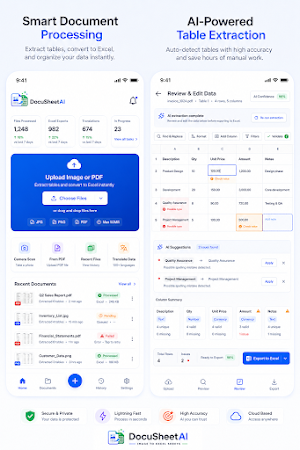
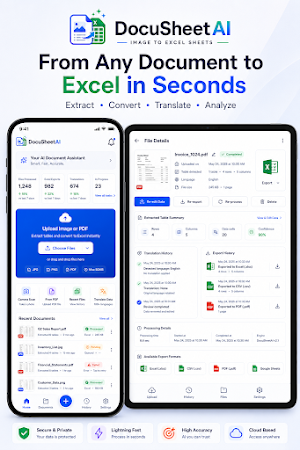
About DocuSheetAI
KEY FEATURES
DOCUMENT SCANNING
- Scan documents, receipts, invoices, and forms using your camera
- Import images and PDFs from your photo library or files
- High-quality OCR text recognition with accuracy detection
TABLE EXTRACTION
- Automatically detect and extract tables from scanned documents
- Preserve table structure with rows and columns intact
- Preview extracted data before exporting
- Edit and clean extracted text
TRANSLATION
- Translate extracted text into multiple languages
- Keep original text alongside translations
- Fast and accurate translation processing
EXCEL EXPORT
- Export extracted tables to Excel (.xlsx) format
- Choose between current table, single sheet, or separate sheets
- Preserve formatting and structure
- Download directly to your device
- Share to Google Drive, cloud storage, or other apps
MULTIPLE EXPORT OPTIONS
- Open files directly in Excel or compatible apps
- Share via standard share sheet
- Save to Google Drive
- Download to device storage
- Export another table or format from the same scan
WHO USES DOCUSHEETAI
- Professionals extracting data from invoices and reports
- Students digitizing notes and study materials
- Accountants processing financial tables
- Researchers collecting data from printed documents
- Businesses converting paper records to digital spreadsheets
- Teachers and schools managing document workflows
PRIVACY & SECURITY
- Your data stays private — files are not shared with third parties
- Encryption in transit and at rest
- Delete your files and account anytime
- No microphone, location, or contacts access required
PLANS
- Free Plan: Basic OCR, table extraction, and export features with ads
- Pro Plan: Higher usage limits, premium features, and reduced ads
- Enterprise Plan: Maximum limits and advanced features for teams
SUPPORTED FORMATS
- Import: Images (JPG, PNG), PDF files
- Export: Excel (.xlsx)
PERMISSIONS USED
- Camera: To scan and capture documents
- Photos/Files: To import and export documents
- Notifications: For app updates and important notices
CONTACT
- Support: [email protected]
- Privacy: [email protected]
DocuSheetAI — Scan. Extract. Translate. Export.
What’s new
Version 1.0.1 · Updated August 14, 2026
Transform any document, image, or photo into a clean, editable Excel spreadsheet in seconds. Docusheetai Uses Advaced AI powered OCR technology to detect and extract tables from documents, receipts, invoices, and screenshots - then exports them as formatted .xlsx files ready to use. No more manual data enter. No more retyping tables, Just Scan, extract, and export.
Alternatives to DocuSheetAI
Looking for apps like DocuSheetAI? Here are 6 similar Android apps on Google Play. All of them are free to download.
-
BRISKO Partner -Restaurant App
-
Morix: Libros y Meditación
-
PetNet ec
-
Timer: Stopwatch & Pomodoro
-
Convención 2026 Santalucía
-
Infloq Pro
| App | Rating | Price | Installs | Last updated | Compare |
|---|---|---|---|---|---|
| DocuSheetAI | – | Free | 10+ | Aug 14, 2026 | |
| BRISKO Partner -Restaurant App | – | Free | 100+ | Sep 24, 2026 | Compare |
| Morix: Libros y Meditación | – | Free | 100+ | – | Compare |
| PetNet ec | – | Free | 100+ | Jul 13, 2024 | Compare |
| Timer: Stopwatch & Pomodoro | – | Free | 100+ | Aug 17, 2026 | Compare |
| Convención 2026 Santalucía | – | Free | 1,000+ | Jan 12, 2026 | Compare |
| Infloq Pro | – | Free | 10+ | Mar 5, 2026 | Compare |
Compare DocuSheetAI with the top alternatives: ratings, updates, ASO score and keyword gaps →
Similar apps on Google Play
- BRISKO Partner -Restaurant App
- Morix: Libros y Meditación
- PetNet ec
- Timer: Stopwatch & Pomodoro
- Convención 2026 Santalucía
- Infloq Pro
- Runable - AI Agent for Work
- IANT App
- RiskPoint
- paapp.ai
- InterTrucker
- myTeams
- Buildex
- KOR3
- Light Control
- 말하면척척
- HydroApps
- i-Justice | Legal AI Assistant
- Passwd: Team Password Manager
- Tamec App
- Nkuku Smart
- ReadAnything Offline TTS Voice
- Hello Lynx
- SlayDay
- ProScanner – PDF & OCR Scanner