
QuickView 3D
Xiamen Dianshe Technology Co., Ltd. Tools In-app purchases
High-performance 3D/2D model viewer supporting formats like STP, X_T, and more.
- Downloads
- 537+
- on Google Play
- Price
- Free
- In-app purchases
- Updated
- Jul 22
- 2025 · v3.1.5
Screenshots


About QuickView 3D
QuickView 3D is a high-performance, cost-effective alternative for viewing CAD drawings and 3D models, designed for engineers, designers, and sales professionals. It supports various 2D and 3D file formats such as STP, SLDPRT, X_T, IGS, OBJ, FBX, GLB, GLTF, and 3DM, among others. The app provides smooth rotation, zooming, measurement, and annotation functionalities, making it easy to interact with complex models. Additionally, it features advanced cloud collaboration and an intelligent management system, enabling real-time communication and efficient data sharing.
Key Features:
Multi-format Support: QuickView 3D supports a wide range of CAD file formats, including step, stp, prt, sldprt, dwg, x-t, stl, iges, igs, asm (Solid Edge assemblies), par (Solid Edge parts), model (CATIA), catpart (CATIA), catproduct (CATIA), sldasm (SolidWorks), stpx, stpz, asat (ACIS), asab (ACIS), and more. Users can easily view models on their mobile devices with excellent performance.
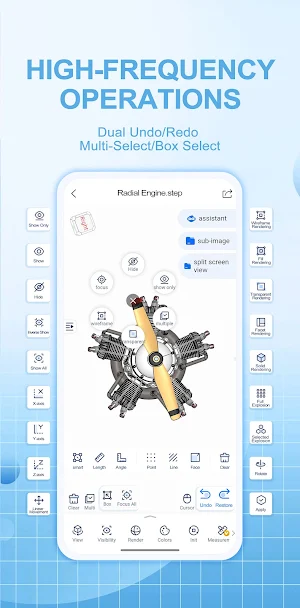
User-friendly Interface: The app is designed with a quick access panel tailored to engineers’ habits, providing functions such as undo/redo, selection, multi-selection, hide/show, fill, transparency, and more with just one click.
3D Annotation and Hyperlinking: The app offers robust 3D annotation tools, allowing users to accurately mark problem areas or add notes on the model. These annotations and hyperlinks help convey design suggestions and modification ideas clearly, ensuring smooth communication within teams.
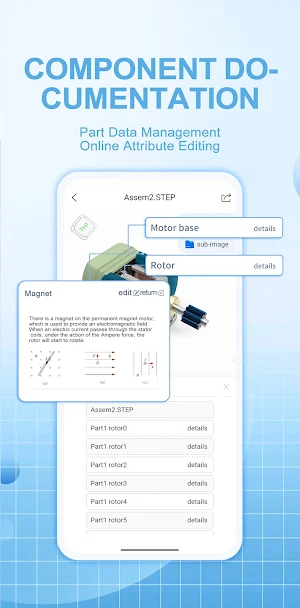
Component Documentation: Users can add detailed operational and maintenance information for each part of the model. The interactive 3D document feature simplifies the process of finding relevant documentation, greatly improving work efficiency.
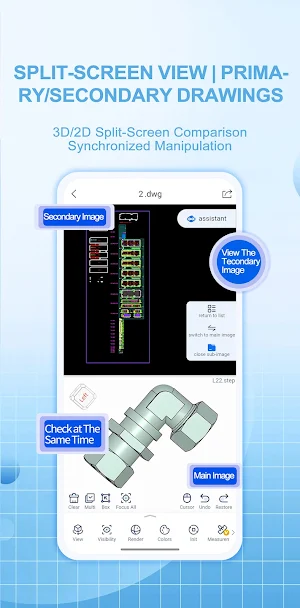
Multi-view and Interactive Operations: QuickView 3D supports multiple view angles and offers interactive operations such as rotation, zooming, and translation, helping users thoroughly analyze and understand every detail of the 3D model.
Security: The app uses a proprietary binary data format, which allows for lightweight processing of large models, significantly enhancing the security and integrity of 3D models and communication data during transmission and storage. This format ensures both high compression rates and high-quality data transfer.
Performance:
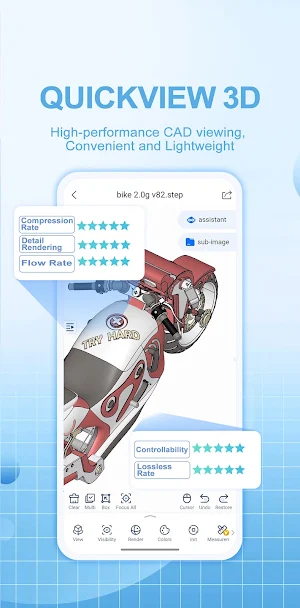
Compression Rate: 90%+ compression rate, significantly reducing model file sizes without sacrificing quality.
Smoothness: The app handles large files and complex models without lag, providing a seamless experience even with high-resolution models.
Lossless Rate: The proprietary binary format ensures a higher level of precision and lossless data handling.
If you have any feedback or need technical support, feel free to email us at: [email protected]
Try QuickView 3D for PC online, with lightweight conversion, collaboration, and seamless viewing: www.quickview3d.com
Key Features:
Multi-format Support: QuickView 3D supports a wide range of CAD file formats, including step, stp, prt, sldprt, dwg, x-t, stl, iges, igs, asm (Solid Edge assemblies), par (Solid Edge parts), model (CATIA), catpart (CATIA), catproduct (CATIA), sldasm (SolidWorks), stpx, stpz, asat (ACIS), asab (ACIS), and more. Users can easily view models on their mobile devices with excellent performance.
User-friendly Interface: The app is designed with a quick access panel tailored to engineers’ habits, providing functions such as undo/redo, selection, multi-selection, hide/show, fill, transparency, and more with just one click.
3D Annotation and Hyperlinking: The app offers robust 3D annotation tools, allowing users to accurately mark problem areas or add notes on the model. These annotations and hyperlinks help convey design suggestions and modification ideas clearly, ensuring smooth communication within teams.
Component Documentation: Users can add detailed operational and maintenance information for each part of the model. The interactive 3D document feature simplifies the process of finding relevant documentation, greatly improving work efficiency.
Multi-view and Interactive Operations: QuickView 3D supports multiple view angles and offers interactive operations such as rotation, zooming, and translation, helping users thoroughly analyze and understand every detail of the 3D model.
Security: The app uses a proprietary binary data format, which allows for lightweight processing of large models, significantly enhancing the security and integrity of 3D models and communication data during transmission and storage. This format ensures both high compression rates and high-quality data transfer.
Performance:
Compression Rate: 90%+ compression rate, significantly reducing model file sizes without sacrificing quality.
Smoothness: The app handles large files and complex models without lag, providing a seamless experience even with high-resolution models.
Lossless Rate: The proprietary binary format ensures a higher level of precision and lossless data handling.
If you have any feedback or need technical support, feel free to email us at: [email protected]
Try QuickView 3D for PC online, with lightweight conversion, collaboration, and seamless viewing: www.quickview3d.com
Alternatives to QuickView 3D
Looking for apps like QuickView 3D? Here are 6 similar Android apps on Google Play. All of them are free to download.
-
CityCom: AI City Reports
-
Anti Theft Phone Alarm: Find
-
proteän
-
VaultXT - Large Text Editor
-
Chemical Resistance Check
-
MCore Scam
| App | Rating | Price | Installs | Last updated | Compare |
|---|---|---|---|---|---|
| QuickView 3D | – | Free | 500+ | Jul 22, 2025 | |
| CityCom: AI City Reports | – | Free | 1+ | Jul 1, 2026 | Compare |
| Anti Theft Phone Alarm: Find | – | Free | 1,000+ | Oct 4, 2026 | Compare |
| proteän | – | Free | 50+ | Oct 10, 2026 | Compare |
| VaultXT - Large Text Editor | – | Free | 100+ | Oct 17, 2026 | Compare |
| Chemical Resistance Check | – | Free | 10+ | Jul 15, 2026 | Compare |
| MCore Scam | – | Free | 10+ | – | Compare |
Compare QuickView 3D with the top alternatives: ratings, updates, ASO score and keyword gaps →
Similar apps on Google Play
- CityCom: AI City Reports
- Anti Theft Phone Alarm: Find
- proteän
- VaultXT - Large Text Editor
- Chemical Resistance Check
- MCore Scam
- Passport Photo Maker
- Trinity Travel eSIM
- Kallipr Kloud Field
- Fast Hearing Control
- Shiftlab
- ML Tools Pro: ML Skin Injector
- TeamClick
- PBSEV
- كوت
- EMIKeyLock
- Crane Rare Pure Whirl
- GPS Guardian
- Technofi
- ladfDO
- Square Cloud
- SiteOwl
- Spectrum tool
- litapp
- ScoreToss: Outdoor games