

QuickSplit
SE61 MFU Software Engineering Finance
Split bills instantly with friends. Fair shares, every time. No sign-up needed.
- Price
- Free
- No in-app purchases
- Updated
- Apr 25
- 2026 · v1.0.2
Screenshots


About QuickSplit
QuickSplit makes splitting bills with friends fast and effortless.
Whether you're dining out, sharing a trip, or splitting rent, QuickSplit calculates everyone's fair share in seconds.
KEY FEATURES
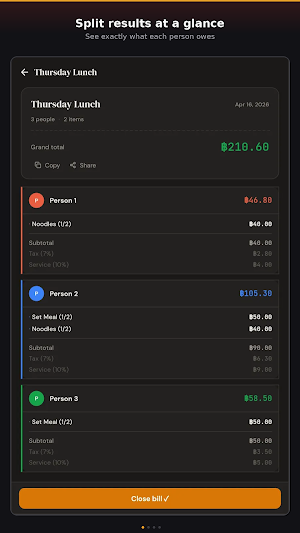
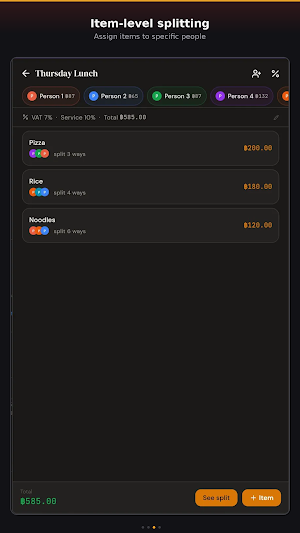
• Split bills by item — assign specific dishes to specific people
• Automatic tax and service charge calculation (VAT 7%, Service 10%, or custom)
• Color-coded person cards so you never lose track
• Copy or share split results with your group
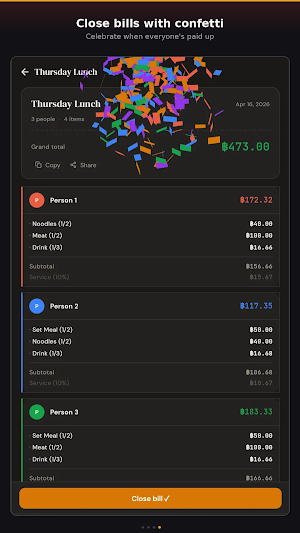
• Confetti celebration when you close a bill
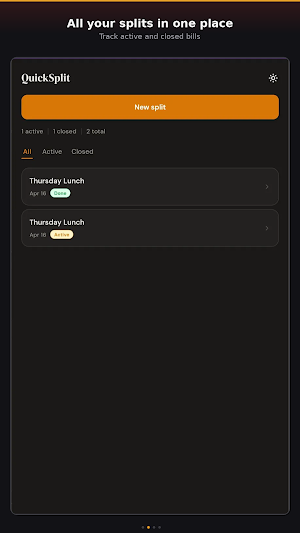
• Track active and closed splits in one place
• Works completely offline — no account needed
HOW IT WORKS
1. Tap "New split" and name your bill
2. Add items and assign them to people
3. Set tax and service rates
4. Tap "See split" — everyone's share is calculated instantly
5. Close the bill when everyone's paid up
Perfect for restaurants, group trips, shared groceries, roommate expenses, and any time you need to divide costs fairly.
QuickSplit is free, fast, and respects your privacy. No ads. No tracking. Just simple bill splitting that works.
Whether you're dining out, sharing a trip, or splitting rent, QuickSplit calculates everyone's fair share in seconds.
KEY FEATURES
• Split bills by item — assign specific dishes to specific people
• Automatic tax and service charge calculation (VAT 7%, Service 10%, or custom)
• Color-coded person cards so you never lose track
• Copy or share split results with your group
• Confetti celebration when you close a bill
• Track active and closed splits in one place
• Works completely offline — no account needed
HOW IT WORKS
1. Tap "New split" and name your bill
2. Add items and assign them to people
3. Set tax and service rates
4. Tap "See split" — everyone's share is calculated instantly
5. Close the bill when everyone's paid up
Perfect for restaurants, group trips, shared groceries, roommate expenses, and any time you need to divide costs fairly.
QuickSplit is free, fast, and respects your privacy. No ads. No tracking. Just simple bill splitting that works.
What’s new
Version 1.0.2 · Updated April 25, 2026
Updated app icon
Alternatives to QuickSplit
Looking for apps like QuickSplit? Here are 6 similar Android apps on Google Play. All of them are free to download.






| App | Rating | Price | Installs | Last updated | Compare |
|---|---|---|---|---|---|
| QuickSplit | – | Free | 0+ | Apr 25, 2026 | |
| OnTime | – | Free | 5+ | – | Compare |
| TickFair Connect | – | Free | 1+ | – | Compare |
| Smart Study Planner | – | Free | 100+ | – | Compare |
| Greenbuddy | – | Free | 1+ | – | Compare |
| StudySync | – | Free | 0+ | – | Compare |
| SubPatrol | – | Free | 1+ | Apr 27, 2026 | Compare |
Compare QuickSplit with the top alternatives: ratings, updates, ASO score and keyword gaps →
Similar apps on Google Play
- OnTime
- TickFair Connect
- Smart Study Planner
- Greenbuddy
- StudySync
- SubPatrol
- Smart Alarm
- TrialGuard
- MFU Eventify
- CineVault
- In-Stocker
- AnonNote
- Dishcovery
- 2Goods Mate
- CalTrack
- Skindare
- LNDR: MFU Laundry Tracker
- SetTrack
- Nozofibi
- Yeah i wash
- Expense Care
- Weather Cup
- StudyBeat
- Filmmend Me
- Assignder
- BetterSpent
- TaskSnap
- StudyZen
- ExpenseTracker
- FinFocus
- EcoGo
- Pin & Plan
- Idiots Community Club
- Fortune
- Dorm App V2
- Fashion Agent
- Caffeinate
- CookSmart
- PaKurng
- Heroi Sushi Bar
- Koala - Tarot
- Zuma Pet Shop
- MyToDos
- WeathPro
- Matcha Notes
- ExpenseGuard
- Cafe Z
- Voyage Camp