

Qvoice Queue management system
Happy Hearts Communication In-app purchases
Voice powered queue number announcer for front desk and customer service
- Downloads
- 500+
- on Google Play
- Price
- Free
- In-app purchases
- Updated
- Sep 18
- 2026 · v1.24.0
Screenshots

About Qvoice Queue management system
📢 Queue Voice Announcer - Professional Token Number Calling Made Easy
Streamline your front desk operations with Queue Voice Announcer, the simple yet powerful app designed for customer service environments. Announce queue and token numbers clearly with customizable voice settings.
✨ KEY FEATURES
🎙️ Voice Announcement
• Text-to-speech technology for clear number calling
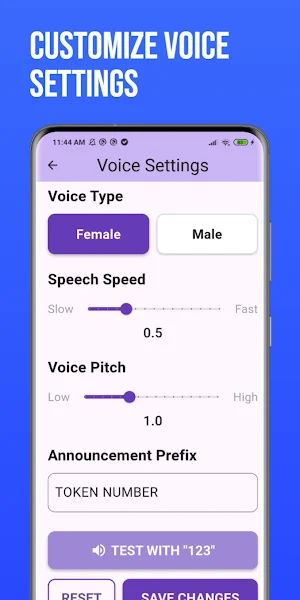
• Customizable announcement prefix (e.g., "TOKEN NUMBER", "QUEUE NUMBER")
• Female and male voice options
• Adjustable speech speed and pitch
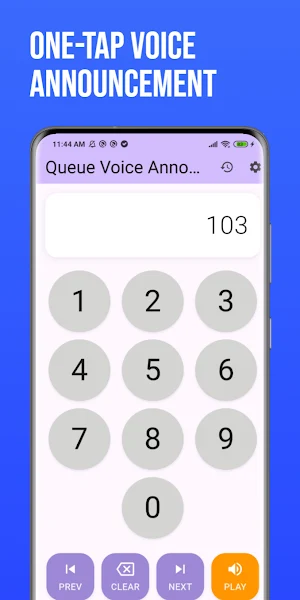
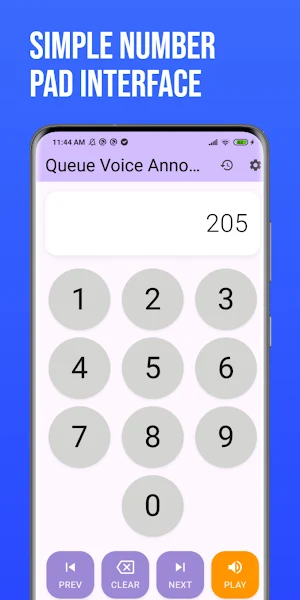
🔢 Number Pad Interface
• iOS Calculator-inspired design for familiarity
• Easy number entry from 0-9
• One-tap playback with PLAY button
• Auto-clear for faster workflow
📋 History Tracking
• View all previously announced numbers
• Timestamp for each announcement
• Replay any number from history
• Quick navigation with PREV/NEXT buttons
⚙️ Customization
• Adjust speech speed (0.3x - 1.0x)
• Control voice pitch (0.5 - 2.0)
• Choose voice gender
• Set custom announcement prefix
• Test settings before saving
🎯 PERFECT FOR
• Front desk operations
• Customer service counters
• Queue management systems
• Token number calling
• Reception areas
• Service centers
• Ticket systems
💡 WHY CHOOSE QUEUE VOICE ANNOUNCER?
✓ Simple & Intuitive - No learning curve, start announcing immediately
✓ Offline Functionality - No internet required
✓ No Ads - Clean, distraction-free experience
✓ Privacy Focused - No data collection, everything stays on your device
✓ Professional - Optimized for business environments
✓ Free - All features included at no cost
📱 HOW IT WORKS
1. Enter the queue/token number using the number pad
2. Press PLAY to announce the number
3. Customize voice settings as needed
4. View history to replay previous announcements
🔒 PRIVACY
Queue Voice Announcer respects your privacy. All data is stored locally on your device. No information is collected, transmitted, or shared.
📞 SUPPORT
Need help or have suggestions? Contact us at [email protected]
⭐ If you find Queue Voice Announcer helpful, please leave a 5 start rating and review!
Streamline your front desk operations with Queue Voice Announcer, the simple yet powerful app designed for customer service environments. Announce queue and token numbers clearly with customizable voice settings.
✨ KEY FEATURES
🎙️ Voice Announcement
• Text-to-speech technology for clear number calling
• Customizable announcement prefix (e.g., "TOKEN NUMBER", "QUEUE NUMBER")
• Female and male voice options
• Adjustable speech speed and pitch
🔢 Number Pad Interface
• iOS Calculator-inspired design for familiarity
• Easy number entry from 0-9
• One-tap playback with PLAY button
• Auto-clear for faster workflow
📋 History Tracking
• View all previously announced numbers
• Timestamp for each announcement
• Replay any number from history
• Quick navigation with PREV/NEXT buttons
⚙️ Customization
• Adjust speech speed (0.3x - 1.0x)
• Control voice pitch (0.5 - 2.0)
• Choose voice gender
• Set custom announcement prefix
• Test settings before saving
🎯 PERFECT FOR
• Front desk operations
• Customer service counters
• Queue management systems
• Token number calling
• Reception areas
• Service centers
• Ticket systems
💡 WHY CHOOSE QUEUE VOICE ANNOUNCER?
✓ Simple & Intuitive - No learning curve, start announcing immediately
✓ Offline Functionality - No internet required
✓ No Ads - Clean, distraction-free experience
✓ Privacy Focused - No data collection, everything stays on your device
✓ Professional - Optimized for business environments
✓ Free - All features included at no cost
📱 HOW IT WORKS
1. Enter the queue/token number using the number pad
2. Press PLAY to announce the number
3. Customize voice settings as needed
4. View history to replay previous announcements
🔒 PRIVACY
Queue Voice Announcer respects your privacy. All data is stored locally on your device. No information is collected, transmitted, or shared.
📞 SUPPORT
Need help or have suggestions? Contact us at [email protected]
⭐ If you find Queue Voice Announcer helpful, please leave a 5 start rating and review!
What’s new
Version 1.24.0 · Updated September 18, 2026
What's New You asked, I built it. 🔢 Number Reading Style — Choose how numbers are announced. Say "ten" instead of "one zero." Switch anytime in Settings. 🔔 Announcement Postfix — Add a message after every number. "Token 10. Please take your meal." Perfect for restaurants and clinics. Got an idea for the next feature? Tap 💡 in Settings and send it — I read every one.
Alternatives to Qvoice Queue management system
Looking for apps like Qvoice Queue management system? Here are 3 similar Android apps on Google Play. All of them are free to download.



| App | Rating | Price | Installs | Last updated | Compare |
|---|---|---|---|---|---|
| Qvoice Queue management system | – | Free | 500+ | Sep 18, 2026 | |
| Stocks League: Investing Game | – | Free | 100+ | Jan 23, 2026 | Compare |
| Divi | – | Free | 100+ | Sep 14, 2023 | Compare |
| Lotus Trading Company | – | Free | 1,000+ | Aug 3, 2024 | Compare |