

CallFlow: Auto Call Forwarding
Tools In-app purchases Contains ads
Automate call forwarding & divert. Route calls if busy or after hours 24/7.
- Downloads
- 10.6K+
- on Google Play
- Price
- Free
- In-app purchases
- Updated
- Sep 20
- 2026 · v1.0.260919.1430
Screenshots


About CallFlow: Auto Call Forwarding
Keep your business running 24/7 and reclaim your personal time. Automatically forward, divert, and route incoming calls based on your schedule.
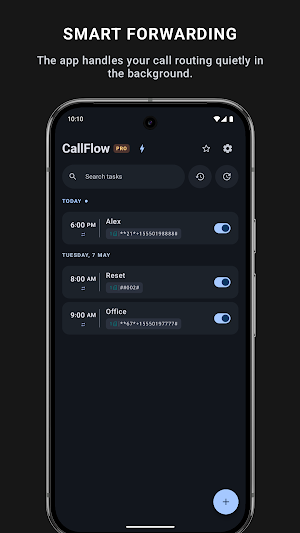
Stop manually dialing network codes every time your shift ends. Simply create your schedule once, and CallFlow acts as your digital receptionist—activating and deactivating carrier codes exactly when needed. No internet connection required!
🔀 SMART ROUTING SCENARIOS
Adapt your phone to any situation to ensure you never miss an important contact:
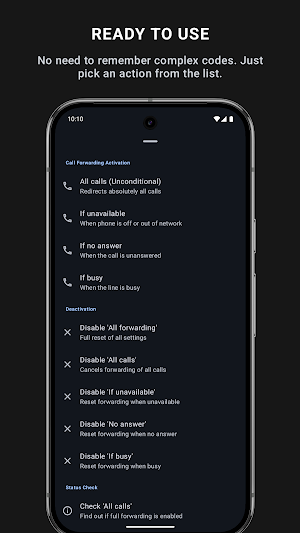
✅ Unconditional Forwarding (*21#): Instantly route all incoming calls to a colleague or call center. Perfect for after-hours and weekends.
✅ Forward if Busy (*67#): Don't let callers hear a busy tone. Automatically divert them to your backup agent or colleague.
✅ Forward if Unanswered (*61#): If you can't reach the phone in time, automatically pass the call to your team.
✅ Forward if Unreachable (*62#): Going into a dead zone or a flight? Have your calls automatically rerouted so no lead is lost.
⏱️ POWERFUL SCHEDULER
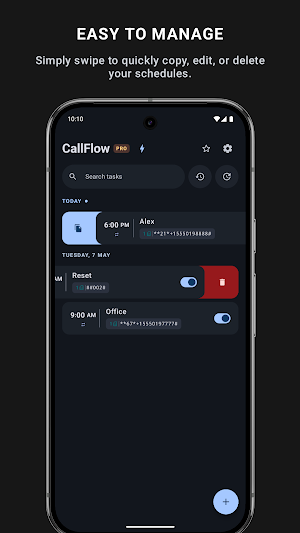
✅ Recurring Automation: Create tasks for specific times (e.g., "Every Friday at 5 PM"). The app automatically reschedules itself for the next cycle.
✅ Status Verification: Schedule automatic checks to ensure your routing is active before you leave work.
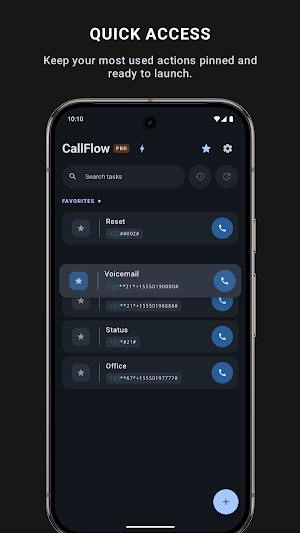
✅ One-Tap Favorites: Pin your most used divert scenarios to your control panel for instant manual activation.
📡 REMOTE CALL FORWARDING & TEAM CONTROL
✅ Forgot Phone at Home: Remotely turn call forwarding on or off on your work phone from anywhere.
✅ Team & On-Call Handoff: Easily route calls across team devices or shift workers without physical access to the phone.
✅ Multi-Device Cloud Link: Securely connect your phones to manage call divert rules across all your devices.
👥 SUITABLE FOR:
✅ Shift Workers & IT On-Call: Seamlessly pass the duty-phone to the next person.
✅ Small Businesses & Freelancers: Catch every inquiry by ringing your phone first, then falling back to a partner.
✅ Dual SIM Professionals: Apply rules strictly to your Work SIM while keeping your Personal SIM fully active.
🔒 SECURE & PRIVATE
Your schedules and contacts never leave your phone. Ensure no client is ever ignored, and never be bothered by a work call at 3 AM again.
Install CallFlow today to automate your call routing! The perfect solution for call forwarding, call divert, virtual receptionist setup, and custom forwarding schedules.
Stop manually dialing network codes every time your shift ends. Simply create your schedule once, and CallFlow acts as your digital receptionist—activating and deactivating carrier codes exactly when needed. No internet connection required!
🔀 SMART ROUTING SCENARIOS
Adapt your phone to any situation to ensure you never miss an important contact:
✅ Unconditional Forwarding (*21#): Instantly route all incoming calls to a colleague or call center. Perfect for after-hours and weekends.
✅ Forward if Busy (*67#): Don't let callers hear a busy tone. Automatically divert them to your backup agent or colleague.
✅ Forward if Unanswered (*61#): If you can't reach the phone in time, automatically pass the call to your team.
✅ Forward if Unreachable (*62#): Going into a dead zone or a flight? Have your calls automatically rerouted so no lead is lost.
⏱️ POWERFUL SCHEDULER
✅ Recurring Automation: Create tasks for specific times (e.g., "Every Friday at 5 PM"). The app automatically reschedules itself for the next cycle.
✅ Status Verification: Schedule automatic checks to ensure your routing is active before you leave work.
✅ One-Tap Favorites: Pin your most used divert scenarios to your control panel for instant manual activation.
📡 REMOTE CALL FORWARDING & TEAM CONTROL
✅ Forgot Phone at Home: Remotely turn call forwarding on or off on your work phone from anywhere.
✅ Team & On-Call Handoff: Easily route calls across team devices or shift workers without physical access to the phone.
✅ Multi-Device Cloud Link: Securely connect your phones to manage call divert rules across all your devices.
👥 SUITABLE FOR:
✅ Shift Workers & IT On-Call: Seamlessly pass the duty-phone to the next person.
✅ Small Businesses & Freelancers: Catch every inquiry by ringing your phone first, then falling back to a partner.
✅ Dual SIM Professionals: Apply rules strictly to your Work SIM while keeping your Personal SIM fully active.
🔒 SECURE & PRIVATE
Your schedules and contacts never leave your phone. Ensure no client is ever ignored, and never be bothered by a work call at 3 AM again.
Install CallFlow today to automate your call routing! The perfect solution for call forwarding, call divert, virtual receptionist setup, and custom forwarding schedules.
What’s new
Version 1.0.260919.1430 · Updated September 20, 2026
- Added new languages and improved stability. 💬 Have feedback, found a bug, or have questions? Email us at [email protected] — we'd be happy to help!
Alternatives to CallFlow: Auto Call Forwarding
Looking for apps like CallFlow: Auto Call Forwarding? Here are 6 similar Android apps on Google Play. The highest rated is MobileVOIP international calls (4.6/5), and all 6 are free to download.
-
MobileVOIP international calls 4.6
-
KeepCalling International 4.5
-
Should I Answer? 4.0
-
Phone Call App & WiFi Call Any 4.2
-
Hiya: Spam Blocker & Caller ID 3.9
-
Call Recorder - Auto Recording 3.9
| App | Rating | Price | Installs | Last updated | Compare |
|---|---|---|---|---|---|
| CallFlow: Auto Call Forwarding | – | Free | 10,000+ | Sep 20, 2026 | |
| MobileVOIP international calls | 4.6 / 5 | Free | 10,000,000+ | Sep 2, 2025 | Compare |
| KeepCalling International | 4.5 / 5 | Free | 1,000,000+ | Sep 22, 2026 | Compare |
| Should I Answer? | 4.0 / 5 | Free | 1,000,000+ | Jul 30, 2026 | Compare |
| Phone Call App & WiFi Call Any | 4.2 / 5 | Free | 1,000,000+ | – | Compare |
| Hiya: Spam Blocker & Caller ID | 3.9 / 5 | Free | 10,000,000+ | Jun 16, 2020 | Compare |
| Call Recorder - Auto Recording | 3.9 / 5 | Free | 50,000,000+ | Oct 10, 2022 | Compare |
Similar apps on Google Play
- MobileVOIP international calls
- KeepCalling International
- Should I Answer?
- Phone Call App & WiFi Call Any
- Hiya: Spam Blocker & Caller ID
- Call Recorder - Auto Recording
- Telz: International Calling
- Ava: Transcribe Voice to Text
- Call Recorder - Talker ACR
- Rogervoice Phone Call Captions
- Employee Link・Time Tracking
- Nextplus: Phone # Text + Call
- FilterBox Notification Manager
- Call Blocker - Block Numbers
- Toast Now
- Qashio
- Coolina
- Zoiper IAX SIP VOIP Softphone
- Quo (formerly OpenPhone)
- Phone Dialer & Contacts: drupe
- Parental Control App- FamiSafe
- Ollie - Human Grade Dog Food