

My Clipboard Manager - Clipboard History
Puna Devops Tools
Save any notes or article that you have copied to Clipboard Manager.
- Rating
- 4.0
- 70 ratings
- Downloads
- 5K+
- on Google Play
- Price
- Free
- No in-app purchases
- Updated
- Dec 29
- 2018 · v1.0
Screenshots


About My Clipboard Manager - Clipboard History
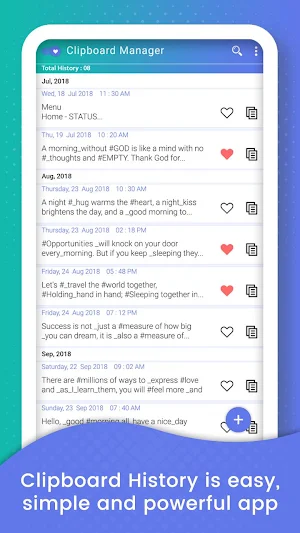
My Clipboard Manager - Clipboard History is easy, simple and powerful app to manage your clipboard stack, keep history, fast access to your notes in history, etc.
Import and export backup data to a file. Any data can now be restored from a previously saved backup.
Add notes to the favorites and you will always be able quickly to filter them from among all that is already kept in the history.
My Clipboard Manager - Clipboard History does not require network permission. It fully supports offline mode for notes creating, viewing & editing. You, and only you, can access your notes any time you want.
My Clipboard Manager - Clipboard History app Features :
- Search in notes contents. You will always be able quickly to find and filter the notes by any occurrence of the entered symbol.
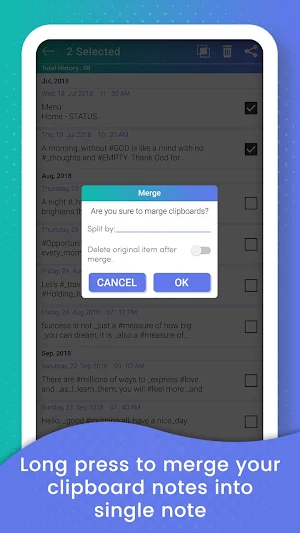
- Manage Unlimited Clipboards
- Automatically save any notes or article that you have copied to Clipboard.
- Keyword search in all your notes or article and you could get the search notes instantly.
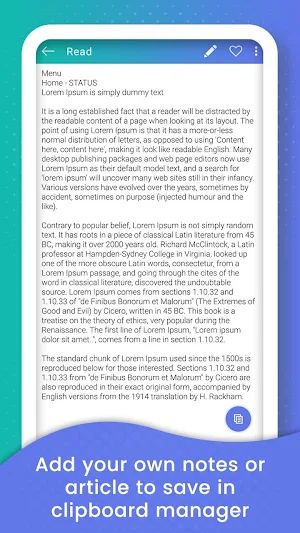
- Add your own notes or article to save in clipboard manager
- Clear clipboard: Clear all copied data
- Provide backup and restore your data with local storage device.
- Copy & Paste Clipboard, Copy to clipboard
- Copy Paste - Clipboard Manager, Copy Paste Anywhere
- Clipboard Settings, how many days you want to keep clipboard history?
Permission Usage
RECEIVE_BOOT_COMPLETED: Start a background service to listen the system clipboard. You can close it in Settings if you really don't want it.
WRITE_EXTERNAL_STORAGE and READ_EXTERNAL_STORAGE: For import & export your clipboard history. This app won't write any other files to your SD card.
Import and export backup data to a file. Any data can now be restored from a previously saved backup.
Add notes to the favorites and you will always be able quickly to filter them from among all that is already kept in the history.
My Clipboard Manager - Clipboard History does not require network permission. It fully supports offline mode for notes creating, viewing & editing. You, and only you, can access your notes any time you want.
My Clipboard Manager - Clipboard History app Features :
- Search in notes contents. You will always be able quickly to find and filter the notes by any occurrence of the entered symbol.
- Manage Unlimited Clipboards
- Automatically save any notes or article that you have copied to Clipboard.
- Keyword search in all your notes or article and you could get the search notes instantly.
- Add your own notes or article to save in clipboard manager
- Clear clipboard: Clear all copied data
- Provide backup and restore your data with local storage device.
- Copy & Paste Clipboard, Copy to clipboard
- Copy Paste - Clipboard Manager, Copy Paste Anywhere
- Clipboard Settings, how many days you want to keep clipboard history?
Permission Usage
RECEIVE_BOOT_COMPLETED: Start a background service to listen the system clipboard. You can close it in Settings if you really don't want it.
WRITE_EXTERNAL_STORAGE and READ_EXTERNAL_STORAGE: For import & export your clipboard history. This app won't write any other files to your SD card.
What’s new
Version 1.0 · Updated December 29, 2018
- Search in notes contents - Manage Unlimited Clipboards - Automatically save any notes or article that you have copied to Clipboard. - Provide backup and restore your data with local storage device.
User reviews

Good app!

Good apk

Very handy app

😍😍

nice apps

Pretty damm great. Free (as in beer). Ad-free. And it works quite well. Thanks Puna!
Alternatives to My Clipboard Manager - Clipboard History
Looking for apps like My Clipboard Manager - Clipboard History? Here are 6 similar Android apps on Google Play. The highest rated is Bluetooth Finder - Scan and Pa (4.6/5), and all 6 are free to download.
-
Transfer phone to SD Card – Fi 3.8
-
Image to JPG/PNG - Image Conve 3.7
-
Bluetooth Finder - Scan and Pa 4.6
-
Block WiFi - WiFi Inspector 3.6
-
PDF Tools - Merge, Rotate, Spl 3.6
-
bCards: Business Card Scanner 4.3
| App | Rating | Price | Installs | Last updated | Compare |
|---|---|---|---|---|---|
| My Clipboard Manager - Clipboard History | 4.0 / 5 | Free | 5,000+ | Dec 29, 2018 | |
| Transfer phone to SD Card – Fi | 3.8 / 5 | Free | 100,000+ | Jul 12, 2019 | Compare |
| Image to JPG/PNG - Image Conve | 3.7 / 5 | Free | 1,000,000+ | Jul 9, 2026 | Compare |
| Bluetooth Finder - Scan and Pa | 4.6 / 5 | Free | 1,000+ | Sep 4, 2021 | Compare |
| Block WiFi - WiFi Inspector | 3.6 / 5 | Free | 100,000+ | Jul 8, 2020 | Compare |
| PDF Tools - Merge, Rotate, Spl | 3.6 / 5 | Free | 100,000+ | – | Compare |
| bCards: Business Card Scanner | 4.3 / 5 | Free | 1,000+ | Feb 28, 2020 | Compare |