
PS Remote Play-Game Controller
CrDev Entertainment Contains ads
Virtual PS Remote Play controller play PS5 & PS4 on phone, no DualSense needed
- Downloads
- 75.8K+
- on Google Play
- Price
- Free
- No in-app purchases
- Updated
- Aug 12
- 2026 · v1.9.0
Screenshots


About PS Remote Play-Game Controller
Play PS5 & PS4 Anywhere with PS Remote Play Controller
Turn your phone into a powerful PS Remote Play controller and play your favorite PS5 Remote Play and PS4 Remote Play games anywhere
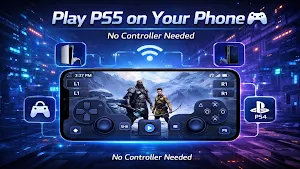
📱Use your device as a virtual controller for PS Remote Play and enjoy smooth gameplay without needing a physical controller.
With this PlayStation Remote Play app, you can stream your console directly to your phone and use an on-screen controller designed for responsive, comfortable gaming.
Experience True Mobile PlayStation Gaming
Play your PlayStation games on your phone with a PS Remote Play controller app that transforms your device into a handheld console.
✔ Stream PS5 and PS4 games to your phone
✔ Use your phone as a virtual PS5 controller or PS4 controller
✔ Enjoy low latency PS Remote Play streaming
✔ Play anywhere without being tied to your TV
Whether you're at home or on the go, this app lets you play PS5 on your phone and control PlayStation remotely with ease.
Key Features
Virtual PS Remote Play Controller
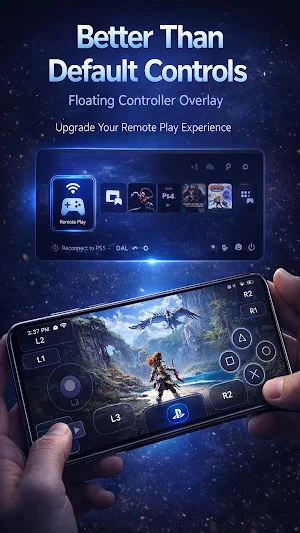
Use a fully functional on-screen controller for PS Remote Play designed to mimic DualSense and DualShock layouts.
PS5 & PS4 Remote Play Streaming
Stream gameplay from your console with high-quality video and low latency performance.
Play Without a Physical Controller
No controller? No problem. Use your phone as a PS Remote Play touch controller and keep playing.
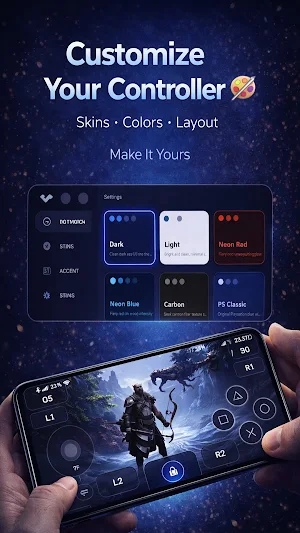
Customizable Controller Layout
Personalize your virtual game controller with custom layouts, colors, and skins.
⚡Optimized Performance
Built for smooth PS Remote Play gameplay, responsive touch controls, and stable connections.
Play Anywhere, Anytime
● Play PS5 games on your phone without a TV
● Stream PS4 games to your mobile device
● Use your phone as a controller replacement for PS Remote Play
● Enjoy a portable PlayStation experience anywhere
This app gives you the freedom to play PlayStation games anytime, anywhere.
How to Use
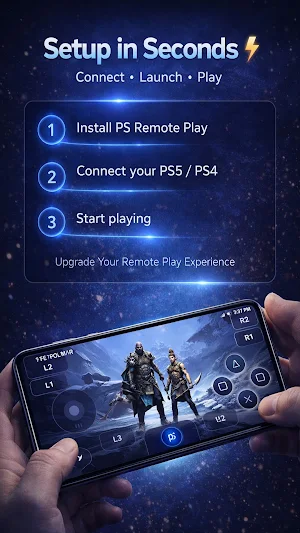
1. Make sure your console supports PlayStation Remote Play
2. Connect your PS5 or PS4 to a stable Wi-Fi network
3. Sign in to your PlayStation account
4. Launch the app and connect to your console
5. Start playing using the PS Remote Play virtual controller
Why Choose This PS Remote Play Controller App?
● ✔Play PS5 & PS4 on your phone
● ✔Use your phone as a PlayStation controller
● ✔Best solution for PS Remote Play without controller
● ✔Smooth, responsive mobile gaming controller experience
● ✔Designed for PlayStation Remote Play compatibility
Disclaimer
This app is a third-party application designed to work with PlayStation Remote Play.
It is not affiliated with, endorsed by, or officially connected to Sony Interactive Entertainment.
Turn your phone into a powerful PS Remote Play controller and play your favorite PS5 Remote Play and PS4 Remote Play games anywhere
📱Use your device as a virtual controller for PS Remote Play and enjoy smooth gameplay without needing a physical controller.
With this PlayStation Remote Play app, you can stream your console directly to your phone and use an on-screen controller designed for responsive, comfortable gaming.
Experience True Mobile PlayStation Gaming
Play your PlayStation games on your phone with a PS Remote Play controller app that transforms your device into a handheld console.
✔ Stream PS5 and PS4 games to your phone
✔ Use your phone as a virtual PS5 controller or PS4 controller
✔ Enjoy low latency PS Remote Play streaming
✔ Play anywhere without being tied to your TV
Whether you're at home or on the go, this app lets you play PS5 on your phone and control PlayStation remotely with ease.
Key Features
Virtual PS Remote Play Controller
Use a fully functional on-screen controller for PS Remote Play designed to mimic DualSense and DualShock layouts.
PS5 & PS4 Remote Play Streaming
Stream gameplay from your console with high-quality video and low latency performance.
Play Without a Physical Controller
No controller? No problem. Use your phone as a PS Remote Play touch controller and keep playing.
Customizable Controller Layout
Personalize your virtual game controller with custom layouts, colors, and skins.
⚡Optimized Performance
Built for smooth PS Remote Play gameplay, responsive touch controls, and stable connections.
Play Anywhere, Anytime
● Play PS5 games on your phone without a TV
● Stream PS4 games to your mobile device
● Use your phone as a controller replacement for PS Remote Play
● Enjoy a portable PlayStation experience anywhere
This app gives you the freedom to play PlayStation games anytime, anywhere.
How to Use
1. Make sure your console supports PlayStation Remote Play
2. Connect your PS5 or PS4 to a stable Wi-Fi network
3. Sign in to your PlayStation account
4. Launch the app and connect to your console
5. Start playing using the PS Remote Play virtual controller
Why Choose This PS Remote Play Controller App?
● ✔Play PS5 & PS4 on your phone
● ✔Use your phone as a PlayStation controller
● ✔Best solution for PS Remote Play without controller
● ✔Smooth, responsive mobile gaming controller experience
● ✔Designed for PlayStation Remote Play compatibility
Disclaimer
This app is a third-party application designed to work with PlayStation Remote Play.
It is not affiliated with, endorsed by, or officially connected to Sony Interactive Entertainment.
What’s new
Version 1.9.0 · Updated August 12, 2026
- make the app more stable and fix some issues.
Alternatives to PS Remote Play-Game Controller
Looking for apps like PS Remote Play-Game Controller? Here are 6 similar Android apps on Google Play. All of them are free to download.
-
Video Downloader for Pinterest
-
Voice Funny Reverse
-
LumiEdg-Edge & Border Lighting
-
Anime Shimeji Pets on Screen
-
DynaBar: Dynamic Notch Island
-
Chameleon: Image Compressor
| App | Rating | Price | Installs | Last updated | Compare |
|---|---|---|---|---|---|
| PS Remote Play-Game Controller | – | Free | 50,000+ | Aug 12, 2026 | |
| Video Downloader for Pinterest | – | Free | 1,000+ | Mar 1, 2026 | Compare |
| Voice Funny Reverse | – | Free | 1,000+ | Nov 9, 2025 | Compare |
| LumiEdg-Edge & Border Lighting | – | Free | 1,000+ | Apr 26, 2026 | Compare |
| Anime Shimeji Pets on Screen | – | Free | 1,000+ | Feb 22, 2026 | Compare |
| DynaBar: Dynamic Notch Island | – | Free | 1,000+ | Mar 3, 2026 | Compare |
| Chameleon: Image Compressor | – | Free | 100+ | Apr 19, 2026 | Compare |
Similar apps on Google Play
- Video Downloader for Pinterest
- Voice Funny Reverse
- LumiEdg-Edge & Border Lighting
- Anime Shimeji Pets on Screen
- DynaBar: Dynamic Notch Island
- Chameleon: Image Compressor
- ArDogy: Funny DogDoin meme
- Digital Compass : Qibla Finder
- IceMote - Universal AC Remote
- GPS Camera: Photo Location Map
- NetPulse –WiFi Analyzer & Info
- BatteryPet: Kawaii Battery Pet
- QR Code Scanner & Generator
- LED Banner & Edge Lighting
- Horizon Wallpaper: Day & Night
- Battery Charging Animation
- Zipper Lock Screen - ZipLock