
Home Morph - AI Home Designer
House & Home In-app purchases Contains ads
Redesign your room from a photo. Describe the look and see it before you buy.
- Downloads
- 5+
- on Google Play
- Price
- Free
- In-app purchases
- Updated
- Aug 20
- 2026 · v1.0.0
Screenshots
About Home Morph - AI Home Designer
HomeMorph redesigns your actual room, not a stock photo.
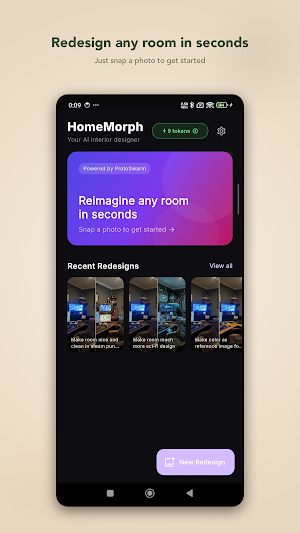
Take a picture of the room you want to change, tell HomeMorph what you have in mind, and it gives you back a redesigned version of that same space. No measuring, no 3D modelling, no design degree. Just a photo and a sentence.
How it works
Snap a photo of your room, or pick one from your gallery.
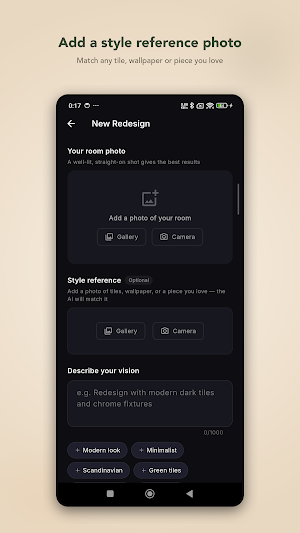
Describe the change you want — "warmer lighting and a big green sofa," "make this a Scandinavian bedroom," "clear the clutter and add plants." Or skip the typing and add a second photo as a style reference.
Get your redesign back in seconds.
Not quite right? Refine it. Ask for a different colour, swap a piece of furniture, or push the whole look further, and HomeMorph reworks the image without starting over.
What you can do with it
Try a new style before spending a cent on paint or furniture
Test ideas for a renovation or a room you're decorating from scratch
Stage a room you're selling or renting
Settle a "should we go dark walls or light" argument
Just play around with rooms you like
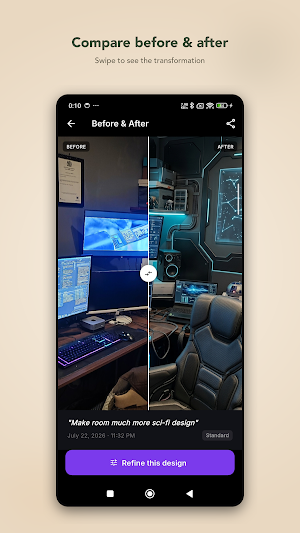
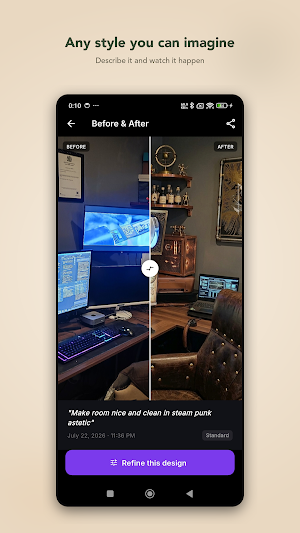
Every redesign is saved to your history, so you can go back, compare before and after with a slider, share the result, or pick one up again later to keep refining.
Tokens
Each redesign uses one token. You start with free tokens to try it properly, and you can top up whenever you run out. Prefer not to pay? Watch a short ad and earn a token. No subscription, no locked features — you only spend a token when you actually generate an image.
A few honest notes
HomeMorph gives you ideas and inspiration, not construction plans. Results are AI-generated, so treat them as a starting point for the real thing. The more specific your description, the closer you'll get to what's in your head.
Point it at a room and see what it comes back with.
Take a picture of the room you want to change, tell HomeMorph what you have in mind, and it gives you back a redesigned version of that same space. No measuring, no 3D modelling, no design degree. Just a photo and a sentence.
How it works
Snap a photo of your room, or pick one from your gallery.
Describe the change you want — "warmer lighting and a big green sofa," "make this a Scandinavian bedroom," "clear the clutter and add plants." Or skip the typing and add a second photo as a style reference.
Get your redesign back in seconds.
Not quite right? Refine it. Ask for a different colour, swap a piece of furniture, or push the whole look further, and HomeMorph reworks the image without starting over.
What you can do with it
Try a new style before spending a cent on paint or furniture
Test ideas for a renovation or a room you're decorating from scratch
Stage a room you're selling or renting
Settle a "should we go dark walls or light" argument
Just play around with rooms you like
Every redesign is saved to your history, so you can go back, compare before and after with a slider, share the result, or pick one up again later to keep refining.
Tokens
Each redesign uses one token. You start with free tokens to try it properly, and you can top up whenever you run out. Prefer not to pay? Watch a short ad and earn a token. No subscription, no locked features — you only spend a token when you actually generate an image.
A few honest notes
HomeMorph gives you ideas and inspiration, not construction plans. Results are AI-generated, so treat them as a starting point for the real thing. The more specific your description, the closer you'll get to what's in your head.
Point it at a room and see what it comes back with.
What’s new
Version 1.0.0 · Updated August 20, 2026
Happy Morphing
Alternatives to Home Morph - AI Home Designer
Looking for apps like Home Morph - AI Home Designer? Here are 6 similar Android apps on Google Play. The highest rated is Renovate AI : House Design (4.5/5), and all 6 are free to download.
-
Sotheby's 4.2
-
Accio: Alibaba AI Agent 4.4
-
Figma: view. comment. mirror. 4.1
-
ConstructionOnline 3.9
-
PandaHall Beads 4.4
-
Renovate AI : House Design 4.5
| App | Rating | Price | Installs | Last updated | Compare |
|---|---|---|---|---|---|
| Home Morph - AI Home Designer | – | Free | 5+ | Aug 20, 2026 | |
| Sotheby's | 4.2 / 5 | Free | 100,000+ | Oct 21, 2026 | Compare |
| Accio: Alibaba AI Agent | 4.4 / 5 | Free | 5,000,000+ | Oct 16, 2026 | Compare |
| Figma: view. comment. mirror. | 4.1 / 5 | Free | 5,000,000+ | Sep 28, 2026 | Compare |
| ConstructionOnline | 3.9 / 5 | Free | 10,000+ | Oct 23, 2026 | Compare |
| PandaHall Beads | 4.4 / 5 | Free | 100,000+ | Sep 18, 2026 | Compare |
| Renovate AI : House Design | 4.5 / 5 | Free | 100,000+ | Oct 7, 2026 | Compare |
Similar apps on Google Play
- Sotheby's
- Accio: Alibaba AI Agent
- Figma: view. comment. mirror.
- ConstructionOnline
- PandaHall Beads
- Renovate AI : House Design
- Design Space: DIY with Cricut
- AI Home Design: Ideal House
- DrawPlan
- Arch - AI Home Design
- Oh She Glows - Healthy Recipes
- AI Home Design: Interior DecAI
- Floor Plan Creator
- Planter - Garden Planner
- Houzz - Home Design & Remodel
- AiPPT- AI Presentation Maker
- Remodel AI - Home Renovation
- Wix - Website Builder
- Home AI - AI Interior Design
- Lotus Flow - Yoga & Workout
- Moblo - 3D Furniture Design
- Fluer: AI Design, Photo, Video
- magicplan
- ZWCAD Mobile - DWG Viewer
- Invaluable Auctions: Bid Live
- ArcSite: CAD & Floor Plans
- HomeByMe
- Planner 5D: AI Home Design
- Homestyler - Home Design Game
- Home Planner AI: Room Interior
- AutoCAD - DWG Viewer & Editor
- Fig - AI Agents & Automation
- Desygner: Graphic Design Maker