

Screen Recorder - Recorder
GAM Mobile App Video Players & Editors Contains ads
Screen capture & Screen recorder with audio from our screen recording app
- Downloads
- 1K+
- on Google Play
- Price
- Free
- No in-app purchases
- Updated
- Sep 15
- 2023 · v1.0.1
Screenshots

About Screen Recorder - Recorder
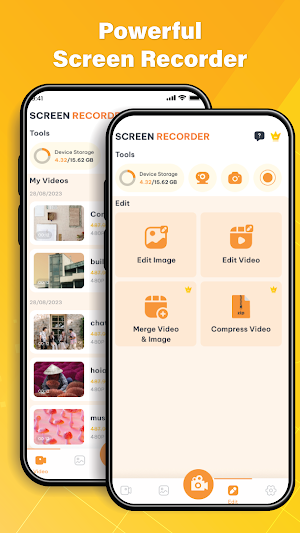
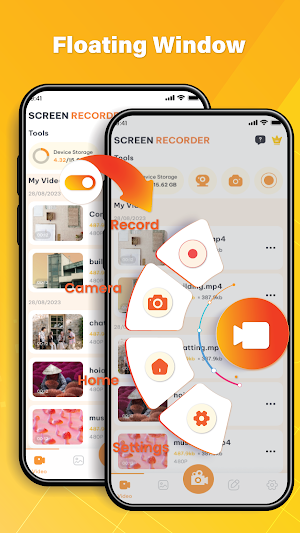
Are you ready to unlock the full potential of your creativity? With the Screen Recorder - an easy-to-use screen recording app to record and capture smooth & clear screen videos with or without a front camera. Just with a tap on the floating window, you can record video & capture screen all things from simple moments to things that can not be downloaded. Discover a variety of features such as screen capture, video recorder, game recorder, record facetime…in your hands from our screen recorder app.
🔥Main features of screen recorder app🔥
🎥Screen Recorder
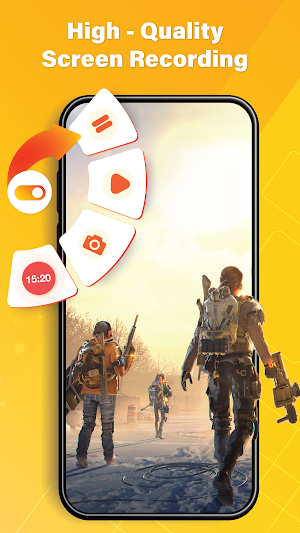
Screen Recorder is a solution for capturing and recording any content right on your screen, even while you are playing. Enjoy the smooth & clear screen recording experience and never miss important moments anymore
🎥Screen recorder with audio
After recording screen, you can choose the audio source that you want to record, such as your computer sound, mic or both. Ensuring that your videos are not only informative but also engaging.
🎥Photo editor & Video maker at your fingertips
Our video recording app will assist you in effortlessly transforming photos into videos with just 1 tap. Simply upload the images you like, and the screen recorder app will merge them to create an engaging story.
🎥Video recorder with multiple editing tools
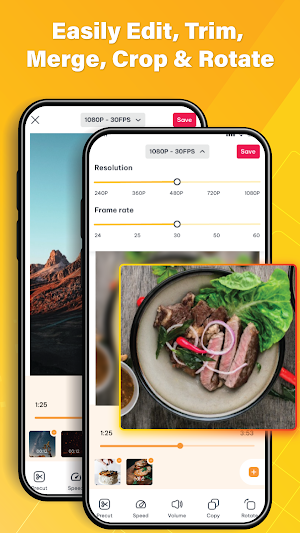
- Video trimmer: Trim, Cut and Split video to make it a better artwork
- Crop & Rotate video left, right or any other angle
- Funny Sticker and Text to personalize your screen capture
- Change speed: Slow down or speed up record your screen
🔥Why choose the screen recorder app?🔥
✅ High quality screen recording
✅ User-friendly interface with simple operations.
✅ Various effects & filters
✅ Stable & Smooth video recorder
✅ Effortlessly make screen recorder with audio
✅ Customize audio for screen recorder
✅ Record screen through notification bar
✅ Share on multiple social media
✅ Multiple language support for an enhanced user experience.
✂️How to use the screen recording app:✂️
Launch the video recording app on your device. Configure your recording video settings according to your needs. Start recording videos with a single click. Try enhancing your video with multiple editing tools. And finally, share them with the world by multiple social media.
Experience the ultimate of creativity with a live Screen Recorder app. Whether you're an educator, content creator, or just someone who loves to share stories, our record games app is your gateway to unlimited creative possibilities. Enjoy our screen record with audio app and start recording videos of all special moments of your life.
If you have any questions about the screen recording app, don’t hesitate to contact us immediately. We will reply as soon as possible. Thank you for using the screen recorder app!
🔥Main features of screen recorder app🔥
🎥Screen Recorder
Screen Recorder is a solution for capturing and recording any content right on your screen, even while you are playing. Enjoy the smooth & clear screen recording experience and never miss important moments anymore
🎥Screen recorder with audio
After recording screen, you can choose the audio source that you want to record, such as your computer sound, mic or both. Ensuring that your videos are not only informative but also engaging.
🎥Photo editor & Video maker at your fingertips
Our video recording app will assist you in effortlessly transforming photos into videos with just 1 tap. Simply upload the images you like, and the screen recorder app will merge them to create an engaging story.
🎥Video recorder with multiple editing tools
- Video trimmer: Trim, Cut and Split video to make it a better artwork
- Crop & Rotate video left, right or any other angle
- Funny Sticker and Text to personalize your screen capture
- Change speed: Slow down or speed up record your screen
🔥Why choose the screen recorder app?🔥
✅ High quality screen recording
✅ User-friendly interface with simple operations.
✅ Various effects & filters
✅ Stable & Smooth video recorder
✅ Effortlessly make screen recorder with audio
✅ Customize audio for screen recorder
✅ Record screen through notification bar
✅ Share on multiple social media
✅ Multiple language support for an enhanced user experience.
✂️How to use the screen recording app:✂️
Launch the video recording app on your device. Configure your recording video settings according to your needs. Start recording videos with a single click. Try enhancing your video with multiple editing tools. And finally, share them with the world by multiple social media.
Experience the ultimate of creativity with a live Screen Recorder app. Whether you're an educator, content creator, or just someone who loves to share stories, our record games app is your gateway to unlimited creative possibilities. Enjoy our screen record with audio app and start recording videos of all special moments of your life.
If you have any questions about the screen recording app, don’t hesitate to contact us immediately. We will reply as soon as possible. Thank you for using the screen recorder app!
What’s new
Version 1.0.1 · Updated September 15, 2023
Screen Recorder - Recorder for Android
Alternatives to Screen Recorder - Recorder
Looking for apps like Screen Recorder - Recorder? Here are 6 similar Android apps on Google Play. The highest rated is Basic Calculator 2023 (5.0/5), and all 6 are free to download.
-
Dog & Cat Translator Prank App 1.2
-
Clap, Whistle To Find My Phone 4.5
-
Basic Calculator 2023 5.0
-
Volume Booster: Sound Booster 4.7
-
Photo Video Maker & Reel Maker 4.9
-
Flashlight & Led Torch Light
| App | Rating | Price | Installs | Last updated | Compare |
|---|---|---|---|---|---|
| Screen Recorder - Recorder | – | Free | 1,000+ | Sep 15, 2023 | |
| Dog & Cat Translator Prank App | 1.2 / 5 | Free | 5,000+ | Aug 28, 2023 | Compare |
| Clap, Whistle To Find My Phone | 4.5 / 5 | Free | 500+ | Aug 26, 2023 | Compare |
| Basic Calculator 2023 | 5.0 / 5 | Free | 5,000+ | Oct 5, 2023 | Compare |
| Volume Booster: Sound Booster | 4.7 / 5 | Free | 100+ | Aug 26, 2023 | Compare |
| Photo Video Maker & Reel Maker | 4.9 / 5 | Free | 10,000+ | Aug 24, 2023 | Compare |
| Flashlight & Led Torch Light | – | Free | 1,000+ | Jan 10, 2023 | Compare |
Similar apps on Google Play
- Dog & Cat Translator Prank App
- Clap, Whistle To Find My Phone
- Basic Calculator 2023
- Volume Booster: Sound Booster
- Photo Video Maker & Reel Maker
- Flashlight & Led Torch Light
- Call Color Themes: Call Dialer
- Cast To TV: Screen Mirroring
- Crack & Broken Screen Prank
- File Miner - Photo Recovery
- PDF Reader: PDF Viewer, Editor
- TV Remote - Universal Control
- Battery Charging Animation
- Speed Test Master: 5G/4G/WiFi
- DJ Music Mixer - DJ Mix Studio
- Screen Mirroring - TV Miracast
- PDF Scanner - Easy Scanner
- QR Code Scanner & Barcode