
Bluetooth Pair: Finder Scanner
Sannit Tech Tools Contains ads
Bluetooth Connector with you can find pair the most connected device
- Downloads
- 100+
- on Google Play
- Price
- Free
- No in-app purchases
- Updated
- May 30
- 2023 · v1.0
Screenshots
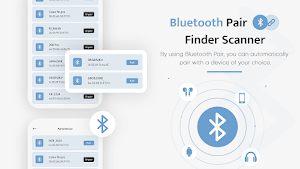
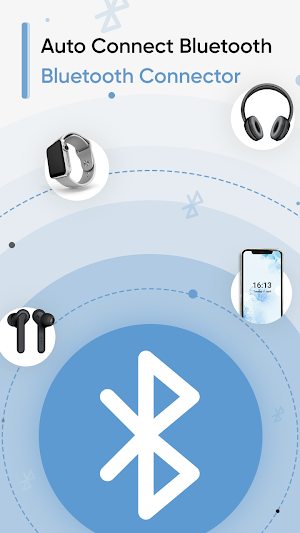
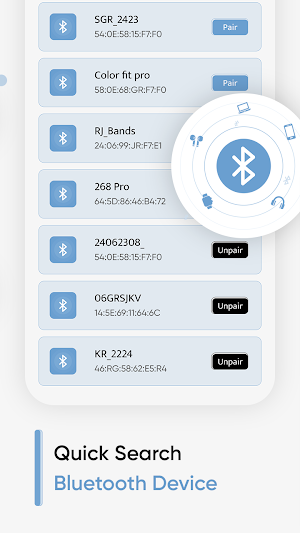
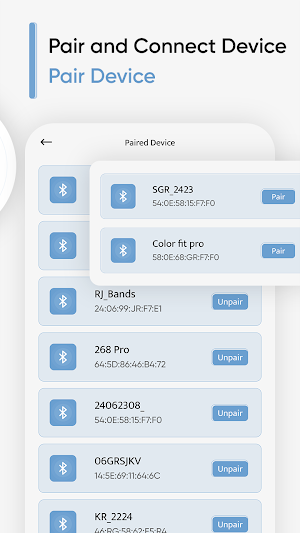


About Bluetooth Pair: Finder Scanner
Bluetooth Pair: Finder Scanner is the app with which you can connect the most recently connected Bluetooth device. Now no more tedious way to connect with Bluetooth devices, use our Bluetooth Pair: Finder Scanner app and direct connect with the last paired Bluetooth device. Sometimes it's too hard to connect with a Bluetooth device, just place our app and directly connect with the last paired device.
Bluetooth Pair: Finder Scanner is the best app for scanning a device and connecting devices. Now it's easy to connect any Bluetooth device, such as a Bluetooth headset or speaker, earbuds, and many wireless devices using this app. The Bluetooth Device Finder also has a feature that allows you to save previously connected Bluetooth devices for reconnecting later. Bluetooth Pair: Finder Scanner app provides you to pair the last connected Bluetooth device.
Bluetooth Pair: Finder Scanner app works like Bluetooth Scanner for the android user which allows the option of quick search Bluetooth speakers, Bluetooth gadgets, and every Bluetooth wireless device. Bluetooth Auto Connector is a simple tool which allows you to scan all nearby Bluetooth devices. This Bluetooth Device Connector with you can also add a direct shortcut Widget of any pair of Bluetooth devices to direct access to enable Bluetooth.
FEATURES OF Bluetooth Pair: Finder Scanner App
# Connect to the last pair of bluetooth device
# Allow to pair the most recently connected BT device
# Easy to scan and connect with Bluetooth Finder tool
# Quick search to find all wireless devices nearby your area
# Find the pair devices list and adjust it with your choice
# See the history of last all connected devices and manage it with your needs
# Allow adding a widget on screen to direct access in one tap
# Smart Bluetooth Finder tool to connect with BT device
# Simple and easy to use
# Clear User Interface design
Bluetooth Pair: Finder Scanner is the best app for scanning a device and connecting devices. Now it's easy to connect any Bluetooth device, such as a Bluetooth headset or speaker, earbuds, and many wireless devices using this app. The Bluetooth Device Finder also has a feature that allows you to save previously connected Bluetooth devices for reconnecting later. Bluetooth Pair: Finder Scanner app provides you to pair the last connected Bluetooth device.
Bluetooth Pair: Finder Scanner app works like Bluetooth Scanner for the android user which allows the option of quick search Bluetooth speakers, Bluetooth gadgets, and every Bluetooth wireless device. Bluetooth Auto Connector is a simple tool which allows you to scan all nearby Bluetooth devices. This Bluetooth Device Connector with you can also add a direct shortcut Widget of any pair of Bluetooth devices to direct access to enable Bluetooth.
FEATURES OF Bluetooth Pair: Finder Scanner App
# Connect to the last pair of bluetooth device
# Allow to pair the most recently connected BT device
# Easy to scan and connect with Bluetooth Finder tool
# Quick search to find all wireless devices nearby your area
# Find the pair devices list and adjust it with your choice
# See the history of last all connected devices and manage it with your needs
# Allow adding a widget on screen to direct access in one tap
# Smart Bluetooth Finder tool to connect with BT device
# Simple and easy to use
# Clear User Interface design
Frequently asked questions
What is Bluetooth Pair: Finder Scanner?
Bluetooth Pair: Finder Scanner is an app that allows you to easily connect with the most recently paired Bluetooth device. It is a tool for quick search and connection with Bluetooth devices.
Why should I use Bluetooth Pair: Finder Scanner?
Bluetooth Pair: Finder Scanner makes it easy to connect with Bluetooth devices such as headsets, speakers, earbuds, and other wireless devices. It also allows you to save and manage a list of previously connected devices for easy reconnection.
What are the features of Bluetooth Pair: Finder Scanner?
The features of Bluetooth Pair: Finder Scanner include connecting to the last paired Bluetooth device, easy scanning and connection with the Bluetooth Finder tool, quick search for nearby wireless devices, managing and adjusting the list of paired devices, keeping a history of connected devices, adding a widget for quick access, a smart Bluetooth Finder tool, simple and easy-to-use interface design.
How does Bluetooth Pair: Finder Scanner work?
Bluetooth Pair: Finder Scanner works as a Bluetooth Scanner for Android users. It scans all nearby Bluetooth devices and allows you to quickly search and connect with Bluetooth speakers, gadgets, and other wireless devices. It also provides a direct shortcut widget for easy access to enable Bluetooth.
Alternatives to Bluetooth Pair: Finder Scanner
Looking for apps like Bluetooth Pair: Finder Scanner? Here are 3 similar Android apps on Google Play. All of them are free to download.


| App | Rating | Price | Installs | Last updated | Compare |
|---|---|---|---|---|---|
| Bluetooth Pair: Finder Scanner | – | Free | 100+ | May 30, 2023 | |
| Night Camera HD Photo & Video | – | Free | 1,000+ | Sep 30, 2023 | Compare |
| Magnifying Glass 10x Zoom | – | Free | 10+ | Aug 5, 2023 | Compare |
| Blood Pressure BPM Tracker | – | Free | 100+ | May 18, 2023 | Compare |