

Z-Cut Movie Maker
Plotagon Entertainment In-app purchases Contains ads
Your story with ZEPETO avatars
- Rating
- 3.8
- 22 ratings
- Downloads
- 1K+
- on Google Play
- Price
- Free
- In-app purchases
- Updated
- Mar 4
- 2022 · v0.9.2
Screenshots


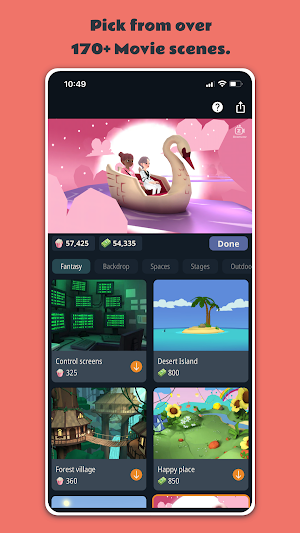
About Z-Cut Movie Maker
Create animated stories with ZEPETO avatars. Making movies has never been this easy! Express your creativity in minutes. Anytime! Anywhere!
Choose a scene. Place your avatar. Animate it. Write dialogues. Add audio. Save and share. Its that simple.
Bring your stories to life with these editing tools:
+ SCENE: Set the location where your story takes place and choose up to 2 ZEPETO avatars.
+ DIALOGUE: Write or record dialogues for your avatars. You can record your own voice or pick one from our library.
+ INTERACTION: Have your avatars interact with each other. Convey the right emotion by choosing from a library of animations.
+ SOUND: Establish realism in your scenes by adding sound effects.
+ MUSIC: Add background music to set the mood.
+ INTERTITLE: Add fullscreen text to provide additional context to your narrative.
Easily organize and preview your narrative in our intuitive manuscript. When you are done, tap the save button to create a video that you can share with friends and family or on social media.
Choose a scene. Place your avatar. Animate it. Write dialogues. Add audio. Save and share. Its that simple.
Bring your stories to life with these editing tools:
+ SCENE: Set the location where your story takes place and choose up to 2 ZEPETO avatars.
+ DIALOGUE: Write or record dialogues for your avatars. You can record your own voice or pick one from our library.
+ INTERACTION: Have your avatars interact with each other. Convey the right emotion by choosing from a library of animations.
+ SOUND: Establish realism in your scenes by adding sound effects.
+ MUSIC: Add background music to set the mood.
+ INTERTITLE: Add fullscreen text to provide additional context to your narrative.
Easily organize and preview your narrative in our intuitive manuscript. When you are done, tap the save button to create a video that you can share with friends and family or on social media.
What’s new
Version 0.9.2 · Updated March 4, 2022
Changes: - Fixes issue where some users were not able to install the app - Fixes issue where rendering a movie resulted in a crash
User reviews

Just good
Frequently asked questions
What is Z-Cut Movie Maker?
Z-Cut Movie Maker is a tool that allows you to create animated stories using ZEPETO avatars.
How do I use Z-Cut Movie Maker?
You can use Z-Cut Movie Maker by choosing a scene, placing your avatar, animating it, writing dialogues, adding audio, and then saving and sharing your creation.
What editing tools are available in Z-Cut Movie Maker?
The editing tools available in Z-Cut Movie Maker include scene selection, dialogue writing and recording, avatar interaction, sound effects, background music, and fullscreen text (intertitle) addition.
How can I preview my narrative in Z-Cut Movie Maker?
You can easily organize and preview your narrative using the intuitive manuscript feature in Z-Cut Movie Maker.
What can I do with the video created in Z-Cut Movie Maker?
Once you are done creating your video in Z-Cut Movie Maker, you can save it and share it with friends and family or on social media platforms.
Alternatives to Z-Cut Movie Maker
Looking for apps like Z-Cut Movie Maker? Here are 6 similar Android apps on Google Play. The highest rated is Film Maker Pro - Movie Maker (4.6/5), and all 6 are free to download.
-
Renderforest Intro Animation 4.6
-
Video Editor & Maker - ShowCut 4.3
-
Pinreel - Reels & Intro Maker 3.7
-
Film Maker Pro - Movie Maker 4.6
-
RealTimes Video Maker 4.3
-
Movavi Clips - Video Editor 4.4
| App | Rating | Price | Installs | Last updated | Compare |
|---|---|---|---|---|---|
| Z-Cut Movie Maker | 3.8 / 5 | Free | 1,000+ | Mar 4, 2022 | |
| Renderforest Intro Animation | 4.6 / 5 | Free | 1,000,000+ | Sep 30, 2026 | Compare |
| Video Editor & Maker - ShowCut | 4.3 / 5 | Free | 5,000+ | Mar 8, 2021 | Compare |
| Pinreel - Reels & Intro Maker | 3.7 / 5 | Free | 100,000+ | Aug 26, 2024 | Compare |
| Film Maker Pro - Movie Maker | 4.6 / 5 | Free | 10,000,000+ | Jun 19, 2024 | Compare |
| RealTimes Video Maker | 4.3 / 5 | Free | 10,000,000+ | – | Compare |
| Movavi Clips - Video Editor | 4.4 / 5 | Free | 10,000,000+ | – | Compare |
Compare Z-Cut Movie Maker with the top alternatives: ratings, updates, ASO score and keyword gaps →
Similar apps on Google Play
- Renderforest Intro Animation
- Video Editor & Maker - ShowCut
- Pinreel - Reels & Intro Maker
- Film Maker Pro - Movie Maker
- RealTimes Video Maker
- Movavi Clips - Video Editor
- LightMV - Video Maker
- LightCut - AI video editor
- PowerDirector - Video Editor
- Video Editing - Vidma Editor
- Vivu Video Pro
- Video Editor - Crop & Trim mp4
- Kapwing
- Apowersoft Screen Recorder
- Filmora Video Editor & Maker
- Cute CUT - Video Editor & Movi
- Vinkle – Music Video Maker
- Splice - Video Editor & Maker