

Messages: SMS, Chat & Text
Patoliya Infotech Communication Contains ads
Smart SMS inbox: auto-sort, block spam, schedule texts, stay private.
- Downloads
- 10.5K+
- on Google Play
- Price
- Free
- No in-app purchases
- Updated
- Sep 21
- 2026 · v1.1.1
Screenshots


About Messages: SMS, Chat & Text
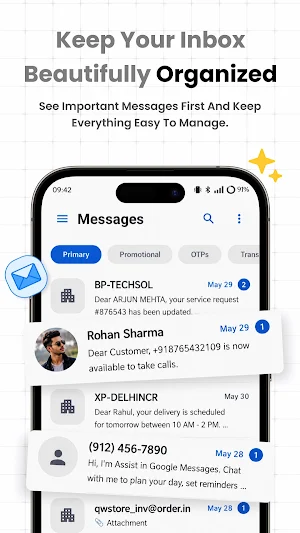
Message turns a cluttered SMS inbox into an organized one. It automatically sorts your texts into Personal, OTP/Secure, and Transaction categories, blocks spam numbers, and lets you schedule messages for later — all while running its smart features entirely on your device.
WHY PEOPLE SWITCH TO MESSAGE
📥 Smart Inbox Organization
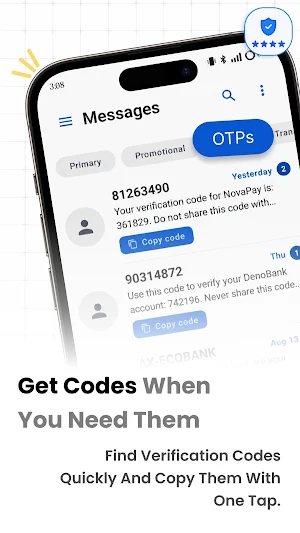
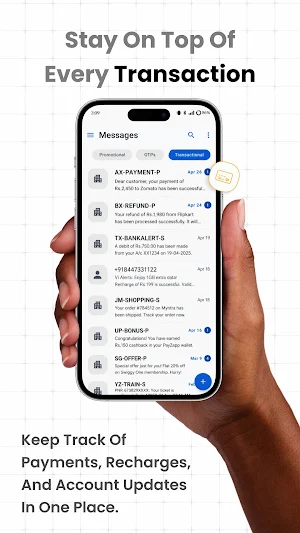
Messages are automatically sorted into Personal, OTP/Secure, and Transactions, so bank alerts and OTPs never get buried under promotions. Find what matters without endless scrolling.
🧹 Auto-Cleanup for Promotions
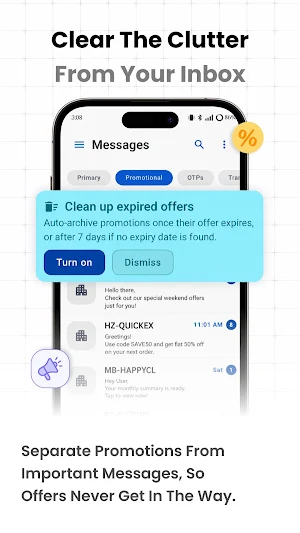
Message reads expiry hints in promotional texts ("Sale ends tonight," "Valid until Dec 1") and automatically archives offers once they're no longer useful — your inbox stays clean without any manual sorting.
🚫 Spam & Number Blocking
Block unwanted numbers and spam senders in one tap. Blocked messages are kept out of sight in a separate, private list.
⏰ Schedule Messages for Later
Write now, send later. Perfect for birthday wishes, reminders, and follow-ups you don't want to forget.
👥 Group Messaging, Photos & Voice Notes
Send group texts, photos, and voice messages — not just plain SMS. Group conversations show every participant clearly.
🔎 Search, Archive & Backup
Search across every conversation instantly, archive old chats without losing them, and back up or restore your entire SMS history anytime.
🎨 Widget, Shortcuts, Badges & Themes
Add a home-screen widget for one-tap access to recent chats, use app shortcuts for your top conversations, see unread counts on your app icon, and pick Light, Dark, or System theme.
🔒 Privacy by Design
Sorting and cleanup run locally on your phone. Your message content is never uploaded to a server or used for tracking.
🌐 English & Hindi Support
Use Message fully in English or Hindi — switch anytime in settings.
SET AS YOUR DEFAULT SMS APP
Android requires one default app for sending and receiving texts. Message walks you through switching in under a minute, and brings your existing conversations with it.
COMMON QUESTIONS
Is Message free?
Yes. Message is free to use and supported by ads that never interrupt an open conversation.
Do I have to set it as default to use it?
Yes — this is an Android requirement for any texting app to send and receive SMS/MMS, and setup takes less than a minute.
Is my message data private?
Yes. Smart sorting and cleanup happen entirely on your device. Nothing about your message content is sent anywhere.
Can I get my old messages back if I switch apps?
Yes — use the built-in backup and restore feature to export your SMS history and bring it back anytime.
Download Message and give your inbox a system that actually keeps up with you.
WHY PEOPLE SWITCH TO MESSAGE
📥 Smart Inbox Organization
Messages are automatically sorted into Personal, OTP/Secure, and Transactions, so bank alerts and OTPs never get buried under promotions. Find what matters without endless scrolling.
🧹 Auto-Cleanup for Promotions
Message reads expiry hints in promotional texts ("Sale ends tonight," "Valid until Dec 1") and automatically archives offers once they're no longer useful — your inbox stays clean without any manual sorting.
🚫 Spam & Number Blocking
Block unwanted numbers and spam senders in one tap. Blocked messages are kept out of sight in a separate, private list.
⏰ Schedule Messages for Later
Write now, send later. Perfect for birthday wishes, reminders, and follow-ups you don't want to forget.
👥 Group Messaging, Photos & Voice Notes
Send group texts, photos, and voice messages — not just plain SMS. Group conversations show every participant clearly.
🔎 Search, Archive & Backup
Search across every conversation instantly, archive old chats without losing them, and back up or restore your entire SMS history anytime.
🎨 Widget, Shortcuts, Badges & Themes
Add a home-screen widget for one-tap access to recent chats, use app shortcuts for your top conversations, see unread counts on your app icon, and pick Light, Dark, or System theme.
🔒 Privacy by Design
Sorting and cleanup run locally on your phone. Your message content is never uploaded to a server or used for tracking.
🌐 English & Hindi Support
Use Message fully in English or Hindi — switch anytime in settings.
SET AS YOUR DEFAULT SMS APP
Android requires one default app for sending and receiving texts. Message walks you through switching in under a minute, and brings your existing conversations with it.
COMMON QUESTIONS
Is Message free?
Yes. Message is free to use and supported by ads that never interrupt an open conversation.
Do I have to set it as default to use it?
Yes — this is an Android requirement for any texting app to send and receive SMS/MMS, and setup takes less than a minute.
Is my message data private?
Yes. Smart sorting and cleanup happen entirely on your device. Nothing about your message content is sent anywhere.
Can I get my old messages back if I switch apps?
Yes — use the built-in backup and restore feature to export your SMS history and bring it back anytime.
Download Message and give your inbox a system that actually keeps up with you.
What’s new
Version 1.1.1 · Updated September 21, 2026
• Fixed shared locations sometimes showing up as blank messages • Fixed a crash some devices hit when opening conversations or photos • Removed ads from the chat screen for a cleaner experience • Added a quick keyboard toggle (letters/numbers) in New Message • Minor UI improvements
Alternatives to Messages: SMS, Chat & Text
Looking for apps like Messages: SMS, Chat & Text? Here are 6 similar Android apps on Google Play. All of them are free to download.
-
CIFF Lab V2
-
Profile Picture Border Frame
-
AutoPaste Copy Paste Keyboard
-
TextOnPic - Text on picture
-
PI Background Eraser
-
Split Camera & Blender
| App | Rating | Price | Installs | Last updated | Compare |
|---|---|---|---|---|---|
| Messages: SMS, Chat & Text | – | Free | 10,000+ | Sep 21, 2026 | |
| CIFF Lab V2 | – | Free | 100+ | Jul 14, 2026 | Compare |
| Profile Picture Border Frame | – | Free | 1,000+ | Apr 26, 2023 | Compare |
| AutoPaste Copy Paste Keyboard | – | Free | 1,000+ | Apr 26, 2023 | Compare |
| TextOnPic - Text on picture | – | Free | 50+ | Aug 25, 2023 | Compare |
| PI Background Eraser | – | Free | 50+ | – | Compare |
| Split Camera & Blender | – | Free | 100+ | Aug 28, 2023 | Compare |
Similar apps on Google Play
- CIFF Lab V2
- Profile Picture Border Frame
- AutoPaste Copy Paste Keyboard
- TextOnPic - Text on picture
- PI Background Eraser
- Split Camera & Blender
- iBanner - AI poster maker
- Onnect - Brain it, Match it
- UPI QR Maker - QR Code Scanner
- Effectly Lyrical Video Status
- Doc Scanner - Camera Scanner,
- QR & Barcode Scanner Reader
- DirectChat - Open WA Chat
- Photo Collage (All In One)
- Animal Sounds - For Kids