
Contacts
VidMadster Music %26 Video Downloader Apps Communication Contains ads
Fast contacts app with smart dialer, call history, and favorites
- Downloads
- 2.3K+
- on Google Play
- Price
- Free
- No in-app purchases
- Updated
- Mar 16
- 2026 · v1.0
Screenshots


About Contacts
Easily search, manage, and dial your contacts faster than ever with the ultimate contact manager and smart dialer app for Android. View call history, favorite contacts, identify unknown callers, and spam calls – all in one lightweight, clean interface.
Contacts App blends smart features with professional simplicity.
From quick dialing to organized contacts, everything feels seamless. Designed for users who value control, speed, and clean design.
Fast, and Easy Dialing
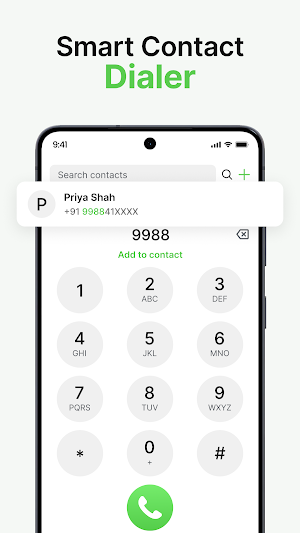
The smart dialer predicts your next call, helping you find contacts in seconds. Its dial pad makes it easy to type, search, and connect quickly. Unlike other dialer apps for Android, this phone dialer offers seamless performance, even for dual SIM users, ensuring smooth operation across personal and business lines.
Instant Contact Dialer
Access the dialer instantly without opening multiple screens.
Enter numbers quickly using a smooth, responsive keypad.
Call any number instantly with minimal taps required.
Designed for fast dialing and everyday convenience.
One-Tap Contact Actions
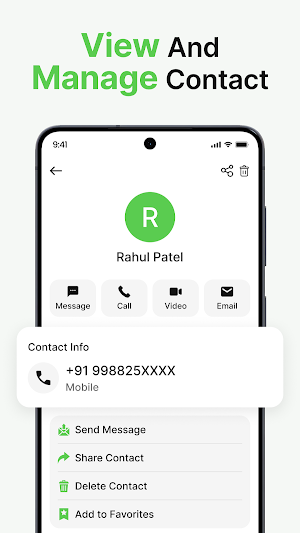
Call, message, or WhatsApp directly from contact cards.
No need to open separate apps for actions.
Smart shortcuts save time during daily communication.
Everything you need is just one tap away.
Light, Dark & System Themes
Switch between light and dark modes easily.
Dark mode offers comfort during nighttime usage.
Designed for visual comfort and personal preference.
After Call Screen Experience
View caller details immediately after every call ends.
Access quick actions like redial or messaging easily.
Designed to enhance productivity after conversations finish.
Simple layout keeps post-call actions fast and clear.
📌 Key Features
📞 Quick Dialer – Make calls instantly using smart search
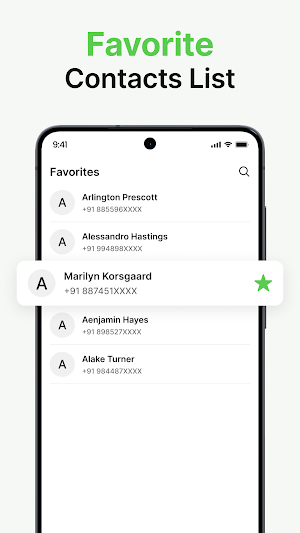
👥 Advanced Contacts: Add, edit, group, or favorite your phone contacts for quick access.
🔍 Search Contacts – Instantly find contacts by name or number
🎨 Custom Themes: Personalize your dialer app for Android with light, dark, or vibrant color themes.
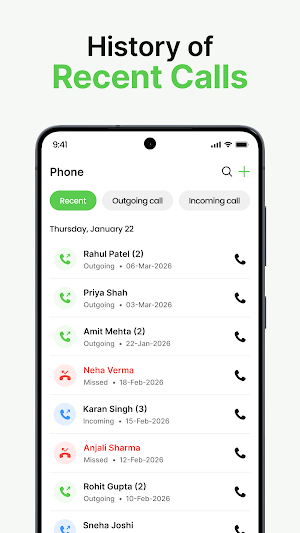
🕘 Call History Viewer – See all incoming, outgoing & missed calls (view only)
🧾 Comprehensive Call Log: Keep a clear record of all your phone calls and manage them easily.
⭐ Favorites – Pin important contacts for one-tap access
⚡ Speed Dial Actions – Call or message in seconds
📞 Your All-in-One Phone Dialer
📇 Full Contact Details – View all contact info in one place
Your Privacy Matters
This app requires access to your contacts and call history contact management features. We only read call history for display purposes; the app does not modify or delete your call logs. All personal data stays on your device and is never uploaded to our servers.
Contacts App blends smart features with professional simplicity.
From quick dialing to organized contacts, everything feels seamless. Designed for users who value control, speed, and clean design.
Fast, and Easy Dialing
The smart dialer predicts your next call, helping you find contacts in seconds. Its dial pad makes it easy to type, search, and connect quickly. Unlike other dialer apps for Android, this phone dialer offers seamless performance, even for dual SIM users, ensuring smooth operation across personal and business lines.
Instant Contact Dialer
Access the dialer instantly without opening multiple screens.
Enter numbers quickly using a smooth, responsive keypad.
Call any number instantly with minimal taps required.
Designed for fast dialing and everyday convenience.
One-Tap Contact Actions
Call, message, or WhatsApp directly from contact cards.
No need to open separate apps for actions.
Smart shortcuts save time during daily communication.
Everything you need is just one tap away.
Light, Dark & System Themes
Switch between light and dark modes easily.
Dark mode offers comfort during nighttime usage.
Designed for visual comfort and personal preference.
After Call Screen Experience
View caller details immediately after every call ends.
Access quick actions like redial or messaging easily.
Designed to enhance productivity after conversations finish.
Simple layout keeps post-call actions fast and clear.
📌 Key Features
📞 Quick Dialer – Make calls instantly using smart search
👥 Advanced Contacts: Add, edit, group, or favorite your phone contacts for quick access.
🔍 Search Contacts – Instantly find contacts by name or number
🎨 Custom Themes: Personalize your dialer app for Android with light, dark, or vibrant color themes.
🕘 Call History Viewer – See all incoming, outgoing & missed calls (view only)
🧾 Comprehensive Call Log: Keep a clear record of all your phone calls and manage them easily.
⭐ Favorites – Pin important contacts for one-tap access
⚡ Speed Dial Actions – Call or message in seconds
📞 Your All-in-One Phone Dialer
📇 Full Contact Details – View all contact info in one place
Your Privacy Matters
This app requires access to your contacts and call history contact management features. We only read call history for display purposes; the app does not modify or delete your call logs. All personal data stays on your device and is never uploaded to our servers.
User reviews

very.. great.app.please..update.sir..add..new..caller..screen..five..stars..rate..thk...u..sir
Alternatives to Contacts
Looking for apps like Contacts? Here are 4 similar Android apps on Google Play. The highest rated is All Video Downloader (4.1/5), and all 4 are free to download.
-
All Video Downloader 4.1
-
GPS Land Area Measure
-
Backup & Restore Messages
-
Split bills : Group Expenses
| App | Rating | Price | Installs | Last updated | Compare |
|---|---|---|---|---|---|
| Contacts | – | Free | 1,000+ | Mar 16, 2026 | |
| All Video Downloader | 4.1 / 5 | Free | 10,000,000+ | – | Compare |
| GPS Land Area Measure | – | Free | 100,000+ | Oct 26, 2026 | Compare |
| Backup & Restore Messages | – | Free | 10,000+ | Sep 14, 2026 | Compare |
| Split bills : Group Expenses | – | Free | 5,000+ | – | Compare |
Compare Contacts with the top alternatives: ratings, updates, ASO score and keyword gaps →