
Phone As Mic: Mic for PC
Raku Technologies Tools In-app purchases Contains ads
Use your phone as a PC mic over WiFi, Bluetooth, or USB.
- Downloads
- 13.6K+
- on Google Play
- Price
- Free
- In-app purchases
- Updated
- Aug 10
- 2026 · v1.0.27
Screenshots


About Phone As Mic: Mic for PC
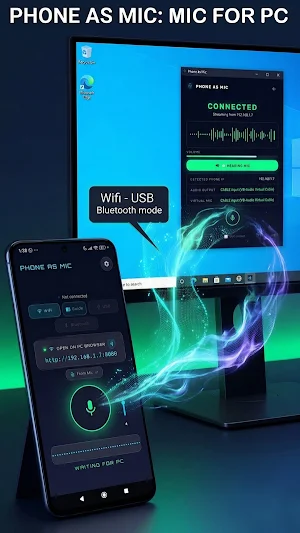
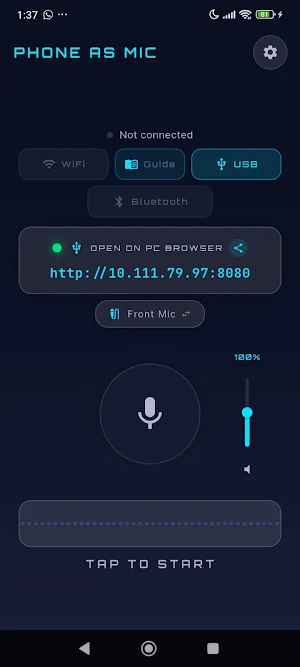
Phone As Mic turns your Android phone into a microphone for your Windows 10 & Windows 11 PC. Connect over WiFi when your phone and PC are on the same local network, or use Bluetooth or USB if you prefer. Once connected, your voice is streamed to your computer in real time.
You can use Phone As Mic in two different ways on your PC. Install the computer app for Windows 10 & Windows 11 so your phone is detected by your PC as a real microphone, or open the local link from your phone in your PC browser and use it directly as a browser source in compatible apps like OBS.
How it works
1. Install Phone As Mic on your Android phone.
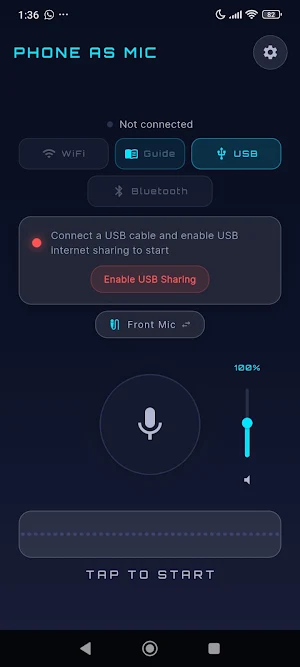
2. Choose how you want to connect: WiFi, Bluetooth, or USB.
3. If you use WiFi, make sure your phone and PC are connected to the same network.
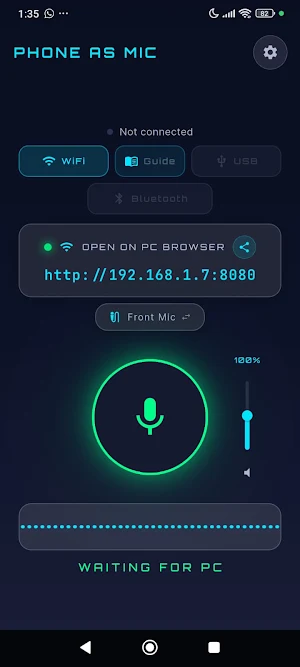
4. Start the mic in the app. Phone As Mic will show a local link or IP address.
5. On your PC, open that link in your browser.
6. Choose one of two options:
• Install the computer app for Windows 10 & Windows 11 so your phone is detected as a real microphone by your PC.
• Use the browser page directly as an audio source in compatible apps such as OBS.
7. Start speaking and use your phone as a mic for calls, streaming, recording, games, and more.
Key Features
• WiFi, Bluetooth, and USB support
• WiFi mode for phone and PC on the same network
• computer app mode or direct browser source mode
• Your phone can be detected by your PC as a real microphone
• Front mic, back mic, or hybrid mic selection
• Real-time volume control
• Low-latency audio streaming
• Works with Zoom, Discord, Microsoft Teams, OBS, games, and other Windows 10 & Windows 11 apps
• computer app delivered directly through your phone
• Clean dark interface
• Fully translated in 50 languages
Premium
Upgrade to premium to unlock:
• No ads
• Unlimited usage time
Phone As Mic gives you a simple and flexible way to turn the phone in your pocket into a microphone for your PC. Download it now and get started in minutes.
You can use Phone As Mic in two different ways on your PC. Install the computer app for Windows 10 & Windows 11 so your phone is detected by your PC as a real microphone, or open the local link from your phone in your PC browser and use it directly as a browser source in compatible apps like OBS.
How it works
1. Install Phone As Mic on your Android phone.
2. Choose how you want to connect: WiFi, Bluetooth, or USB.
3. If you use WiFi, make sure your phone and PC are connected to the same network.
4. Start the mic in the app. Phone As Mic will show a local link or IP address.
5. On your PC, open that link in your browser.
6. Choose one of two options:
• Install the computer app for Windows 10 & Windows 11 so your phone is detected as a real microphone by your PC.
• Use the browser page directly as an audio source in compatible apps such as OBS.
7. Start speaking and use your phone as a mic for calls, streaming, recording, games, and more.
Key Features
• WiFi, Bluetooth, and USB support
• WiFi mode for phone and PC on the same network
• computer app mode or direct browser source mode
• Your phone can be detected by your PC as a real microphone
• Front mic, back mic, or hybrid mic selection
• Real-time volume control
• Low-latency audio streaming
• Works with Zoom, Discord, Microsoft Teams, OBS, games, and other Windows 10 & Windows 11 apps
• computer app delivered directly through your phone
• Clean dark interface
• Fully translated in 50 languages
Premium
Upgrade to premium to unlock:
• No ads
• Unlimited usage time
Phone As Mic gives you a simple and flexible way to turn the phone in your pocket into a microphone for your PC. Download it now and get started in minutes.
What’s new
Version 1.0.27 · Updated August 10, 2026
Turn your phone into a wireless microphone for your PC! • Stream audio to your PC via WiFi, USB, or Bluetooth • Works with OBS, Zoom, Discord, and any app • Windows companion app for virtual microphone integration • Supports 50 languages
User reviews

I liked the idea but I can't find the program on the web pls help

😮
Alternatives to Phone As Mic: Mic for PC
Looking for apps like Phone As Mic: Mic for PC? Here are 6 similar Android apps on Google Play. The highest rated is UE | BOOM by Ultimate Ears (4.8/5), and all 6 are free to download.
-
AmpMe - Speaker Booster 3.0
-
Chaos Audio: Effects & Amp AI 4.2
-
Radio Me: Live Radio, Podcasts 4.2
-
Napster - AI Music & Experts 2.9
-
UE | BOOM by Ultimate Ears 4.8
-
Podcast Guru - Podcast App 4.4
| App | Rating | Price | Installs | Last updated | Compare |
|---|---|---|---|---|---|
| Phone As Mic: Mic for PC | – | Free | 10,000+ | Aug 10, 2026 | |
| AmpMe - Speaker Booster | 3.0 / 5 | Free | 10,000,000+ | Nov 1, 2023 | Compare |
| Chaos Audio: Effects & Amp AI | 4.2 / 5 | Free | 1,000+ | Sep 25, 2026 | Compare |
| Radio Me: Live Radio, Podcasts | 4.2 / 5 | Free | 5,000+ | Sep 6, 2026 | Compare |
| Napster - AI Music & Experts | 2.9 / 5 | Free | 10,000,000+ | Oct 24, 2026 | Compare |
| UE | BOOM by Ultimate Ears | 4.8 / 5 | Free | 5,000,000+ | May 13, 2026 | Compare |
| Podcast Guru - Podcast App | 4.4 / 5 | Free | 100,000+ | Sep 3, 2026 | Compare |