

台股美股記帳Pro
OoniauLab Finance
TWUSStockPro is an app focused on investment records in Taiwan and US stocks.
- Downloads
- 9+
- on Google Play
- Price
- $17.99
- No in-app purchases
- Updated
- Jul 26
- 2026 · v1.0.2
Screenshots


About 台股美股記帳Pro
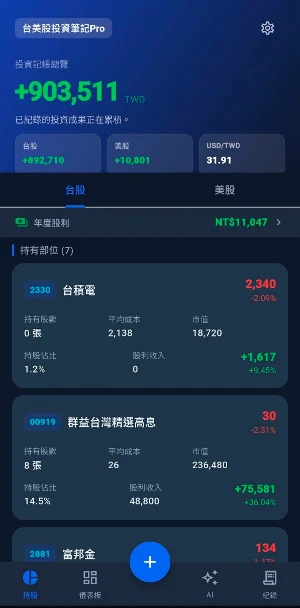
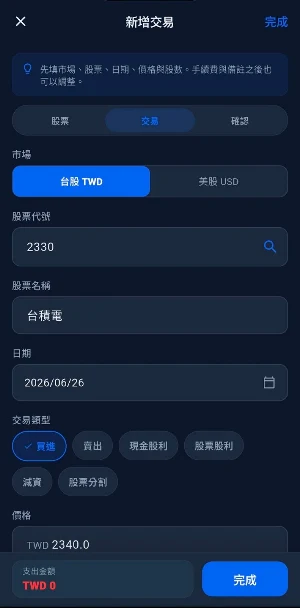
TWUSStockPro is an app focused on recording investments in Taiwan and US stocks. It helps users record buy and sell transactions, dividends, capital reductions, and stock splits, and organizes information on holdings, profit and loss, dividends, asset allocation, and risks. The app also provides an AI investment record assistant that generates interpretations and reports based on the user's local trading data.
The information provided in this app is for recording, organizing, and research purposes only and does not constitute any investment advice, buy or sell recommendations, or profit guarantee. Investing involves risk; users should make their own judgments and bear the associated risks.
##Main Functions
- Taiwan and US Stock Holdings Management: View current holdings, closed positions, average cost, number of shares, and profit/loss by market.
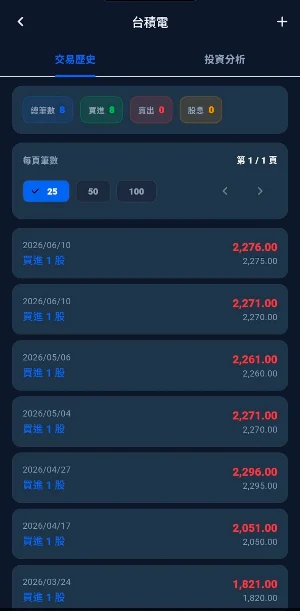
- Transaction History: Supports buy, sell, cash dividends, stock dividends, capital reductions, and stock splits.
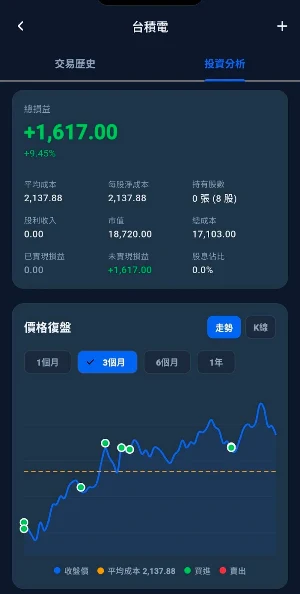
- Stock Details: View the trading history, average cost, dividend income, total cost, and total profit/loss for a single stock.
- Investment Dashboard: Compiles total market capitalization, Taiwan and US stock allocation, stock concentration, and risk overview.
- Annual Dividends: Compiles annual dividends and income.
- Risk Assessment: Built-in questionnaire to build your personal risk tolerance score.
- Real-time and Historical Quotes: Supports Taiwan stocks, US stocks, candlestick charts, Beta coefficients, and USD/TWD exchange rate estimation.
- AI Assistant: Can answer questions, provide summaries, and export reports based on transaction records and holdings.
- Data Backup: Supports JSON export and import of transaction data.
- System Settings: Supports dark/light/system themes, theme colors, font scaling, language switching, and system restore.
- Multilingual: Currently includes localized resources in English and Traditional Chinese.
## Data Sources
### Taiwan Stocks Taiwan stock quotes will first attempt to use real-time data from TWSE MIS, and will use Yahoo Finance's `.TW` or `.TWO` data as backup when necessary. Taiwan stock names will attempt to be obtained from TWSE OpenAPI and TPEx OpenAPI.
The settings page also provides a field for API keys from Taiwanese stock brokerages. Currently, the options include:
- Yuanta Securities (Shioaji)
- Fubon Securities (Neo API)
- E.SUN Securities API
These keys will be stored in the device's secure storage.
### US Stocks
US stock quotes offer multiple provider options:
- Alpha Vantage
- Polygon.io
- IEX Cloud
- Yahoo Finance
- EODHD
- Finnhub
- Twelve Data
If using a provider that requires an API key, please enter and test the key on the settings page. Yahoo Finance does not require an API key and can be used as a backup quote source.
### Exchange Rates
The USD/TWD exchange rate will attempt to retrieve exchange rate data from Taiwanese banks. If immediate retrieval fails, the app will use `32.00` as a temporary estimate.
## AI Assistant
The AI assistant can read local transaction data to help users organize their holdings, transaction records, risks, and report content. AI Configuration Support:
- Cloud AI Provider Configuration
- Custom OpenAI Compatible API
- Native GGUF Model
- Chat History Saving
- Report Export and Sharing
The native GGUF model runs on the device. Large models may require more memory and longer response times; the app will warn of resource risks when necessary.
## Data and Privacy
- Transaction data is stored locally using Drift/SQLite.
- API keys are stored using Flutter Secure Storage. Android uses the system's secure storage mechanism, and iOS uses Keychain.
- The app does not automatically upload transaction data.
- Users can export JSON backups themselves, or import backup data.
- System restore will erase transaction, cache, and configuration data; please back up your data before performing any operations.
The information provided in this app is for recording, organizing, and research purposes only and does not constitute any investment advice, buy or sell recommendations, or profit guarantee. Investing involves risk; users should make their own judgments and bear the associated risks.
##Main Functions
- Taiwan and US Stock Holdings Management: View current holdings, closed positions, average cost, number of shares, and profit/loss by market.
- Transaction History: Supports buy, sell, cash dividends, stock dividends, capital reductions, and stock splits.
- Stock Details: View the trading history, average cost, dividend income, total cost, and total profit/loss for a single stock.
- Investment Dashboard: Compiles total market capitalization, Taiwan and US stock allocation, stock concentration, and risk overview.
- Annual Dividends: Compiles annual dividends and income.
- Risk Assessment: Built-in questionnaire to build your personal risk tolerance score.
- Real-time and Historical Quotes: Supports Taiwan stocks, US stocks, candlestick charts, Beta coefficients, and USD/TWD exchange rate estimation.
- AI Assistant: Can answer questions, provide summaries, and export reports based on transaction records and holdings.
- Data Backup: Supports JSON export and import of transaction data.
- System Settings: Supports dark/light/system themes, theme colors, font scaling, language switching, and system restore.
- Multilingual: Currently includes localized resources in English and Traditional Chinese.
## Data Sources
### Taiwan Stocks Taiwan stock quotes will first attempt to use real-time data from TWSE MIS, and will use Yahoo Finance's `.TW` or `.TWO` data as backup when necessary. Taiwan stock names will attempt to be obtained from TWSE OpenAPI and TPEx OpenAPI.
The settings page also provides a field for API keys from Taiwanese stock brokerages. Currently, the options include:
- Yuanta Securities (Shioaji)
- Fubon Securities (Neo API)
- E.SUN Securities API
These keys will be stored in the device's secure storage.
### US Stocks
US stock quotes offer multiple provider options:
- Alpha Vantage
- Polygon.io
- IEX Cloud
- Yahoo Finance
- EODHD
- Finnhub
- Twelve Data
If using a provider that requires an API key, please enter and test the key on the settings page. Yahoo Finance does not require an API key and can be used as a backup quote source.
### Exchange Rates
The USD/TWD exchange rate will attempt to retrieve exchange rate data from Taiwanese banks. If immediate retrieval fails, the app will use `32.00` as a temporary estimate.
## AI Assistant
The AI assistant can read local transaction data to help users organize their holdings, transaction records, risks, and report content. AI Configuration Support:
- Cloud AI Provider Configuration
- Custom OpenAI Compatible API
- Native GGUF Model
- Chat History Saving
- Report Export and Sharing
The native GGUF model runs on the device. Large models may require more memory and longer response times; the app will warn of resource risks when necessary.
## Data and Privacy
- Transaction data is stored locally using Drift/SQLite.
- API keys are stored using Flutter Secure Storage. Android uses the system's secure storage mechanism, and iOS uses Keychain.
- The app does not automatically upload transaction data.
- Users can export JSON backups themselves, or import backup data.
- System restore will erase transaction, cache, and configuration data; please back up your data before performing any operations.
What’s new
Version 1.0.2 · Updated July 26, 2026
更順暢的交易體驗 1.新增交易更直覺 在主頁點擊新增交易後,可先選擇台股或美股,表單會自動切換到所選市場。 2.美股交易更順暢 從美股個股頁新增交易時,表單會鎖定為美股,並可自動帶出股票名稱。
Alternatives to 台股美股記帳Pro
Looking for apps like 台股美股記帳Pro? Here are 6 similar Android apps on Google Play. All of them are free to download.
-
Mumbuca Eventos
-
Alwaysdatalink | bills payment
-
PayMoji: Your Travel Wallet
-
BuySmart
-
KOPILKA.online
-
CESSENTIEL
| App | Rating | Price | Installs | Last updated | Compare |
|---|---|---|---|---|---|
| 台股美股記帳Pro | – | $17.99 | 5+ | Jul 26, 2026 | |
| Mumbuca Eventos | – | Free | 10+ | Aug 3, 2026 | Compare |
| Alwaysdatalink | bills payment | – | Free | 100+ | – | Compare |
| PayMoji: Your Travel Wallet | – | Free | 500+ | Oct 2, 2026 | Compare |
| BuySmart | – | Free | 10+ | – | Compare |
| KOPILKA.online | – | Free | 10+ | Aug 10, 2026 | Compare |
| CESSENTIEL | – | Free | 1+ | Aug 21, 2026 | Compare |
Compare 台股美股記帳Pro with the top alternatives: ratings, updates, ASO score and keyword gaps →
Similar apps on Google Play
- Mumbuca Eventos
- Alwaysdatalink | bills payment
- PayMoji: Your Travel Wallet
- BuySmart
- KOPILKA.online
- CESSENTIEL
- Sardikhola Mobile App
- Forex Trading Journal
- Signals BinarAI
- ECAP
- Stifel Bank Treasury
- Horyzon: Portfolio Tracker
- Alianza Móvil Cortazar
- Harion Smart App
- Currency Converter: Forex Rate
- Obligon Fixed-Income Terminal
- My Trawick
- Owempay
- Vhorizon
- TalentWave
- Setu MF
- CariMurah
- Subora: Subscription Manager
- Budget Buddy
- +Vantagge