

Peppermint Ops Toolbox
Productivity
Manage robot map and update files, and update Peppermint robots.
- Downloads
- 10+
- on Google Play
- Price
- Free
- No in-app purchases
- Updated
- Jul 7
- 2026 · v5.0.2
Screenshots


About Peppermint Ops Toolbox
Manage Your Robot Files and Updates with the Peppermint Ops Toolbox
The Peppermint Ops Toolbox is a file-management and operations tool for teams who deploy, update, and manage Peppermint service robots. At its core, it manages and maintains your robot map files and software update packages in a working folder on your device — organizing, packaging, and keeping them up to date as you deploy and service your own robots. Sign-in requires a Peppermint enterprise account.
Key Features:
On-Device File Management: Set a working folder on your device for your robot files — for example in Documents, Downloads, or a folder synced from a cloud drive. The app then manages the files in that folder for you: it saves and updates robot files, organizes them, packages a set of files together, unpacks packages back into the folder, checks that files are complete and intact, and removes files you no longer need. This covers robot map files, navigation and mission files, and software and firmware update packages.
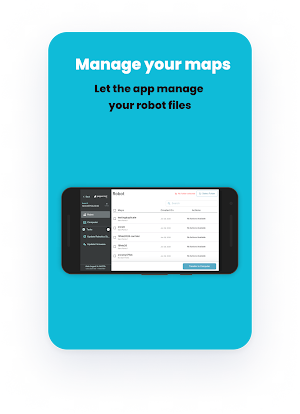
Map File Management: Download, upload, duplicate, and delete robot map files between your device and your robots.
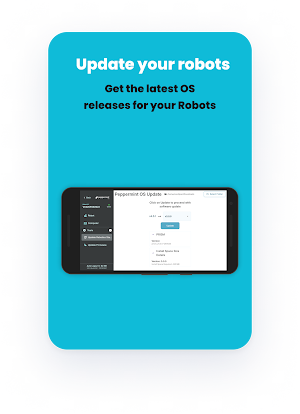
Software and Firmware Files: Select update packages saved on your device and install them to robots, with integrity checks and live progress.
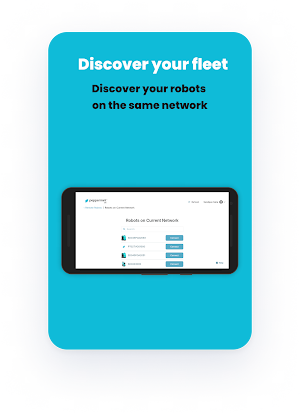
Easy Connection: Find and connect to your robots nearby, on your network, or remotely from anywhere.
Path and Mission Planning: Draw navigation paths and build robot missions, saved as files in your chosen folder.
Real-Time Monitoring: View live sensor data, read logs, and adjust robot settings on the fly.
Secure Access: Role-based sign-in means every team member sees only the tools they're approved to use.
Why all-files access: Managing and maintaining these robot files in your working folder is the app's core function, and operators keep them in many different locations on the device — most often Documents, Downloads, or folders synced from cloud drives. The app needs all-files access so it can manage the files in the folder you already use — saving, organizing, packaging, unpacking, and removing them in place — rather than forcing each file through a separate one-at-a-time pick. The app prompts you to enable this under Special app access settings, and uses it only for the file management described above.
At Peppermint Robotics, we're dedicated to automating mundane, repetitive workflows in commercial and industrial environments. The Ops Toolbox gives your team everything it needs to keep robot files organized and robots updated and ready to work.
Download now and streamline the way you manage your robot files and fleet.
The Peppermint Ops Toolbox is a file-management and operations tool for teams who deploy, update, and manage Peppermint service robots. At its core, it manages and maintains your robot map files and software update packages in a working folder on your device — organizing, packaging, and keeping them up to date as you deploy and service your own robots. Sign-in requires a Peppermint enterprise account.
Key Features:
On-Device File Management: Set a working folder on your device for your robot files — for example in Documents, Downloads, or a folder synced from a cloud drive. The app then manages the files in that folder for you: it saves and updates robot files, organizes them, packages a set of files together, unpacks packages back into the folder, checks that files are complete and intact, and removes files you no longer need. This covers robot map files, navigation and mission files, and software and firmware update packages.
Map File Management: Download, upload, duplicate, and delete robot map files between your device and your robots.
Software and Firmware Files: Select update packages saved on your device and install them to robots, with integrity checks and live progress.
Easy Connection: Find and connect to your robots nearby, on your network, or remotely from anywhere.
Path and Mission Planning: Draw navigation paths and build robot missions, saved as files in your chosen folder.
Real-Time Monitoring: View live sensor data, read logs, and adjust robot settings on the fly.
Secure Access: Role-based sign-in means every team member sees only the tools they're approved to use.
Why all-files access: Managing and maintaining these robot files in your working folder is the app's core function, and operators keep them in many different locations on the device — most often Documents, Downloads, or folders synced from cloud drives. The app needs all-files access so it can manage the files in the folder you already use — saving, organizing, packaging, unpacking, and removing them in place — rather than forcing each file through a separate one-at-a-time pick. The app prompts you to enable this under Special app access settings, and uses it only for the file management described above.
At Peppermint Robotics, we're dedicated to automating mundane, repetitive workflows in commercial and industrial environments. The Ops Toolbox gives your team everything it needs to keep robot files organized and robots updated and ready to work.
Download now and streamline the way you manage your robot files and fleet.
What’s new
Version 5.0.2 · Updated July 7, 2026
1. Smoother firmware updates with clearer progress 2. More reliable sign-in and permissions 3. Added support for the LR600 robot 4. Path planner improvements and bug fixes
Alternatives to Peppermint Ops Toolbox
Looking for apps like Peppermint Ops Toolbox? Here are 6 similar Android apps on Google Play. The highest rated is Team RWB (4.7/5), and all 6 are free to download.
-
Intellifi by Adtran® 4.2
-
CallHub 4.4
-
Team RWB 4.7
-
Soothe: Wellness On Demand 3.5
-
Mila Air 4.0
-
LANDR - Master & Release Music 4.6
| App | Rating | Price | Installs | Last updated | Compare |
|---|---|---|---|---|---|
| Peppermint Ops Toolbox | – | Free | 10+ | Jul 7, 2026 | |
| Intellifi by Adtran® | 4.2 / 5 | Free | 10,000+ | Oct 21, 2026 | Compare |
| CallHub | 4.4 / 5 | Free | 10,000+ | Oct 14, 2026 | Compare |
| Team RWB | 4.7 / 5 | Free | 10,000+ | Oct 21, 2026 | Compare |
| Soothe: Wellness On Demand | 3.5 / 5 | Free | 100,000+ | Oct 23, 2026 | Compare |
| Mila Air | 4.0 / 5 | Free | 10,000+ | Sep 25, 2026 | Compare |
| LANDR - Master & Release Music | 4.6 / 5 | Free | 100,000+ | Oct 21, 2026 | Compare |