
SnoreTracker
PegoLab Health & Fitness
AI-powered snoring detection, 100% on-device. No cloud or account required.
- Downloads
- 180+
- on Google Play
- Price
- Free
- No in-app purchases
- Updated
- Aug 20
- 2026 · v1.10
Screenshots


About SnoreTracker
▶ 100% OFFLINE — NO CLOUD, NO ACCOUNT
Microphone audio is analyzed locally on your phone. No data is sent to a server. No analytics SDK, no Firebase, no advertising ID. The app doesn’t even ask for INTERNET permission. Uninstalling SnoreTracker deletes all your data immediately.
▶ WHAT THE APP DOES
• Detects snoring episodes in real time via YAMNet (TensorFlow Lite). The classifier distinguishes real snoring from a voice, a passing vehicle, a fan, music, or other ambient noise.
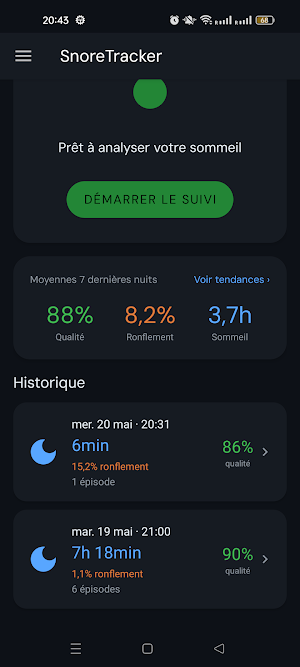
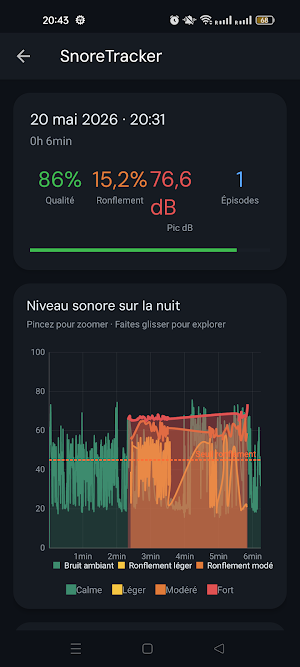
• Calculates a sleep quality score for each night (based on the percentage of snoring and the number of episodes).
• Tracks sound levels (dB) throughout the night, with color-coded intensity bands: Light (45–55 dB), Moderate (55–65 dB), Loud (> 65 dB).
• Saves a short audio clip of each episode so you can listen, confirm, or correct the classification.
▶ ANTI-SNORING VIBRATION ALERT (OPTIONAL)
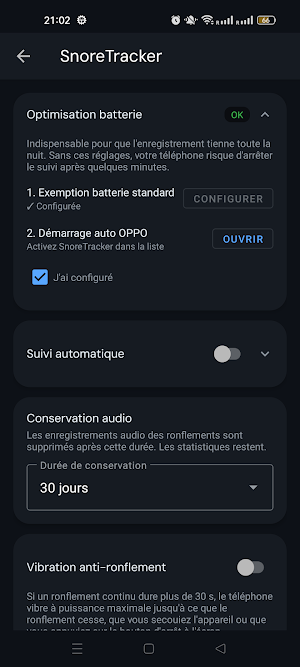
If continuous snoring lasts longer than 30 seconds, the phone vibrates at full power to prompt you to change position. The vibration stops as soon as the snoring stops, when you shake the device, or when you tap the STOP button on the screen. Can be disabled at any time in Settings.
▶ TRENDS & HISTORY
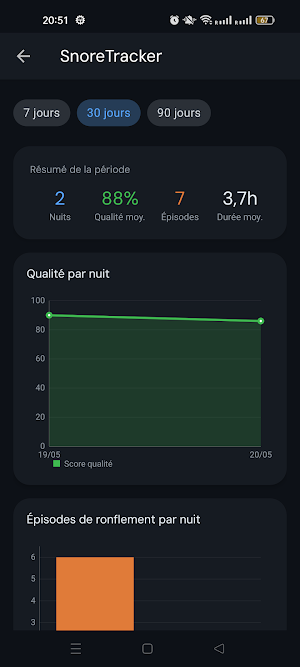
Browse all recorded nights; open a night to view the graph and list of episodes. The Trends screen displays statistics for 7, 30, or 90 days: average quality, total episodes, quality per night, episodes per night.
▶ MANUAL RECLASSIFICATION
Each episode displays the AI’s verdict (confirmed snoring, voice, vehicle, music, ambient noise…). One tap is all it takes to reclassify an episode. Your corrections automatically adjust the detection sensitivity to your environment.
▶ AUTOMATIC SCHEDULING
Choose your bedtime days and start/end times. SnoreTracker starts and stops recording on its own. Naps (same day) and nights (past midnight) are handled automatically.
▶ AUDIO RETENTION AT YOUR FINGERTIPS
Audio clips of episodes are stored for 7, 30, 90 days, or indefinitely—your choice. Statistics (quality, % of snoring, number of episodes) remain until you manually delete a night.
▶ DESIGNED TO LAST ALL NIGHT
Foreground service with wake-lock so recording continues even when the screen is locked. Built-in guides for battery optimization on Xiaomi (MIUI), Huawei, Samsung, Oppo, Vivo, OnePlus, and ASUS—the most common causes of silent background shutdowns. Sessions interrupted by a force stop or a dead battery are automatically recovered and marked as “Interrupted” so you don’t lose any data.
▶ BUG REPORTS
The “Report a Problem” button generates a text report (recent logs + metadata) that you can email to the developer. Audio recordings are never attached.
▶ LANGUAGES
French, English, Spanish — follows the phone’s language, or choose one in Settings.
▶ PERMISSIONS
• RECORD_AUDIO — only during a session you start.
• POST_NOTIFICATIONS — for the persistent recording notification (required by Android for foreground services).
• VIBRATE — for the vibration alert, if you enable it.
• FOREGROUND_SERVICE_MICROPHONE — to continue recording with the screen off.
No INTERNET. No location. No contacts. No analytics.
SnoreTracker is a personal tracking tool, not a medical device. If you suspect sleep apnea or a sleep disorder, consult a healthcare professional.
What’s new
Version 1.10 · Updated August 20, 2026
• Scheduled tracking fixed on Android 14+: it could crash on start, and the scheduled time was in fact never applied. A notification now lets you start the night with one tap. • Settings: "Alarms & reminders" and "Full-screen notifications" permissions are now shown with their status. • Anti-snore vibration: no more stuttering, reliable stop. • Fixed a crash when starting a session on Android 8 to 9. • Android 16 compatibility.
Alternatives to SnoreTracker
Looking for apps like SnoreTracker? Here are 6 similar Android apps on Google Play. All of them are free to download.
-
Her Journey: Cycle to Baby
-
SAPSPORT
-
MCA Coach
-
Period Tracker and Pregnancy
-
GolfBod
-
Fiber Tracker: Daily Goal
| App | Rating | Price | Installs | Last updated | Compare |
|---|---|---|---|---|---|
| SnoreTracker | – | Free | 100+ | Aug 20, 2026 | |
| Her Journey: Cycle to Baby | – | Free | 10+ | – | Compare |
| SAPSPORT | – | Free | 10+ | Sep 21, 2026 | Compare |
| MCA Coach | – | Free | 100+ | Sep 26, 2026 | Compare |
| Period Tracker and Pregnancy | – | Free | 100+ | – | Compare |
| GolfBod | – | Free | 100+ | – | Compare |
| Fiber Tracker: Daily Goal | – | Free | 0+ | – | Compare |
Compare SnoreTracker with the top alternatives: ratings, updates, ASO score and keyword gaps →
Similar apps on Google Play
- Her Journey: Cycle to Baby
- SAPSPORT
- MCA Coach
- Period Tracker and Pregnancy
- GolfBod
- Fiber Tracker: Daily Goal
- 7-Day Fit
- Sleepzy - Sleep Tracker Sounds
- Neo-Guardian
- GymLog
- Hawkers Hill Gym
- FitNinza
- EVLV
- Phase: Menopause & HRT Tracker
- BENIO
- Hemo.One
- Senior Diet
- Symptom Diary: Health Tracker
- Headspace XR
- CREWDOME
- Calories Counter AI
- MindBell
- VitaSign
- FiRE
- Speedo iQ