

PATROLCONTROL
DOBR%C3%81 AGENTURA, s.r.o. Productivity
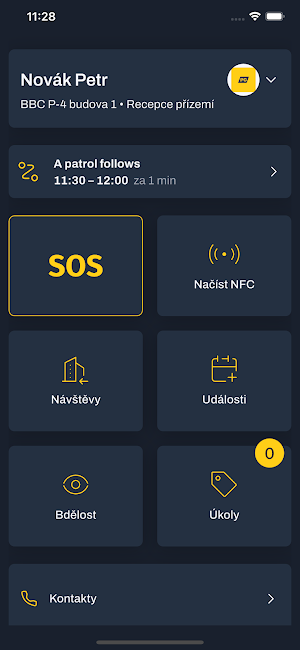
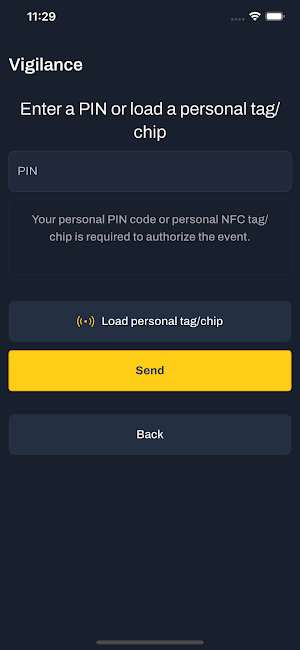
Guard lone worker control app with GPS, NFC, SOS, Mandown, Vigilance, Tasks.
- Downloads
- 185+
- on Google Play
- Price
- Free
- No in-app purchases
- Updated
- Oct 9
- 2026 · v1.1.7
Screenshots


About PATROLCONTROL
PATROLCONTROL – Application for supervision of patrol performances
The PATROLCONTROL application monitors the prescribed activities of field workers. The app is designed to meet the needs of modern security and ensure effective real-time supervision of workers.
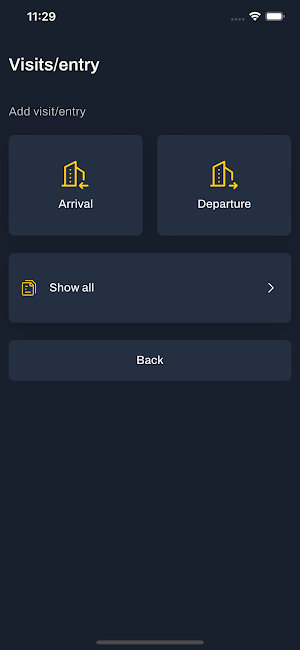
Basic functions: Record patrols, lone worker, attendance tracking, text messages, tasks, asset management, GPS localization.
For more information, see www.patrolcontrol.com
Why choose the PATROLCONTROL app?
The application perfectly suits any safety needs and is optimized for ease of operation. It is mainly used by companies providing physical security, facilities and cleaning services.
It serves as a client of the online service of the PATROLCONTROL portal and therefore a contract with the service provider is required. For details, see the provider's website, patrolcontrol.com
The app aims to provide an easy-to-use all-in-one solution
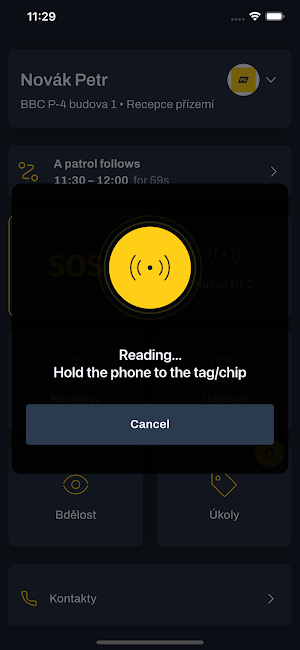
Records of patrols are carried out using NFC chips with server-side evaluation with the PATROLCONTROL cloud portal.
The lone worker system provides automatic alert by text messages and phone calls, including alarms to the server. The app detects alarm states using the device's sensors.
Key features of the PATROLCONTROL app:
- Real-time data collection: Get instant information about security performance. The app collects GPS, photos, video, and audio recordings, which are securely transmitted to a cloud portal for easy analysis and reporting.
- Loneworker: A special feature that focuses on monitoring lone workers. In the event of an emergency, the PANIC/SOS or MAN DOWN function immediately alerts administrators and ensures a quick response, protecting the health and safety of employees.
- Secure identification and connection: Workers identify themselves using NFC chips, which are also used to mark checkpoints. Our secure SIM card connection with an M2M plan ensures that your operations are always under control, even without an internet connection.
- Web-based management portal: Monitor and evaluate activities in real-time via PATROLCONTROL's intuitive web interface. You can export data to various formats (PDF, Excel, HTML, CSV) to keep track of what's going on in your security structure. Data from the portal can also be sent directly to the control room with a centralized security desk.
- Task module: The application allows you to easily enter and evaluate tasks. Clients can have access to assign or control tasks, which promotes transparency and effective communication.
- The application can be operated in the classic way, as well as in the louncher mode, when other functions of the phone are inaccessible to the user and only the functionalities of the PATROLCONTROL application can be used.
Safety standards and support the PATROLCONTROL system meets the highest safety standards. All data is encrypted and access to it is transparent. The application provider's team guarantees technical support and regular training to help you use all the features of the application effectively.
Conclusion: Install the PATROLCONTROL app and gain full control over the workers who perform their work tasks in the field. You will increase the quality of work and the safety of lone workers.
Setup Instructions:
- Application installation and initial setup is usually done by an IT technician or application provider. Users are employees without permission to change device settings. The application should provide users with the simplest possible user experience.
- The first time you launch the app, it asks for permissions that can be denied. In this case, the app will provide a detailed explanation of which features will not be available. If any permission is denied in this step, the application will only ask for it when necessary.
- The second step is to pair the application with the server account.
The PATROLCONTROL application monitors the prescribed activities of field workers. The app is designed to meet the needs of modern security and ensure effective real-time supervision of workers.
Basic functions: Record patrols, lone worker, attendance tracking, text messages, tasks, asset management, GPS localization.
For more information, see www.patrolcontrol.com
Why choose the PATROLCONTROL app?
The application perfectly suits any safety needs and is optimized for ease of operation. It is mainly used by companies providing physical security, facilities and cleaning services.
It serves as a client of the online service of the PATROLCONTROL portal and therefore a contract with the service provider is required. For details, see the provider's website, patrolcontrol.com
The app aims to provide an easy-to-use all-in-one solution
Records of patrols are carried out using NFC chips with server-side evaluation with the PATROLCONTROL cloud portal.
The lone worker system provides automatic alert by text messages and phone calls, including alarms to the server. The app detects alarm states using the device's sensors.
Key features of the PATROLCONTROL app:
- Real-time data collection: Get instant information about security performance. The app collects GPS, photos, video, and audio recordings, which are securely transmitted to a cloud portal for easy analysis and reporting.
- Loneworker: A special feature that focuses on monitoring lone workers. In the event of an emergency, the PANIC/SOS or MAN DOWN function immediately alerts administrators and ensures a quick response, protecting the health and safety of employees.
- Secure identification and connection: Workers identify themselves using NFC chips, which are also used to mark checkpoints. Our secure SIM card connection with an M2M plan ensures that your operations are always under control, even without an internet connection.
- Web-based management portal: Monitor and evaluate activities in real-time via PATROLCONTROL's intuitive web interface. You can export data to various formats (PDF, Excel, HTML, CSV) to keep track of what's going on in your security structure. Data from the portal can also be sent directly to the control room with a centralized security desk.
- Task module: The application allows you to easily enter and evaluate tasks. Clients can have access to assign or control tasks, which promotes transparency and effective communication.
- The application can be operated in the classic way, as well as in the louncher mode, when other functions of the phone are inaccessible to the user and only the functionalities of the PATROLCONTROL application can be used.
Safety standards and support the PATROLCONTROL system meets the highest safety standards. All data is encrypted and access to it is transparent. The application provider's team guarantees technical support and regular training to help you use all the features of the application effectively.
Conclusion: Install the PATROLCONTROL app and gain full control over the workers who perform their work tasks in the field. You will increase the quality of work and the safety of lone workers.
Setup Instructions:
- Application installation and initial setup is usually done by an IT technician or application provider. Users are employees without permission to change device settings. The application should provide users with the simplest possible user experience.
- The first time you launch the app, it asks for permissions that can be denied. In this case, the app will provide a detailed explanation of which features will not be available. If any permission is denied in this step, the application will only ask for it when necessary.
- The second step is to pair the application with the server account.
What’s new
Version 1.1.7 · Updated October 9, 2026
- Bug fixes and minor improvements
Alternatives to PATROLCONTROL
Looking for apps like PATROLCONTROL? Here are 6 similar Android apps on Google Play. All of them are free to download.






| App | Rating | Price | Installs | Last updated | Compare |
|---|---|---|---|---|---|
| PATROLCONTROL | – | Free | 100+ | Oct 9, 2026 | |
| e-Vikas Retailer App | – | Free | 100,000+ | Jul 31, 2026 | Compare |
| e-Spot | – | Free | 1,000+ | Jun 17, 2026 | Compare |
| AnteaTask | – | Free | 100+ | Jul 28, 2026 | Compare |
| Grocer Genie UAT | – | Free | 10+ | Mar 24, 2026 | Compare |
| Galvatest | – | Free | 100+ | Dec 5, 2025 | Compare |
| Gestor app | – | Free | 10+ | Aug 10, 2024 | Compare |
Compare PATROLCONTROL with the top alternatives: ratings, updates, ASO score and keyword gaps →
Similar apps on Google Play
- e-Vikas Retailer App
- e-Spot
- AnteaTask
- Grocer Genie UAT
- Galvatest
- Gestor app
- CFLOOR
- Files.com
- Absenseee
- Mindvora – Productivity App
- Etiek
- Hydraze: Water Reminder
- TallyTouch
- homeHospital
- Zip Extractor - UnZIP, UnRAR
- Ayanshlifesciences
- Progetto Linea
- SKY-PHR
- GoPSR Online Lahat
- AttendX
- Colaboradores Valoran
- PLRA PY
- WSwap
- Bera Vip Eğitim
- AiSee