
Parkidam
Vehonitor Travel & Local
Find parking spots, Rent out parking spots.
- Downloads
- 10+
- on Google Play
- Price
- Free
- No in-app purchases
- Updated
- Apr 2
- 2026 · v2.0.0
Screenshots
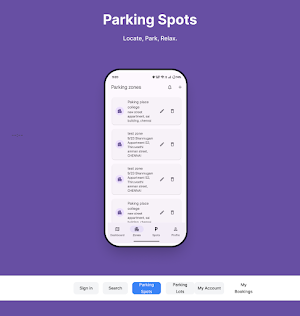


About Parkidam
Are you in a big city trying to find a parking space? or Are you looking to rent out a parking space?
We are here to help you with that, with our app you can find and rent out parking spots with ease.
Here is a list of our app features:
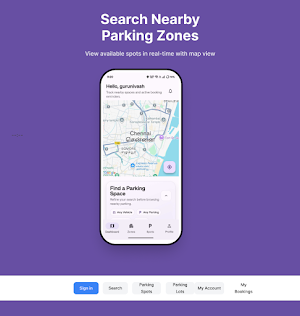
1. Find Near-by Parking Spots.(Available without login)
2. View Parking Zones and Spot Details. (Available without login)
3. Book Parking Spots.(Login required)
4. Create Parking Zone.(Login required)
5. Rent out Parking Space.(Login required)
6. QR-based Check-In and Check-Out.(Login required)
7. Steps to Delete Account.
Using the App Without Login (Guest Mode):
You can now use some features without creating an account, such as:
1. View your current location on the map
2. View nearby parking zones
3. View available parking spots inside each zone
4. View spot details such as price, type, and size
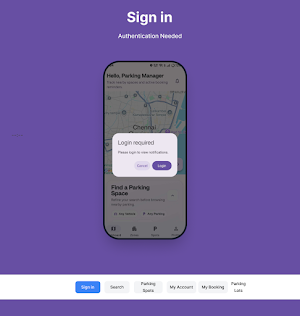
When you try to rent a spot, add a vehicle, or access profile features, the app will show a login popup.
Simply follow these steps to book an parking spot:
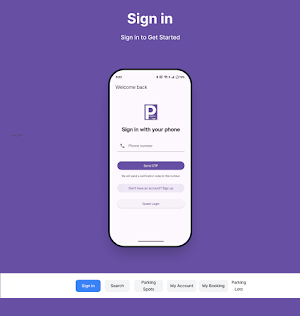
1. Sign up
2. Once signed up, tap on location icon
3. List of parking zones will appear in nearby spots
4. Tap on view spot in any zones
5. Select one of the spot in zones
6. Add vehicle and select hours or days
7. Make payment or use cash booking and confirm the booking spot.
8. Tap on the Profile icon and go to My Bookings
9. Click Check-In and complete the process
10. After booking end time or when leaving, click Check-Out
11. Complete the check-out process
12. Your booking will be completed successfully
Follow these steps to create parking zone:
1. Tap on zones
2. Tap on plus (+) icon in upper corner
3. Provide the list of information in those fields
4. Click create button to create a zone
5. Zones can update and delete also in zones page.
Follow these steps to create parking spots:
1. Tap on spots
2. Tap on plus (+) icon in upper corner
3. Provide the list of information in those fields
4. Click create button to create a parking spot
5. Spots can update in spots page
6. Spots can filter by clicking those zone and type dropdowns.
Follow these steps to delete an account:
1. Log into your account
2. Tap on profile
3. Tap on delete account
4. Tap on delete in alert popup
5. Then the whole user data will we removed.
We are here to help you with that, with our app you can find and rent out parking spots with ease.
Here is a list of our app features:
1. Find Near-by Parking Spots.(Available without login)
2. View Parking Zones and Spot Details. (Available without login)
3. Book Parking Spots.(Login required)
4. Create Parking Zone.(Login required)
5. Rent out Parking Space.(Login required)
6. QR-based Check-In and Check-Out.(Login required)
7. Steps to Delete Account.
Using the App Without Login (Guest Mode):
You can now use some features without creating an account, such as:
1. View your current location on the map
2. View nearby parking zones
3. View available parking spots inside each zone
4. View spot details such as price, type, and size
When you try to rent a spot, add a vehicle, or access profile features, the app will show a login popup.
Simply follow these steps to book an parking spot:
1. Sign up
2. Once signed up, tap on location icon
3. List of parking zones will appear in nearby spots
4. Tap on view spot in any zones
5. Select one of the spot in zones
6. Add vehicle and select hours or days
7. Make payment or use cash booking and confirm the booking spot.
8. Tap on the Profile icon and go to My Bookings
9. Click Check-In and complete the process
10. After booking end time or when leaving, click Check-Out
11. Complete the check-out process
12. Your booking will be completed successfully
Follow these steps to create parking zone:
1. Tap on zones
2. Tap on plus (+) icon in upper corner
3. Provide the list of information in those fields
4. Click create button to create a zone
5. Zones can update and delete also in zones page.
Follow these steps to create parking spots:
1. Tap on spots
2. Tap on plus (+) icon in upper corner
3. Provide the list of information in those fields
4. Click create button to create a parking spot
5. Spots can update in spots page
6. Spots can filter by clicking those zone and type dropdowns.
Follow these steps to delete an account:
1. Log into your account
2. Tap on profile
3. Tap on delete account
4. Tap on delete in alert popup
5. Then the whole user data will we removed.
What’s new
Version 2.0.0 · Updated April 2, 2026
Implemented a QR-based vehicle check-in system combining
Alternatives to Parkidam
Looking for apps like Parkidam? Here are 3 similar Android apps on Google Play. All of them are free to download.



| App | Rating | Price | Installs | Last updated | Compare |
|---|---|---|---|---|---|
| Parkidam | – | Free | 10+ | Apr 2, 2026 | |
| Tner | – | Free | 0+ | – | Compare |
| ReliableDrs Healthcare | – | Free | 10+ | Feb 19, 2026 | Compare |
| reliableDrs | – | Free | 10+ | Feb 19, 2026 | Compare |
Compare Parkidam with the top alternatives: ratings, updates, ASO score and keyword gaps →