

Employee Reporting & Tracking
OZOQO Technologies Business
Assign tasks to your employees, get virtual reports and track their movement.
- Downloads
- 500+
- on Google Play
- Price
- Free
- No in-app purchases
- Updated
- Oct 28
- 2019 · v1.0.7
Screenshots


About Employee Reporting & Tracking
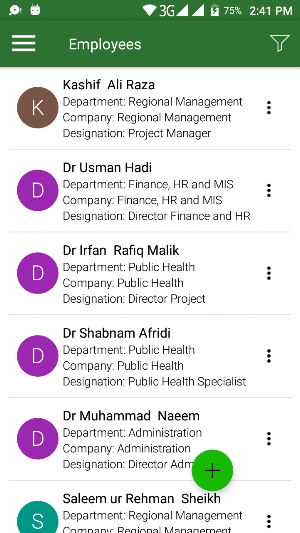
Businesses are continuously growing, and it is becoming hard to manage employees and the tasks assigned to everyone. Employee Reporting and Tracking will help you manage day to day tasks of each member of your team. The application supports three user levels; Super Admins, Sub-Admins and Employees.
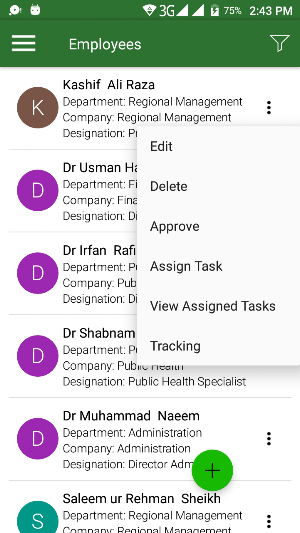
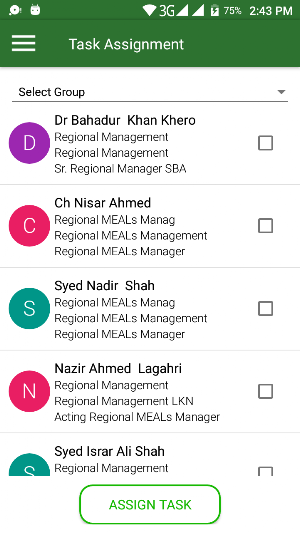
The Admin accounts can add multiple employees as individuals. They can even group them into teams so assigning similar tasks is easier and efficient. All employees can be bound to report to a certain team lead (Sub-Admin) or multiple team leads or managers. Team leads, or managers are also responsible to assign tasks to the employees. Each employee can view these tasks by logging into his personal account. If he is already logged in, a notification will automatically be received. Employees have the option of submitting a report, along with images, in response to the task assigned. The reports are an effective measure of the performance of your employees. The location of the employees can be tracked through this application during their work time.
This application can work both offline and online. However, the user will need an internet connection to send images/reports and upload data on any task. The data should automatically be uploaded once an internet connection becomes available.
The three user levels have different set of activities they can carry out:
Super Admin Module:
The Super Admin is the first user of the application and has complete control over the application. This user can create employees, group of employees, sub-admins, and even create a sub-admin from existing employees.
Sub-Admin Module:
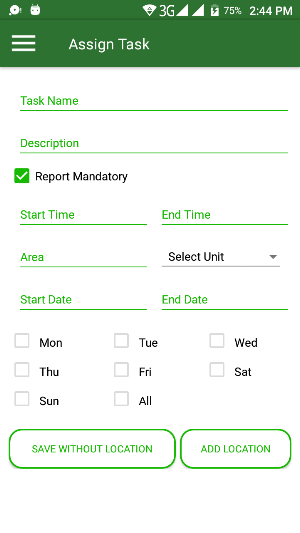
The Sub-Admin account is created by the Super Admin who is only able to perform certain roles as assigned by the Super Admin. Sub-Admins can also add employees and group them into teams. They can also assign individual or grouped tasks, at a specific location and time, and request reports etc.
Employee Module:
Employees will essentially receive daily tasks with real-time notifications (if internet access is available) that he is to perform in a certain period of time – This could be daily or weekly or even monthly. Other than directly receiving tasks, the employee can also make a task for himself and send it up his reporting line for approval. One employee can also create a task for another employee in his group however, such a task needs sub-admin or super admin approval.
Keep a record of all the tasks and reports online for an indefinite amount of time so you never lose them and always know how your team is performing.
The Admin accounts can add multiple employees as individuals. They can even group them into teams so assigning similar tasks is easier and efficient. All employees can be bound to report to a certain team lead (Sub-Admin) or multiple team leads or managers. Team leads, or managers are also responsible to assign tasks to the employees. Each employee can view these tasks by logging into his personal account. If he is already logged in, a notification will automatically be received. Employees have the option of submitting a report, along with images, in response to the task assigned. The reports are an effective measure of the performance of your employees. The location of the employees can be tracked through this application during their work time.
This application can work both offline and online. However, the user will need an internet connection to send images/reports and upload data on any task. The data should automatically be uploaded once an internet connection becomes available.
The three user levels have different set of activities they can carry out:
Super Admin Module:
The Super Admin is the first user of the application and has complete control over the application. This user can create employees, group of employees, sub-admins, and even create a sub-admin from existing employees.
Sub-Admin Module:
The Sub-Admin account is created by the Super Admin who is only able to perform certain roles as assigned by the Super Admin. Sub-Admins can also add employees and group them into teams. They can also assign individual or grouped tasks, at a specific location and time, and request reports etc.
Employee Module:
Employees will essentially receive daily tasks with real-time notifications (if internet access is available) that he is to perform in a certain period of time – This could be daily or weekly or even monthly. Other than directly receiving tasks, the employee can also make a task for himself and send it up his reporting line for approval. One employee can also create a task for another employee in his group however, such a task needs sub-admin or super admin approval.
Keep a record of all the tasks and reports online for an indefinite amount of time so you never lose them and always know how your team is performing.
User reviews

Such a unique app for reporting and tracking of your employees.

Nice app
Alternatives to Employee Reporting & Tracking
Looking for apps like Employee Reporting & Tracking? Here are 3 similar Android apps on Google Play. All of them are free to download.


| App | Rating | Price | Installs | Last updated | Compare |
|---|---|---|---|---|---|
| Employee Reporting & Tracking | – | Free | 500+ | Oct 28, 2019 | |
| Ring A Hakeem | – | Free | 50+ | Feb 3, 2020 | Compare |
| Health Facility Daily Reportin | – | Free | 100+ | Dec 27, 2018 | Compare |
| Ring a Doctor | – | Free | 10,000+ | Aug 27, 2021 | Compare |