

OTS
OSSL Productivity
Manage, assign, accept, and resolve support tickets with OTS.
- Downloads
- 60+
- on Google Play
- Price
- Free
- No in-app purchases
- Updated
- Sep 23
- 2026 · v1.0.1
Screenshots
About OTS
OTS is a modern ticket management application designed to help teams efficiently create, assign, manage, and resolve support tickets from one convenient platform.
With OTS, users can easily track ticket progress, manage assigned tasks, and stay updated throughout the ticket lifecycle.
KEY FEATURES
🎫 Create Tickets
Create tickets with clear titles, descriptions, priorities, and relevant information to ensure every issue is properly documented.
👥 Assign Tickets
Assign tickets to the appropriate team members so that every task reaches the right person.
✅ Accept Tickets
Team members can review and accept assigned tickets, making responsibilities clear and helping teams respond faster.
📊 Dashboard
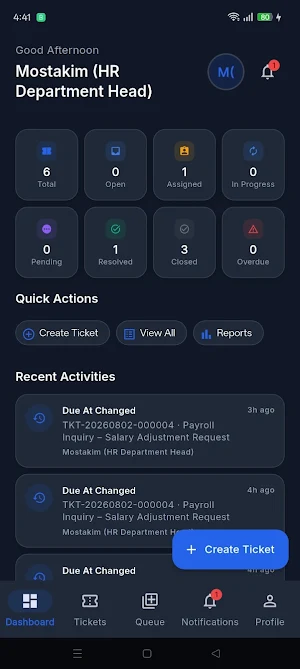
Get a quick overview of ticket activity through an intuitive dashboard with useful statistics and ticket summaries.
🔎 Search & Filter
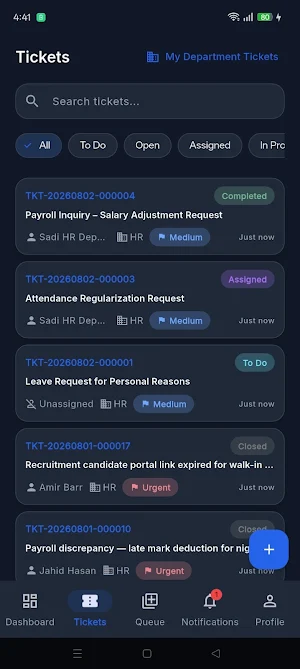
Quickly find tickets using search, status, priority, and other filtering options.
📋 Ticket Details
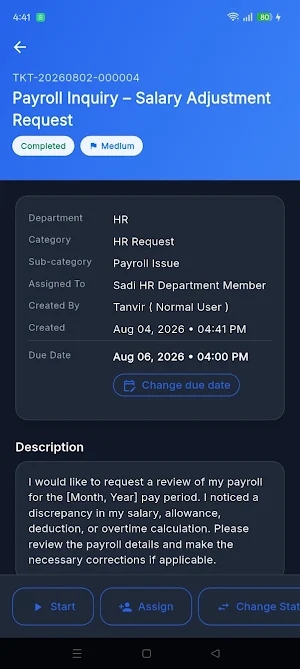
View complete ticket information, including description, status, priority, assignment, and activity history.
🔔 Stay Updated
Keep track of ticket progress and important activities so nothing gets overlooked.
⚡ Simple & Modern Interface
A clean, user-friendly interface makes ticket management simple, efficient, and easy to understand.
OTS helps organizations improve task visibility, team coordination, and support workflow by keeping ticket-related activities organized in one place.
Whether you are creating a new issue, assigning work to a team member, accepting a task, or tracking its progress, OTS provides a streamlined workflow for managing tickets efficiently.
With OTS, users can easily track ticket progress, manage assigned tasks, and stay updated throughout the ticket lifecycle.
KEY FEATURES
🎫 Create Tickets
Create tickets with clear titles, descriptions, priorities, and relevant information to ensure every issue is properly documented.
👥 Assign Tickets
Assign tickets to the appropriate team members so that every task reaches the right person.
✅ Accept Tickets
Team members can review and accept assigned tickets, making responsibilities clear and helping teams respond faster.
📊 Dashboard
Get a quick overview of ticket activity through an intuitive dashboard with useful statistics and ticket summaries.
🔎 Search & Filter
Quickly find tickets using search, status, priority, and other filtering options.
📋 Ticket Details
View complete ticket information, including description, status, priority, assignment, and activity history.
🔔 Stay Updated
Keep track of ticket progress and important activities so nothing gets overlooked.
⚡ Simple & Modern Interface
A clean, user-friendly interface makes ticket management simple, efficient, and easy to understand.
OTS helps organizations improve task visibility, team coordination, and support workflow by keeping ticket-related activities organized in one place.
Whether you are creating a new issue, assigning work to a team member, accepting a task, or tracking its progress, OTS provides a streamlined workflow for managing tickets efficiently.
What’s new
Version 1.0.1 · Updated September 23, 2026
- Bug Fixes
Alternatives to OTS
Looking for apps like OTS? Here are 4 similar Android apps on Google Play. All of them are free to download.




| App | Rating | Price | Installs | Last updated | Compare |
|---|---|---|---|---|---|
| OTS | – | Free | 50+ | Sep 23, 2026 | |
| O School | – | Free | 1+ | – | Compare |
| Dokaner Hisab | – | Free | 50+ | – | Compare |
| O-HR | – | Free | 100+ | May 3, 2026 | Compare |
| Expense Tracker | – | Free | 10+ | – | Compare |
Compare OTS with the top alternatives: ratings, updates, ASO score and keyword gaps →