
Launcher Phone OS
Nasim Alsharq LLC Productivity Contains ads
Stylish launcher with smart layout, themes, control center & lock screen
- Downloads
- 3.2K+
- on Google Play
- Price
- Free
- No in-app purchases
- Updated
- Jul 30
- 2026 · v3.0
Screenshots
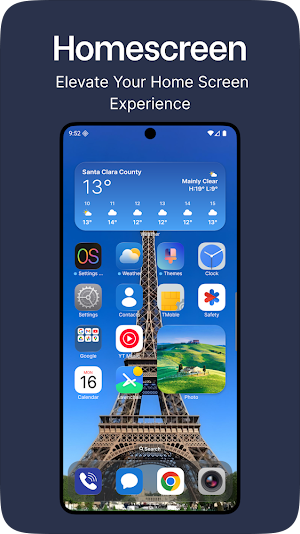
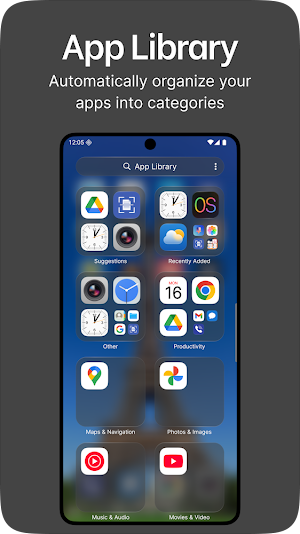
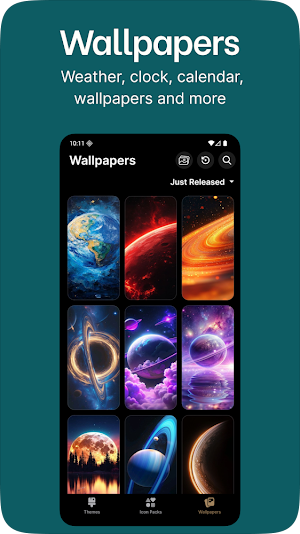
About Launcher Phone OS
Experience a stylish, and customizable launcher that transforms your Android phone with a clean layout, smooth animations, and powerful personalization features. Designed for those who love simplicity and elegance, this launcher brings a fresh new look to your home screen.
✨ Key Features:
🔹 Smart Home Screen Layout
Enjoy an organized home screen with automatic app sorting, customizable grid sizes, and smooth scrolling for a seamless user experience.
🔹 Control Center
Access key settings like Wi-Fi, Bluetooth, Brightness, and more instantly with a swipe from the edge. Customize toggles and shortcuts for quick control.
🔹 App Library & Suggestions
Find apps faster with a smart app library that auto-categorizes and provides app suggestions based on usage.
🔹 Personalized Themes & Icon Packs
Choose from multiple themes, wallpapers, and icon styles to match your mood. Apply icon packs and customize each app icon individually.
🔹 Lock Screen & Widget Support
Secure your phone with a stylish lock screen and access your favorite widgets directly from the home screen.
🔹 Gesture Controls
Use intuitive gestures to open apps, access settings, or return to the home screen quickly and naturall
ACCESSIBILITY SERVICE DISCLOSURE
This launcher uses the Android Accessibility Service API to power optional iOS-style features that you choose to enable:
• Assistive Touch — Home, Back, Recent Apps, Notifications, and Power menu shortcuts
• Control Center — system shortcuts including screenshot (on supported devices)
• Custom Lock Screen — detects when a phone call is active to adjust lock screen behavior
Why it is needed: Android only allows certain system actions (such as Home, Back, Recents, and Notifications) through the Accessibility Service when provided by a third-party launcher overlay.
What we do NOT do: We do not read typed text, collect personal data, or send accessibility data to any server. The service is used only for the features above while they are enabled by you.
Before enabling: The app shows a clear in-app disclosure explaining this use. You can disable the service at any time in Android Settings → Accessibility.
Optional: These features work only if you manually enable Accessibility for this app. The launcher home screen works without it.
Optional Accessibility Service powers Assistive Touch & Control Center — disclosed in-app before enable.
✨ Key Features:
🔹 Smart Home Screen Layout
Enjoy an organized home screen with automatic app sorting, customizable grid sizes, and smooth scrolling for a seamless user experience.
🔹 Control Center
Access key settings like Wi-Fi, Bluetooth, Brightness, and more instantly with a swipe from the edge. Customize toggles and shortcuts for quick control.
🔹 App Library & Suggestions
Find apps faster with a smart app library that auto-categorizes and provides app suggestions based on usage.
🔹 Personalized Themes & Icon Packs
Choose from multiple themes, wallpapers, and icon styles to match your mood. Apply icon packs and customize each app icon individually.
🔹 Lock Screen & Widget Support
Secure your phone with a stylish lock screen and access your favorite widgets directly from the home screen.
🔹 Gesture Controls
Use intuitive gestures to open apps, access settings, or return to the home screen quickly and naturall
ACCESSIBILITY SERVICE DISCLOSURE
This launcher uses the Android Accessibility Service API to power optional iOS-style features that you choose to enable:
• Assistive Touch — Home, Back, Recent Apps, Notifications, and Power menu shortcuts
• Control Center — system shortcuts including screenshot (on supported devices)
• Custom Lock Screen — detects when a phone call is active to adjust lock screen behavior
Why it is needed: Android only allows certain system actions (such as Home, Back, Recents, and Notifications) through the Accessibility Service when provided by a third-party launcher overlay.
What we do NOT do: We do not read typed text, collect personal data, or send accessibility data to any server. The service is used only for the features above while they are enabled by you.
Before enabling: The app shows a clear in-app disclosure explaining this use. You can disable the service at any time in Android Settings → Accessibility.
Optional: These features work only if you manually enable Accessibility for this app. The launcher home screen works without it.
Optional Accessibility Service powers Assistive Touch & Control Center — disclosed in-app before enable.
Alternatives to Launcher Phone OS
Looking for apps like Launcher Phone OS? Here are 6 similar Android apps on Google Play. The highest rated is PelisPlus MAX (1.0/5), and all 6 are free to download.
-
IPTV Smarters Player
-
PelisPlus MAX 1.0
-
iPhone 15 Launcher, iOS 17 Max
-
Subway Scooters Race
-
Lucky Block Mod for Minecraft
-
Craftarena
| App | Rating | Price | Installs | Last updated | Compare |
|---|---|---|---|---|---|
| Launcher Phone OS | – | Free | 1,000+ | Jul 30, 2026 | |
| IPTV Smarters Player | – | Free | 50,000+ | Sep 15, 2026 | Compare |
| PelisPlus MAX | 1.0 / 5 | Free | 10,000+ | Dec 2, 2025 | Compare |
| iPhone 15 Launcher, iOS 17 Max | – | Free | 10,000+ | Jul 29, 2026 | Compare |
| Subway Scooters Race | – | Free | 50+ | Jun 28, 2026 | Compare |
| Lucky Block Mod for Minecraft | – | Free | 5,000+ | May 22, 2026 | Compare |
| Craftarena | – | Free | 10,000+ | Sep 14, 2026 | Compare |
Compare Launcher Phone OS with the top alternatives: ratings, updates, ASO score and keyword gaps →