

Oracle PPM Cloud Mobile
Oracle America, Inc. Business
Oracle PPM Cloud Mobile
- Downloads
- 1K+
- on Google Play
- Price
- Free
- No in-app purchases
- Updated
- Jun 16
- 2020
Screenshots


About Oracle PPM Cloud Mobile
By installing this app you agree to the End User License Agreement terms at http://www-content.oracle.com/technetwork/licenses/mobile-android-license-3400156.html
Oracle PPM Cloud Mobile gives team members anytime, anywhere access to their Project Portfolio Management Cloud applications and enables them to capture their time and manage work on the move.
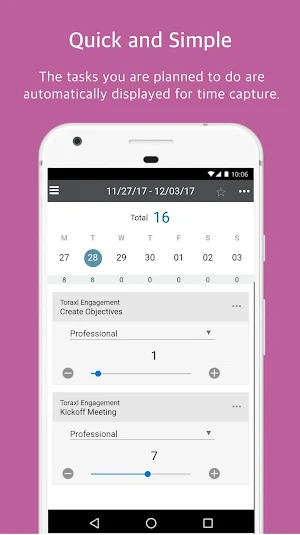
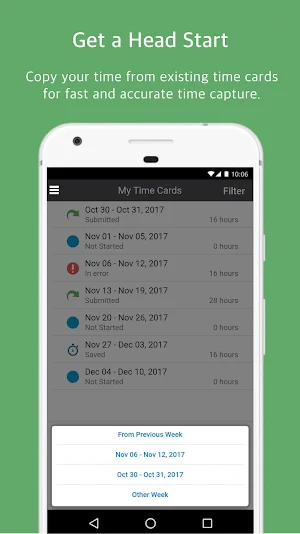
With Oracle PPM Cloud Mobile, team members can easily capture their actual time worked on projects and financial tasks. When opening the mobile time card, there is no need to search for the tasks you are working on, they are automatically displayed. You simply enter your time and submit for approval and processing. You can copy a previous or favorite time card to your current time card for quick and easy time capture and processing.
Team members, challenged by the quantity of tasks they own, can now easily manage their project and administrative work in a single app.
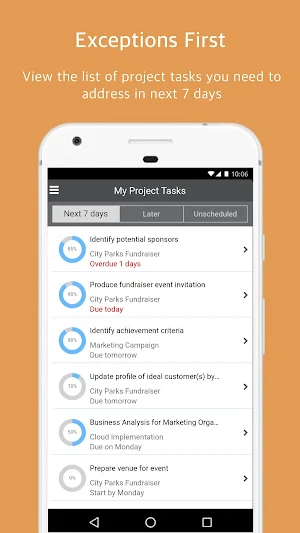
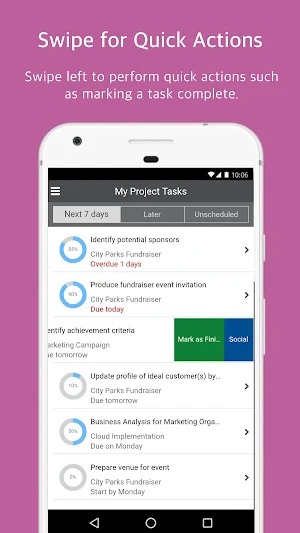
In this app, you can easily view your project tasks and to-do tasks separately without applying additional filters. You can quickly create to-do tasks and mark them as complete to keep all your work related activities in one place. Collaboration with the team members is provided through the Oracle Social Network (OSN) mobile application, downloaded separately.
Note: Oracle PPM Cloud Mobile requires an active Oracle Project Management Cloud Applications account on Release 13, Update 17C or later, and features available will be based on licensed functionality. Time Entry features in the mobile application are only available for Release 13, Update 17D or later version of Project Management Cloud application. See the Application License Agreement for details.
Oracle PPM Cloud Mobile gives team members anytime, anywhere access to their Project Portfolio Management Cloud applications and enables them to capture their time and manage work on the move.
With Oracle PPM Cloud Mobile, team members can easily capture their actual time worked on projects and financial tasks. When opening the mobile time card, there is no need to search for the tasks you are working on, they are automatically displayed. You simply enter your time and submit for approval and processing. You can copy a previous or favorite time card to your current time card for quick and easy time capture and processing.
Team members, challenged by the quantity of tasks they own, can now easily manage their project and administrative work in a single app.
In this app, you can easily view your project tasks and to-do tasks separately without applying additional filters. You can quickly create to-do tasks and mark them as complete to keep all your work related activities in one place. Collaboration with the team members is provided through the Oracle Social Network (OSN) mobile application, downloaded separately.
Note: Oracle PPM Cloud Mobile requires an active Oracle Project Management Cloud Applications account on Release 13, Update 17C or later, and features available will be based on licensed functionality. Time Entry features in the mobile application are only available for Release 13, Update 17D or later version of Project Management Cloud application. See the Application License Agreement for details.
What’s new
Updated June 16, 2020
1. Usability enhancements for the daily project time entry page: - Added save button that appears when unsaved changes exist. - Added action to copy previous tasks. Copy the tasks from the prior time entry and start entering hours for the day. If the day already has tasks, then choose to either add more tasks or replace the existing tasks. 2. Bug fixes
Alternatives to Oracle PPM Cloud Mobile
Looking for apps like Oracle PPM Cloud Mobile? Here are 6 similar Android apps on Google Play. The highest rated is Oracle Cloud Infrastructure (3.8/5), and all 6 are free to download.
-
Oracle HCM Cloud 2.3
-
Oracle Mobile Authenticator 3.7
-
NetSuite 2.1
-
Oracle Field Service 3.6
-
Oracle Cloud Infrastructure 3.8
-
Oracle MICROS InMotion Mobile 2.9
| App | Rating | Price | Installs | Last updated | Compare |
|---|---|---|---|---|---|
| Oracle PPM Cloud Mobile | – | Free | 1,000+ | Jun 16, 2020 | |
| Oracle HCM Cloud | 2.3 / 5 | Free | 1,000,000+ | Oct 13, 2026 | Compare |
| Oracle Mobile Authenticator | 3.7 / 5 | Free | 1,000,000+ | Mar 4, 2025 | Compare |
| NetSuite | 2.1 / 5 | Free | 100,000+ | Oct 9, 2026 | Compare |
| Oracle Field Service | 3.6 / 5 | Free | 500,000+ | – | Compare |
| Oracle Cloud Infrastructure | 3.8 / 5 | Free | 100,000+ | Jun 30, 2026 | Compare |
| Oracle MICROS InMotion Mobile | 2.9 / 5 | Free | 100,000+ | Jul 13, 2026 | Compare |
Similar apps on Google Play
- Oracle HCM Cloud
- Oracle Mobile Authenticator
- NetSuite
- Oracle Field Service
- Oracle Cloud Infrastructure
- Oracle MICROS InMotion Mobile
- Oracle Fusion Expenses
- OpenAir Mobile
- Self-Service HR for EBS
- Oracle Management Cloud
- Oracle Content
- Oracle WMS Cloud Mobile
- Oracle MAX
- Oracle Primavera P6 Mobile
- Hotel Mobile
- Oracle BI Mobile (Deprecated)
- Oracle Mobile Field Service
- Oracle Mobile Associate
- Approvals for EBS
- Timecards for EBS
- Oracle Aconex
- Oracle CX Cloud Mobile
- Mobile Supply Chain for EBS
- Oracle Analytics
- Oracle CX Sales
- Enterprise Manager Mobile
- Oracle Municipal Code Officer
- Oracle Live Experience Demo
- Oracle Inspector
- Oracle Process Mobile
- Oracle Primavera Cloud
- Oracle Primavera Unifier
- Oracle IoT Connected Worker
- Oracle Fusion SSP Mobile
- Oracle Retail Execution Mobile
- Oracle IoT Production Monitori
- Oracle Analytics Day by Day
- Oracle IoT Fleet Monitoring
- Oracle Mfg Cloud Supervisor
- Oracle Analytics Synopsis
- Oracle IoT Asset Monitoring
- Yard for EBS
- Oracle MWM
- Discrete Quality Manager EBS
- Process Quality Manager EBS
- Oracle Transportation Mobile
- Siebel
- Person Directory for EBS
- Learning for EBS
- Process Prod Supervisor EBS
- iProcurement for EBS
- Sales Orders for EBS
- Procurement for EBS
- Maintenance for EBS
- Project Manufacturing for EBS
- Inventory for EBS
- Discrete Prod Supervisor EBS
- Project Manager for EBS
- Instantis EnterpriseTrack
- Intelligent Advisor
- Oracle WebCenter Content
- Oracle CRM On Demand Mobile
- VBCS Mobile Sanity